Acer Chromebook R11 Touchscreen: Cloud Gaming and Media Performance
The Acer Chromebook R11 is a compact, flexible laptop engineered around Chrome OS, built to handle everyday personal browsing, video streaming, and casual web-driven entertainment. Featuring an 11.6-inch multi-touch display and an Intel Celeron N3150 quad-core processor, this device offers a portable 360-degree convertible design that smoothly transitions between a traditional clamshell notebook and an…
By Mark Archer
9 min read
As Amazon Associates, we earn from qualifying purchases. This means we may receive a small commission at no extra cost to you if you click through and make a purchase.
The Acer Chromebook R11 is a compact, flexible laptop engineered around Chrome OS, built to handle everyday personal browsing, video streaming, and casual web-driven entertainment. Featuring an 11.6-inch multi-touch display and an Intel Celeron N3150 quad-core processor, this device offers a portable 360-degree convertible design that smoothly transitions between a traditional clamshell notebook and an interactive slate tablet. For users who prioritize portable entertainment and web tasks over heavy computing workloads, it provides dependable daily utility in a sturdy, travel-friendly package.
This convertible suits students, frequent travelers, and casual entertainment seekers who want an ultra-portable machine for streaming video services, browsing online storefronts, and running lightweight web applications. Anyone seeking high-frame-rate local 3D rendering, intense video editing software, or modern AAA desktop gaming will quickly discover hardware boundaries and should look toward dedicated gaming rigs or more powerful modern platforms instead. If you prefer larger display areas or newer silicon architectures, exploring alternatives like the hp – 14 2k touchscreen 2-in-1 chromebook – intel core n150 – 8gb memory – 64gb emmc – sky blue provides an entirely different class of computing headroom.
Display Flexibility and Convertible 2-in-1 Design
The standout physical design feature of this machine centers around the acer chromebook r11 convertible 2-in-1 hinge mechanism, which rotates a full 360 degrees to facilitate clamshell, tent, display, and tablet orientations. Because the device weighs only 2.76 pounds, holding it during tablet-style interactions or positioning it upright on a narrow coffee table remains remarkably natural. The chassis allows easy manipulation, enabling users to transition from typing an email on a flat desk to reclining on a couch with the keyboard folded away behind the screen.
Visual presentation relies on the acer chromebook r11 ips display, which offers 1366 x 768 HD resolution across an 11.6-inch diagonal measurement. Utilizing In-Plane Switching panel engineering ensures wide viewing angles without severe color shifts or contrast washouts when viewing the screen off-axis, making shared media viewing far more practical than standard twisted-nematic alternatives. The high-brightness LED-backlit surface supports responsive 10-finger capacitive multi-touch gestures, letting you tap, pinch-to-zoom, and scroll smoothly across web pages or browser-based interfaces.
While the sub-1080p resolution reflects the compact dimensions of the panel, the pixel density remains clear enough for standard web reading, educational coursework, and video streaming at normal viewing distances. The responsive multi-touch glass layer adds genuine tactile versatility, particularly when switching into tablet mode to navigate media players or interactive digital publications without needing an external mouse.
Processing Performance and Cloud Gaming Potential
When analyzing the acer chromebook r11 specs, the machine relies on an Intel Celeron N3150 quad-core processor running at a base clock of 1.6GHz with Intel Burst Technology scaling up to 2.08GHz. Paired with 4GB of DDR3L onboard memory and integrated Intel HD Graphics, the overall acer chromebook r11 performance accommodates routine digital chores like document creation, managing multiple browser tabs, and navigating cloud productivity suites. Demanding local gaming tasks remain outside this processor’s scope, as integrated graphics and 4GB memory are meant for web architecture rather than rendering compute-intensive 3D game engines.
Evaluating the acer chromebook r11 for gaming requires looking toward modern network streaming solutions rather than native desktop execution. The acer chromebook r11 cloud gaming experience hinges on offloading intensive processing to remote server farms while your machine merely decodes the incoming video feed. Because the processor features integrated hardware acceleration for standard video codecs, streaming game platforms through a Chrome browser session can function smoothly as long as your local wireless environment maintains sufficient stability. For users curious about whether alternative hardware provides more local crunch, comparing devices like the acer chromebook 514 reveals how newer silicon steps up raw processing boundaries.
The internal 32GB SSD provides responsive read and write rates for system operations and essential offline caches, booting Chrome OS quickly and ensuring rapid application launches. However, the limited 32GB capacity emphasizes the cloud-first philosophy of Chrome OS, encouraging users to store media libraries, heavy datasets, and expansive game files on remote cloud storage drives or attached external storage hardware.
Media Playback and Video Streaming Quality
As an entertainment machine, the acer chromebook r11 media playback delivers an enjoyable and straightforward viewing experience across modern streaming platforms. Video files encoded in standard web formats decode cleanly using the Intel HD Graphics coprocessor, preventing frame drops during high-definition YouTube, Twitch, or movie streaming. The compact 11.6-inch footprint lets users prop the machine up in tent mode on a nightstand or kitchen counter, keeping the keyboard hidden and maximizing screen visibility without taking up excessive surface area.
Acoustic output is handled by two built-in stereo speakers positioned within the chassis. These speakers produce clear audio output suited for dialogue-heavy podcasts, video conferences, and casual streaming, though the compact enclosure naturally limits low-frequency bass output. Users seeking rich cinematic dynamics or deep bass will benefit from connecting external audio equipment or pairing wireless headphones via the integrated Bluetooth 4.0 radio.
For home entertainment setups, the inclusion of a dedicated full-sized HDMI port with HDCP support provides convenient external output capabilities. You can seamlessly output video to a larger television or external desktop monitor without requiring proprietary adapters, transforming the compact convertible into a lightweight media player for living room streaming.
Battery Endurance and Peripheral Connectivity
Portability remains a central attribute of this machine, backed by a 3-cell lithium-ion battery packing a 3220 mAh capacity operating at 3.6 volts. The official rating points to up to 10 hours of runtime on a full charge under typical usage patterns. In practice, acer chromebook r11 battery life will vary depending on your active display brightness, Wi-Fi activity levels, and whether you are streaming continuous high-definition video or running simple offline text documents. The power efficiency of the low-wattage Intel Celeron platform helps maintain steady operation throughout school hours or long commutes without demanding an immediate tether to a wall outlet.
Wireless performance benefits from an 802.11ac Wi-Fi adapter featuring dual-band 2.4GHz and 5GHz frequencies with MIMO technology. Dual-band wireless helps maintain throughput across crowded home networks, reducing packet loss and jitter during cloud gaming sessions or video calls. Built-in Bluetooth 4.0 facilitates cable-free connections to wireless mice, keyboards, and mobile accessories. If you frequently handle broader multi-device setups or require larger viewing spaces, checking out the acer chromebook 315 15.6 inch laptop intel processor n4500 4gb ram 64gb emmc pure silver demonstrates how larger desktop-replacement form factors approach connectivity and workspace real estate.
Physical I/O options cover essential daily needs with one USB 3.0 port for faster data transfers to external drives, one USB 2.0 port for standard peripherals, and the aforementioned HDMI port. A front-facing HD webcam operating at 1280 x 720 resolution enables clear video calls for online classes or family catch-ups, ensuring that essential remote communication tools are integrated directly into the hardware.
Acer Chromebook R11 Pros and Cons
Pros
- Flexible 360-degree convertible hinge
- Vibrant 11.6-inch IPS multi-touch display
- Up to 10 hours of battery life
- Dual-band 802.11ac Wi-Fi with MIMO
- Dedicated full-sized HDMI port
Cons
- Modest 32GB internal SSD capacity
- Entry-level Intel Celeron processing performance
- Sub-1080p display resolution
Check Acer Chromebook R11 on Amazon
Who Should Buy the Acer Chromebook R11
The Acer Chromebook R11 targets users who need a light, durable, and highly versatile convertible laptop that handles foundational computing tasks without physical bulk. Determining whether the device meets your personal workflow depends heavily on your daily software requirements and computing expectations.
Buy It If
- You want a compact 360-degree convertible laptop with a responsive 10-point multi-touch IPS display for flexible tablet and tent usage.
- Your daily routine focuses on web browsing, streaming video, cloud productivity, and cloud-based gaming services.
- You require an ultra-portable device weighing under 3 pounds with up to 10 hours of battery life for travel or campus mobility.
- You frequently connect to external monitors or televisions and appreciate a built-in full-sized HDMI port with HDCP support.
Skip It If
- You need high-performance local computing for 3D modeling, desktop AAA video games, or intensive video editing suites.
- You require large internal local storage beyond the built-in 32GB SSD capacity for massive offline media libraries.
- You prefer high-resolution Full HD 1080p or 4K screen resolutions on larger laptop displays.
Acer Chromebook R11 Alternatives Worth a Look
If you are exploring the Chrome OS market, several alternative devices present different screen sizes, hardware combinations, and peripheral accessories to match specific personal preferences.
HP 14″ HD Chromebook Laptop

The HP 14″ HD Chromebook Laptop features a larger 14-inch HD display paired with an Intel Quad-Core N4120 processor, 4GB of RAM, and 64GB of eMMC storage. It also touts up to 14 hours of battery life and USB Type-C connectivity alongside HDMI, making it an appealing selection for students who desire a larger screen surface and doubled internal storage capacity over the 11.6-inch Acer platform.
14″ FHD IPS 300 nits

The 14″ FHD IPS 300 nits ASUS CX14 Chromebook laptop offers a crisper Full HD display with 300 nits brightness, an Intel Celeron N50 CPU, modern 4GB LPDDR5 memory, and Wi-Fi 6 wireless networking. This machine provides a combined 576GB of storage (64GB SSD plus a 512GB PLUSERA Docking Set), making it a compelling alternative for shoppers seeking higher display sharpness, expanded storage accessories, and updated wireless protocols.
64GB eMMC
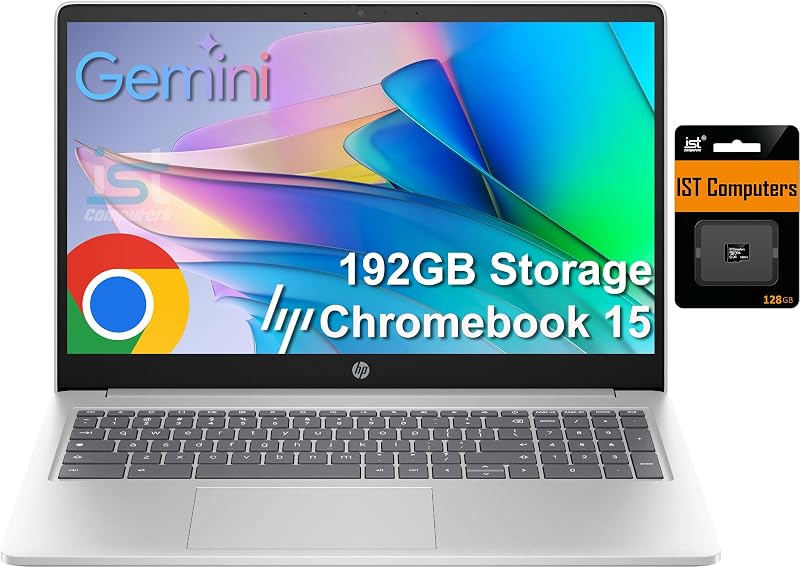
The 64GB eMMC HP Chromebook 15 features a spacious 15.6-inch anti-glare display, an Intel N200 processor, 8GB of DDR5 RAM, and a bundled 128GB SD card alongside 64GB of onboard eMMC for 192GB total storage. Readers who prioritize a full numeric keyboard, substantially higher system memory for heavy multitasking, and physical webcam privacy shutter mechanisms should consider this full-sized model over an 11.6-inch convertible.
Final Verdict
Assessing whether the machine fits your setup ultimately answers the fundamental question: is acer chromebook r11 worth it for portable entertainment and cloud tasks? The Acer Chromebook R11 succeeds by combining an adaptable 360-degree convertible design with a vibrant 11.6-inch IPS touchscreen and solid 802.11ac MIMO wireless connectivity. For streaming television shows, reading digital content in tablet mode, or playing games through cloud streaming platforms, the hardware provides an accessible, nimble, and reliable form factor.
Its hardware boundaries are transparent, with an entry-level Intel Celeron N3150 processor, 4GB of DDR3L onboard memory, and 32GB of SSD storage designed explicitly around the cloud-centric Chrome OS environment. If your computing lifestyle thrives inside web browser tabs and streaming applications, this compact convertible delivers flexible day-to-day functionality in a lightweight, travel-ready chassis.
FAQ
Can the Acer Chromebook R11 run cloud gaming platforms?
Yes, the Acer Chromebook R11 can access web-based cloud gaming services through its Chrome browser. Because the processing and graphic rendering take place on remote cloud servers, the laptop only needs to decode the incoming video stream, which the integrated Intel HD Graphics and 802.11ac dual-band Wi-Fi are equipped to manage.
Does the Acer Chromebook R11 have a touchscreen display?
Yes, it features an 11.6-inch HD IPS display with integrated 10-finger capacitive multi-touch support. The touchscreen allows users to tap, pinch, and interact with web applications across laptop, tent, display, and tablet modes.
What ports are available on the Acer Chromebook R11?
The device includes one USB 3.0 port, one USB 2.0 port, and a full-sized HDMI port with HDCP support. These ports allow connection to external storage drives, wired peripherals, and secondary monitors or televisions.
How long does the battery last on a full charge?
The Acer Chromebook R11 is equipped with a 3-cell lithium-ion battery with 3220 mAh capacity that offers up to 10 hours of battery life under typical usage, though actual endurance depends on screen brightness and application demands.
Can you expand the internal 32GB SSD storage?
The listing does not specify internal storage upgradeability, but users can attach external storage devices through the USB 3.0 and USB 2.0 ports or use cloud storage options supported by Chrome OS.
How these reviews are put together
- 540reviews published
- 2,271products with a buyer rating
- 2,222products with listed features
- 87brands covered
Every number, star and price on this site is read from the Amazon product listing. We do not run lab tests of our own, so scores here are out of 10, based on listed specifications and buyer feedback, not a verdict from a test bench. Prices change without notice; check the listing before buying.


