Acer Nitro 16S: High-Refresh Esports Power in a Lean Chassis
Finding a portable machine capable of driving competitive framerates without requiring an oversized backpack has long been a challenge for PC enthusiasts. The Acer Nitro 16S steps directly into this arena as an AI-ready mid-tier contender, combining next-generation hardware architecture with an agile chassis. Engineered around an AMD Ryzen AI 7 350 processor and the…
By Mark Archer
10 min read
As Amazon Associates, we earn from qualifying purchases. This means we may receive a small commission at no extra cost to you if you click through and make a purchase.
Finding a portable machine capable of driving competitive framerates without requiring an oversized backpack has long been a challenge for PC enthusiasts. The Acer Nitro 16S steps directly into this arena as an AI-ready mid-tier contender, combining next-generation hardware architecture with an agile chassis. Engineered around an AMD Ryzen AI 7 350 processor and the NVIDIA GeForce RTX 5060 Laptop GPU, this laptop focuses on high-efficiency computing and modern graphics technologies. It balances the thermal and mechanical demands of mobile gaming with an ultra-portable profile, positioning itself as a capable solution for both high-refresh esports and heavy productivity.
This system suits competitive gamers, traveling tournament players, and hybrid users who need reliable framerates alongside daily productivity. Its sleek frame and dedicated neural hardware make it an appealing match for students and professionals seeking a low-profile gaming laptop. Conversely, users searching for large desktop-replacement displays or those demanding native 4K resolutions will want to look at bulkier alternatives. For anyone prioritizing fluid gameplay, advanced DLSS rendering, and manageable travel dimensions, this machine represents a compelling entry in the portable mid-range category.
Next-Gen Processing and Dedicated Graphics Horsepower
At the foundation of this laptop sits the AMD Ryzen AI 7 350 processor, an 8-core CPU designed on modern Zen architecture to handle multi-threaded processing, competitive gameplay, and 4K HDR streaming without thermal throttling. The platform incorporates dedicated neural computing cores capable of 66 overall AI TOPS, securing its place as an official Windows 11 Copilot+ PC. This processing baseline ensures fast background operations, low latency during heavy multitasking, and seamless workflow execution when running compute-heavy applications. Players coming from earlier platforms like the laptop gamer acer nitro v will immediately notice how effortlessly the updated core architecture manages modern operating system demands alongside intensive background services.
Graphics rendering is handled by the dedicated NVIDIA GeForce RTX 5060 Laptop GPU, outfitted with 8GB of high-speed GDDR7 video memory and built on NVIDIA’s Blackwell architecture. The graphics unit delivers 572 AI TOPS of computational horsepower, enabling advanced neural rendering pipelines. Hardware-accelerated ray tracing benefits directly from these architectural updates, delivering cinematic light paths and accurate reflections in demanding AAA titles. The integration of DLSS 4 introduces Multi Frame Generation alongside enhanced Ray Reconstruction and Super Resolution, transforming raw silicon performance into substantially higher frame rates during complex scenes. In demanding esports and modern adventure titles, the GPU maintains smooth frame pacing while offloading visual reconstruction to specialized tensor cores.
Evaluating the acer nitro 16s gaming performance reveals a well-calibrated mid-tier machine engineered for contemporary titles. The combination of an 8-core processor and the RTX 5060 ensures that the acer nitro 16s for gaming handles modern titles at native 1200p resolution without requiring aggressive detail compromises. The dedicated 8GB GDDR7 memory pipeline ensures fast asset streaming in open-world games, eliminating the micro-stutters frequently found on older memory standards. By pairing next-gen Blackwell GPU features with high-efficiency multi-threaded compute, the laptop achieves dependable stability during prolonged gaming marathons.
Display Clarity and Fast-Paced Visuals
Visual fidelity is anchored by an expansive 16-inch WUXGA display operating at a native resolution of 1920 x 1200 pixels. The modern 16:10 aspect ratio provides noticeable vertical canvas space compared to traditional 16:9 panels, offering distinct benefits when navigating complex menus, editing timelines, or tracking peripheral UI elements in competitive games. Utilizing IPS panel technology, the screen maintains wide viewing angles and uniform brightness distribution across the entire surface. Color reproduction meets the 100% sRGB color gamut standard, delivering accurate saturation that benefits both digital media creation and immersive open-world environments.
For tournament players and competitive shooters, the acer nitro 16s display 180hz panel delivers a significant tactical advantage. The 180Hz refresh rate updates visual information every 5.5 milliseconds, reducing motion blur and rendering high-speed motion with exceptional fluidity. Paired with a swift 3ms response time, the screen minimizes ghosting during rapid camera sweeps in fast-paced esports. The result is instant visual feedback during tracking and micro-adjustments, ensuring that players can react precisely to on-screen movements without visual smearing or motion artifact distractions.
The panel’s balance of esports responsiveness and color accuracy makes it adaptable beyond standard gaming sessions. While competitive gamers will spend most of their time utilizing the fast refresh rate on the built-in screen, the system also features dedicated HDMI and DisplayPort video outputs for expansive multi-monitor setups. Enthusiasts seeking a broader field of view at their primary desk station can easily link the machine to an acer nitro 34 ultrawide monitor while retaining the laptop display for secondary monitoring, chat channels, or streaming utilities.
Thermal Design and Quad-Intake Cooling
High-performance components inside a compact chassis inevitably generate concentrated thermal energy, making chassis airflow a critical engineering consideration. The acer nitro 16s cooling architecture addresses this thermal density through a specialized quad-intake cooling configuration. By drawing cool air from multiple external surfaces and channeling it across internal heat exchange zones, the system creates balanced airflow currents that cool the Ryzen AI 7 350 processor and RTX 5060 GPU simultaneously. Dedicated exhaust pathways ensure that hot air is quickly expelled outward, minimizing surface heat accumulation near the primary typing area.
Maintaining thermal equilibrium is essential for sustaining GPU boost frequencies and preventing processor downclocking during extended competitive sessions. The quad-intake layout ensures that airflow intake is not entirely choked off when the machine rests on varied desk surfaces. Because the internal cooling channels are optimized to handle both the 8-core CPU and the Blackwell GPU at full load, thermal throttling is held in check during demanding AAA workloads and generative AI computations. The cooling hardware functions efficiently without requiring an excessively bulky chassis, allowing the system to preserve its lean profile.
Chassis Design, Portability, and Build Quality
Portability serves as the defining attribute of the S-series chassis, differentiating it from traditional, cumbersome gaming rigs. Measuring 14.05 inches in length, 10.85 inches in width, and just 0.83 inches thick, the laptop qualifies under the ultra-portable form factor designation. Weighing in at 4.8 pounds, it slides into standard travel backpacks and messenger bags without creating the physical strain typically associated with 16-inch gaming laptops. The exterior features a stealthy black finish that minimizes garish aesthetic accents, allowing it to transition naturally between a classroom lecture hall, an office boardroom, and an esports venue.
Evaluating the overall acer nitro 16s build quality reveals a solid assembly designed for frequent transport. The display hinges offer firm resistance, preventing screen wobble during rapid typing or desk movement. The integrated backlit keyboard delivers comfortable key travel for extended typing sessions while providing clear illumination for nighttime gaming. In terms of memory and storage, the platform includes 16GB of DDR5 system memory and a fast 1TB Gen 4 SSD for quick level loads. Users managing exceptionally large content creation libraries who might otherwise look at setups like the acer nitro v16 32gb ram configuration will find that the standard 16GB allocation here remains well-optimized for standard esports multitasking and gaming.
Peripheral expansion is well supported across the chassis flanks. The inclusion of dedicated HDMI and DisplayPort video outputs allows users to drive multiple high-resolution external monitors without relying on secondary splitters. A built-in memory card slot accommodates microSD media, offering photographers, drone operators, and action-cam enthusiasts a fast way to transfer raw footage directly to the internal NVMe drive. Wireless connectivity is anchored by Wi-Fi 6E, delivering low-latency wireless connections across supported 6GHz networks for stable competitive online play without mandatory Ethernet tethering.
Acer Nitro 16S Pros and Cons
Pros
- Fluid 180Hz 3ms WUXGA display
- GeForce RTX 5060 with GDDR7 memory
- 8-core AMD Ryzen AI 7 processor
- Slim 0.83-inch chassis under five pounds
- Efficient quad-intake cooling system
- Built-in microSD memory card slot
Cons
- Lacks an integrated optical drive
- Display capped at 1200p resolution
- Standard system memory limited to 16GB
Check Acer Nitro 16S on Amazon
Who Should Buy the Acer Nitro 16S
Buy It If
- You play competitive esports titles where a 180Hz refresh rate and 3ms response time offer a distinct tactical advantage in visual tracking.
- You require an ultra-portable gaming machine under five pounds with an 0.83-inch thickness for daily travel between work, school, and home.
- You want next-generation graphics features, including NVIDIA Blackwell architecture, 8GB GDDR7 memory, and DLSS 4 frame generation.
- You need an AI-capable PC powered by an 8-core AMD Ryzen AI 300 series chip with hardware-level Copilot+ support.
Skip It If
- You prefer an oversized 17-inch or 18-inch desktop replacement screen that eliminates the need for any external monitor.
- You require legacy physical optical media drives for disc-based software or vintage media collections.
- You need massive out-of-the-box system memory exceeding 16GB for specialized virtualization or heavy 8K rendering workflows.
Acer Nitro 16S Alternatives Worth a Look
The mid-tier gaming laptop landscape provides several contrasting form factors and hardware configurations for prospective buyers to evaluate.
ASUS ROG Strix G16
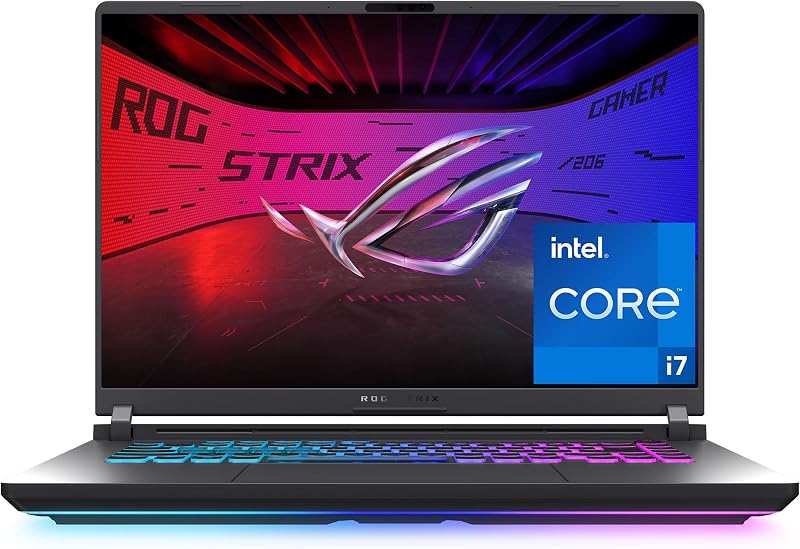
The ASUS ROG Strix G16 provides a strong alternative for players who lean toward Intel processing. It features an Intel Core i7 14650HX processor paired with an NVIDIA GeForce RTX 5060 GPU and a 16-inch FHD+ 165Hz display. Gamers looking for Wi-Fi 7 connectivity and an HX-series desktop-class Intel processor may prefer this model over the Nitro’s AMD Ryzen AI setup.
msi Cyborg 17

Shoppers wanting a larger desktop viewing area can consider the msi Cyborg 17 17.3″ FHD. This machine pairs an Intel Core 9-270H processor with an RTX 5060 GPU, driving a 17.3-inch 144Hz panel, and bundles 2TB of total storage via an internal 1TB SSD combined with an external docking station. It appeals to users who prioritize physical screen real estate over the compact 0.83-inch profile of the Acer Nitro.
KAIGERR Gaming Laptop

For entry-level users with straightforward productivity requirements, the KAIGERR Gaming Laptop offers an alternative computing profile. Powered by an AMD Ryzen 7430U processor with integrated graphics, 16GB of DDR4 memory, and a 512GB SSD, it handles daily business tasks and basic computing. Users who do not need dedicated Blackwell ray-tracing graphics or high-refresh gaming panels might look here for standard daily operations.
Final Verdict
When asking is acer nitro 16s worth it, the answer centers on how well its hardware aligns with modern mobile gaming habits. By pairing the efficient 8-core AMD Ryzen AI 7 350 processor with an NVIDIA GeForce RTX 5060 Laptop GPU featuring GDDR7 memory, Acer delivers a responsive performance package. The addition of Blackwell-generation capabilities, including DLSS 4 Multi Frame Generation and Ray Reconstruction, allows this compact system to achieve smooth visuals in demanding modern titles without sacrificing thermal stability.
The 16-inch 180Hz WUXGA display, quad-intake cooling architecture, and comprehensive port array confirm its standing as a well-rounded contender. Encased in a chassis that weighs 4.8 pounds and measures just 0.83 inches thick, it strikes an exceptional balance between performance and portability. For gamers, students, and mobile creators seeking next-gen graphics and fast refresh rates in an agile form factor, the Acer Nitro 16S stands out as a highly capable choice.
FAQ
What are the core acer nitro 16s specs?
The primary acer nitro 16s specs include an AMD Ryzen AI 7 350 8-core processor, an NVIDIA GeForce RTX 5060 Laptop GPU with 8GB of GDDR7 VRAM, 16GB of DDR5 system memory, and a 1TB Gen 4 SSD. It features a 16-inch WUXGA 180Hz IPS display and operates on Windows 11 Home.
How does the acer nitro 16s display 180hz panel perform in competitive titles?
The 16-inch 180Hz display provides rapid frame delivery with a 3ms response time, minimizing ghosting and motion blur during fast camera sweeps. Its 16:10 aspect ratio offers additional vertical screen space, while 100% sRGB color gamut coverage ensures vibrant and accurate color rendering.
Does the Acer Nitro 16S feature dedicated artificial intelligence hardware?
Yes. The AMD Ryzen AI 7 350 processor features platform-level AI capabilities delivering 66 overall AI TOPS, meeting Microsoft Copilot+ PC standards. Additionally, the NVIDIA GeForce RTX 5060 Laptop GPU contributes 572 AI TOPS for neural rendering features like DLSS 4 Super Resolution and Multi Frame Generation.
What display connectivity options are built into the chassis?
The laptop includes dedicated HDMI and DisplayPort video output interfaces. These connections allow users to run multiple external monitors alongside the native 16-inch screen for multi-display workspaces or immersive home gaming setups.
How does the quad-intake cooling system work on this laptop?
The quad-intake thermal system pulls fresh air from multiple strategic intake zones across the chassis to cool the internal processor and graphics coprocessor. It routes the airflow through dedicated internal thermal pathways before exhausting heat away from primary user contact zones, sustaining stable clock speeds during heavy gaming loads.
How these reviews are put together
- 976reviews published
- 2,271products with a buyer rating
- 2,222products with listed features
- 87brands covered
Every number, star and price on this site is read from the Amazon product listing. We do not run lab tests of our own, so scores here are out of 10, based on listed specifications and buyer feedback, not a verdict from a test bench. Prices change without notice; check the listing before buying.


