Anker 5-in-1 USB-C Hub: Performance Breakdown for Gamers and Media
The Anker 332 USB-C Hub is a lightweight, five-port connectivity adapter designed to solve the port limitations of modern ultra-thin laptops and handheld machines. Featuring a 4K HDMI interface, two USB-A data ports, a USB-C data channel, and an external power delivery passthrough connection, this compact dongle provides essential everyday utility in an exceptionally portable…
By Eric Monroe
9 min read
As Amazon Associates, we earn from qualifying purchases. This means we may receive a small commission at no extra cost to you if you click through and make a purchase.
The Anker 332 USB-C Hub is a lightweight, five-port connectivity adapter designed to solve the port limitations of modern ultra-thin laptops and handheld machines. Featuring a 4K HDMI interface, two USB-A data ports, a USB-C data channel, and an external power delivery passthrough connection, this compact dongle provides essential everyday utility in an exceptionally portable footprint. If you need a travel-ready adapter for running spreadsheets, presenting slide decks, and connecting common peripherals on a laptop, it delivers reliable baseline performance, but entertainment and gaming enthusiasts will find that its video output ceiling presents distinct trade-offs.
This multiport adapter best serves office professionals, students, and casual media consumers who prioritize physical portability and simple cable management over high-refresh gaming displays. Users who plan to connect a productivity mouse, a thumb drive, and a standard conference room monitor will appreciate the plug-and-play simplicity. However, power users seeking high-frame-rate 4K gaming, dedicated multi-display arrangements, or full compatibility with Linux-based operating systems should look toward higher-tier docking stations instead.
4K HDMI Display Output and Gaming Refresh Rates
Display performance is one of the primary criteria gamers and media enthusiasts examine when evaluating a portable expansion hub. The Anker 5 in 1 usb c hub display output relies on a single HDMI port capable of driving an external monitor at a maximum resolution of 4K at 30Hz. For productivity tasks, watching standard 24-to-30-frames-per-second video files, or streaming standard cinematic media, this bandwidth is sufficient to produce an ultra-high-definition picture on a 4K TV or desktop screen.
When assessing the anker 5 in 1 usb c hub for gaming, the 30Hz cap on 4K output creates noticeable friction. High-action gaming at 30Hz exhibits visible motion blur and input latency, which can disrupt competitive or fast-paced gameplay. If you drop the resolution to 1080p, you can achieve a standard 60Hz feed for smoother rendering, but users targeting native anker 5 in 1 usb c hub 4k hdmi visual fidelity at competitive frame rates will face hardware limitations. Handheld players looking for a dedicated television interface, such as those weighing anker 5 in 1 hub steam deck usability, should note that while basic video passthrough works on supported displays, performance enthusiasts often favor a specialized syntech 6-in-1 steam deck docking station that provides alternative physical positioning and display parameters.
It is equally crucial to note the routing limitations across the physical ports. The manufacturer data explicitly notes that neither the 5 Gbps USB-C data port nor the 100W PD-IN port supports video output or DisplayPort Alternate Mode. All video passthrough is exclusively routed through the single HDMI interface, meaning multi-monitor setups cannot be driven directly from this hub.
Power Delivery Dynamics and 85W Pass-Through Performance
Reliable power routing is vital when connecting laptops and power-hungry handheld machines to an external hub. The anker 5 in 1 usb c hub pass through charging pipeline is governed by a dedicated USB-C 100W PD-IN connection. While the port accepts up to a 100W input from a compatible USB Power Delivery charger, the hub internally consumes approximately 15W to power its internal controller and connected downstream devices, resulting in a maximum of 85W pass-through charging directed to the host laptop.
This 85W net delivery provides adequate power headroom to sustain most modern productivity laptops, MacBook Air configurations, and mid-sized MacBook Pro models without battery drain under sustained computational workloads. For mobile media consumption and tablet setups, the manufacturer recommends pairing the hub with at least a 45W wall charger to achieve full charging power for an iPad. Because the hub ships without an AC adapter or standalone charging brick, you must supply your own external USB-C Power Delivery source.
Gamers and creators demanding extended dock stability should review how peripheral power distribution compares to higher-tier options like the anker 8 in 1 usb c hub, which shares similar Power Delivery architecture while expanding auxiliary port selection. Additionally, the manufacturer specifications emphasize that the 100W PD-IN port is strictly engineered for power intake. It does not transfer data, nor does it support USB-C audio accessories such as headphones, microphones, or powered external studio monitors.
Data Transfer Speeds and Peripheral Latency
Peripheral connectivity is driven by three dedicated data interfaces: two standard USB-A ports and one USB-C port. Each of these ports is rated for an anker usb c hub 5gbps transfer speed, which conforms to the USB 3.0 / USB 3.2 Gen 1 standard. At 5 Gbps, moving standard media files, image archives, and documents between a laptop and an external solid-state drive or high-speed flash drive proceeds without significant bottlenecking.
For PC gaming, latency through these 5 Gbps ports is well-controlled for wired input hardware. Connecting a mechanical keyboard, a high-polling-rate gaming mouse, and a standard game controller into the hub leaves standard desktop navigation and gaming controls responsive. The distribution of two USB-A ports alongside a modern USB-C port allows you to maintain legacy USB hardware alongside newer external storage equipment without carrying multiple separate dongles.
However, serious digital editors handling multi-gigabyte video caches or raw visual captures will find that 5 Gbps represents the baseline for modern high-speed storage. Large game installations or continuous data transfers will saturate this interface faster than modern 10 Gbps or 40 Gbps Thunderbolt drives. Gamers who routinely swap hundred-gigabyte game directories may eventually want broader bandwidth, but for everyday peripheral input and regular media movement, the three-port data array performs reliably.
Build Quality, Form Factor, and Hardware Compatibility
Portability stands as one of the definitive strengths in the anker 5 in 1 usb c hub specs. Built from Acrylonitrile Butadiene Styrene (ABS) plastic, the chassis measures a compact 4.78 inches long, 1.59 inches wide, and just 0.45 inches thick. Weighing in at only 1.44 ounces, the hub slips into an accessory pouch, laptop sleeve, or console carrying case without contributing meaningful physical bulk.
Operating system support covers a wide swath of desktop and mobile ecosystems, officially supporting Windows 10, Windows 11, Windows 7, ChromeOS, and macOS versions 12 and newer. The built-in host cable interfaces cleanly with modern USB-C, USB4, and Thunderbolt 3, 4, and 5 ports, provided the host laptop or tablet supports DisplayPort Alternate Mode for video and USB Power Delivery for charging. Those managing broader desktop ecosystems can compare this lightweight mobile profile against a stationary hub like the anker 555 usb-c hub 8-in-1 to decide between pure travel ergonomics and heavier desktop utility.
A critical limitation highlighted in the official manufacturer specifications is that this device is not compatible with Linux. Handheld gaming enthusiasts who run custom Linux distributions or utilize Linux-based operating systems should take heed of this restriction, as driver and interface recognition is unsupported. For standard Windows, macOS, and ChromeOS users, installation requires no third-party software, executing basic plug-and-play initialization upon connection.
Anker 332 USB-C Hub Pros and Cons
Pros
- Up to 85W pass-through charging capacity
- Lightweight design at just 1.44 ounces
- Dedicated 5 Gbps USB-C and USB-A ports
- Supports Thunderbolt and USB4 host connections
- Worry-free 18-month manufacturer warranty
Cons
- HDMI output capped at 4K 30Hz
- Incompatible with Linux operating systems
- USB-C ports lack video display output
Check Anker 332 USB-C Hub on Amazon
Who Should Buy the Anker 332 USB-C Hub
Before purchasing this hub, match its capabilities and physical limits against your core daily workflow.
Buy It If
- You need an ultra-lightweight travel dongle weighing under two ounces for coffee shop, office, or classroom work.
- Your laptop relies on USB-C charging and requires up to 85W of sustained pass-through power while using peripherals.
- You primarily use standard productivity monitors or 1080p 60Hz displays for daily work and general media watching.
- You need a balanced mix of traditional USB-A slots and a modern USB-C data port for basic flash drives and wired controllers.
Skip It If
- You intend to play competitive PC or console games at native 4K resolution where 60Hz or higher refresh rates are required.
- Your primary computing hardware runs on Linux, which the manufacturer explicitly designates as incompatible.
- You require multi-monitor display outputs or need your USB-C ports to output auxiliary video streams.
Anker 332 USB-C Hub Alternatives Worth a Look
Depending on whether your workflow prioritizes higher refresh rates, a higher volume of legacy ports, or raw data bandwidth, several alternatives from the same segment may better suit your setup.
85W Max PD

The 85W Max PD adapter is a 7-in-1 multi-port USB adapter from Anker that steps up display output to 4K@60Hz via HDMI. It features two USB 3.0 ports, one USB-C data port, an SD/TF card reader, and 85W pass-through charging. Gamers and visual creators who demand smooth 60 frames-per-second video output alongside dedicated memory card slots will find this option markedly better aligned with high-definition media requirements than the 30Hz-capped 332 model.
Aluminum FORIDA USB Hub 3.0

The Aluminum FORIDA USB Hub 3.0 focuses on pure peripheral expansion, delivering a 7-port fast multiport USB-C splitter wrapped in an aluminum chassis. Shoppers who manage a broad desktop collection of wired flight sticks, racing wheels, gamepads, external mice, and accessory lights without requiring video output or power delivery passthrough should consider this multi-port hub for expanding peripheral capacity.
Type-C Multiport Adapter Fast Data
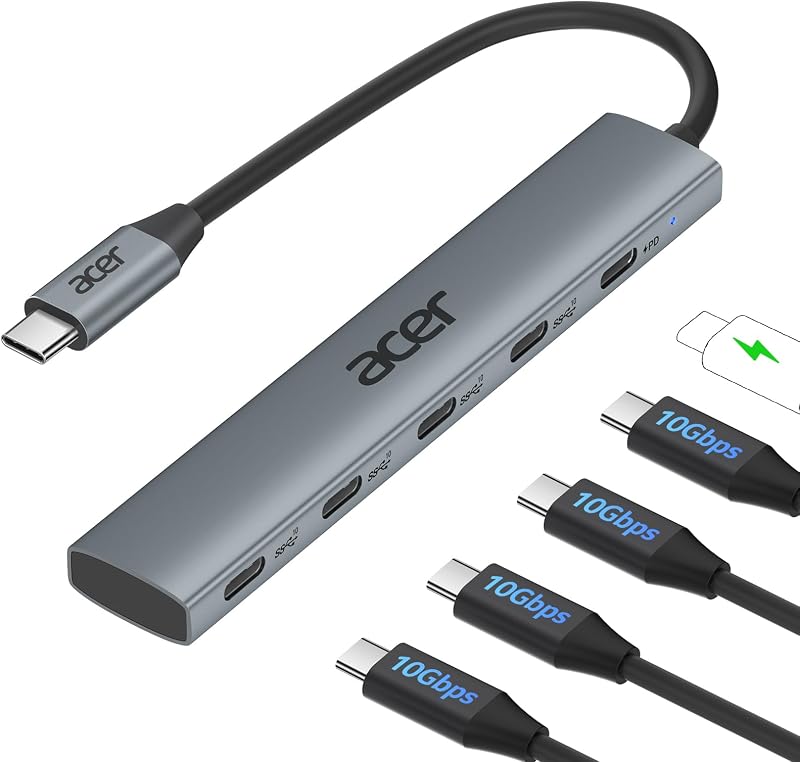
The Type-C Multiport Adapter Fast Data from Acer is a dedicated 10 Gbps USB-C hub offering four USB-C 3.2 data ports alongside a 100W PD port. While it explicitly includes no video output, users focused on moving massive game libraries or media files at double the transfer rate of standard 5 Gbps hubs will prefer its faster data pipeline for modern USB-C external solid-state drives.
Final Verdict
Answering whether the is anker 5 in 1 usb c hub worth it comes down to balancing its compact dimensions against its visual output ceilings. In this anker 332 usb-c hub review, the device proves itself to be a competent, highly portable connectivity splitter for basic office applications, general computing, and casual video playback. Its inclusion of an 85W pass-through charging channel, two USB-A ports, and an additional USB-C data connection covers all the basic connectivity requirements an ultrabook user encounters on the go.
However, users looking for high-performance gaming hardware will find the 4K@30Hz limit restrictive, and the lack of Linux compatibility prevents it from serving as an all-purpose docking accessory for open-source gaming handhelds. If you understand these functional boundaries and simply need a dependable, lightweight dongle to manage everyday desktop peripherals and 1080p display feeds, the Anker 332 USB-C Hub provides solid, fuss-free utility backed by an 18-month warranty.
FAQ
Can the USB-C data port on this hub output video to an external monitor?
No. According to the official product specifications, the 5 Gbps USB-C data port does not support video output. The 100W PD-IN port is also limited strictly to charging. All external display feeds must be routed exclusively through the onboard HDMI port.
Does the Anker 332 USB-C Hub include a wall charger in the box?
No. The packaging includes the Anker 332 USB-C Hub, a welcome guide, and warranty documentation. To utilize pass-through charging, you must connect your own external USB-C Power Delivery wall charger to the hub’s 100W PD-IN port.
Can I use this hub with a computer running Linux?
No. The manufacturer listing explicitly states that this device is not compatible with Linux operating systems. It is formally designed to support Windows 7, 10, and 11, macOS 12 or newer, and ChromeOS.
What happens if I plug my headphones into the USB-C PD-IN port?
The USB-C 100W PD-IN port supports only power delivery input. It does not route data or audio signals, meaning USB-C headphones, speakers, or audio interfaces will not function when plugged into that specific port.
What is the maximum refresh rate supported when outputting at 4K resolution?
The HDMI port supports 4K resolution at a maximum refresh rate of 30Hz. If you require higher refresh rates such as 60Hz or 120Hz for gaming, you will need to lower your display resolution or choose an alternative hub equipped with a higher-bandwidth video controller.
How these reviews are put together
- 1,107reviews published
- 2,271products with a buyer rating
- 2,222products with listed features
- 87brands covered
Every number, star and price on this site is read from the Amazon product listing. We do not run lab tests of our own, so scores here are out of 10, based on listed specifications and buyer feedback, not a verdict from a test bench. Prices change without notice; check the listing before buying.


