ASUS TUF Gaming A18 Deep Dive: Immersion and Hardware Output
The ASUS TUF Gaming A18 pairs desktop replacement scale with modern silicon, positioning an 18-inch panel alongside the AMD Ryzen 7 260 processor and NVIDIA GeForce RTX 5060 graphics. Designed to offer a stationary battle station without the clutter of an external monitor, it focuses on high-bandwidth processing and expansive visual immersion. Our verdict is…
By Mark Archer
9 min read
As Amazon Associates, we earn from qualifying purchases. This means we may receive a small commission at no extra cost to you if you click through and make a purchase.
The ASUS TUF Gaming A18 pairs desktop replacement scale with modern silicon, positioning an 18-inch panel alongside the AMD Ryzen 7 260 processor and NVIDIA GeForce RTX 5060 graphics. Designed to offer a stationary battle station without the clutter of an external monitor, it focuses on high-bandwidth processing and expansive visual immersion. Our verdict is straightforward: it serves as a commanding desktop replacement that balances raw gaming throughput and everyday productivity on a large canvas, though its sizable footprint requires a committed desk space.
This massive notebook fits gamers, stream enthusiasts, and software developers who prioritize visual real estate and want 32 GB of high-speed system memory right out of the box. The spacious 16:10 workspace and Windows 11 Pro integration create an efficient dual-purpose environment for heavy compute loads and after-hours entertainment. However, daily commuters and frequent travelers seeking a light backpack companion should bypass this large chassis and consider more compact portable options such as the asus tuf dash f15 instead.
Visual Immersion and Screen Characteristics
The headline feature of this machine is its commanding 18-inch IPS-level display. Sporting a WUXGA resolution of 1920 by 1200 pixels, the panel uses an expansive 16:10 aspect ratio that yields extra vertical space for editing timelines, browser windows, and development environments. While users seeking razor-sharp 4K text might notice the lower pixel density across an 18-inch diagonal, the 1200p resolution allows the dedicated GPU to push fast frame rates without sacrificing graphical fidelity.
Fast-motion responsiveness remains a major asset for fast-paced genres. Supported by the fluid asus tuf 18 144hz display and a 3ms response time, animated transitions and rapid camera pans retain visual clarity without distracting ghosting. The inclusion of NVIDIA G-SYNC over supported display connections synchronizes panel refresh rates directly with the GPU output, eliminating visual tearing and frame pacing judder during complex combat sequences.
ASUS pairs this panel with an anti-glare finish that mitigates harsh overhead office lights and desk lamp reflections. Combined with the generous viewing angles inherent to IPS-level screen technology, the display remains clear and color-consistent whether you are sitting upright during ranked matches or leaning back to stream video content.
Processing and Graphics Hardware Performance
Computational speed is anchored by the AMD Ryzen 7 260 processor, which features 8 physical cores and 16 threads with boost frequencies reaching up to 5.10 GHz. This architectural balance ensures dependable single-core performance for esports titles alongside ample multi-threaded capacity for compiling code, unzipping large archives, and managing active background applications. The processor also includes an AMD XDNA neural processing unit delivering up to 16 TOPS to assist with dedicated local AI tasks.
Graphics tasks fall to the dedicated asus tuf 18 rtx 5060 laptop GPU, equipped with 8GB of modern GDDR7 video memory. The introduction of high-bandwidth GDDR7 memory assists the graphics pipeline when handling high-resolution textures, dynamic lighting, and complex particle effects. When evaluating the asus tuf 18 for gaming, this combination capably drives contemporary releases at high graphical presets while staying comfortably within the native FHD+ resolution ceiling.
Compared to entry-tier alternatives such as the asus tuf f16 rtx 5050, stepping up to the 5060 with GDDR7 memory unlocks broader graphical headroom and smoother rendering under intensive workloads. The CPU and GPU work in tandem to eliminate processing bottlenecks, maintaining steady pacing whether handling creative productivity software or competitive multiplayer lobbies.
Thermal Architecture and Cooling Efficiency
A primary benefit of an 18-inch chassis is the sheer volume of internal air space, which directly enhances the asus tuf 18 cooling performance. ASUS equips the laptop with custom Arc Flow Fans engineered to cycle large amounts of cool air through bottom intake cutouts while reducing air turbulence. Internal heat is drawn away from the processor and graphics silicon into an expansive full-width heatsink, which exhausts warmth through side and rear ventilation channels.
This robust thermal setup helps sustain peak clock speeds on the asus tuf 18 ryzen 7 260 during sustained gaming sessions or intensive video exports. Because the heatsink array spans a broad surface area, the internal fans do not have to ramp up into shrill, high-pitched frequencies to maintain operational stability. Surface heat is also kept away from primary touch points, allowing the RGB backlit keyboard to remain comfortable under prolonged usage.
Structural reliability complements the thermal solution, as the chassis is constructed to meet MIL-STD-810H military-grade endurance benchmarks. This rigorous standard ensures the internal thermal assembly and heat pipe contacts remain securely seated even if the notebook encounters routine vibrations and minor handling shocks over years of ownership.
Memory Configuration and Storage Provisions
System memory is configured with 32 GB of high-frequency DDR5 5600MHz RAM, granting vast headroom for heavy multitaskers. This memory allocation allows power users to keep virtual machines running, browse dozens of web resources, manage game clients, and host Discord streams simultaneously without triggering performance slowdowns or Windows paging delays.
Local storage is handled by a swift 1 TB PCIe 4.0 NVMe solid-state drive, ensuring rapid operating system boot sequences and brisk game asset loading. When assessing the asus tuf 18 specs, shoppers should review a specific detail stated on the product listing: the original manufacturer seal is opened exclusively to install and test the upgraded 32 GB RAM and 1 TB SSD components to ensure they meet advertised operational standards before delivery.
For enthusiasts considering long-term asus tuf 18 upgradeability, having 32 GB of DDR5 pre-installed mitigates any immediate need to access internal slots. Readers curious about smaller form factors and standard internal configurations across the broader lineup can also check out our review of the asus tuff a15 to see how compact chassis designs manage their components.
Chassis Construction, Battery, and External I/O
Carrying dimensions of 15.71 inches in width, 11.14 inches in depth, and 1.05 inches in thickness, the TUF Gaming A18 is an unapologetic desktop replacement. Finished in Mecha Gray and Jaeger Gray tones, the laptop combines an understated industrial aesthetic with military-grade toughness. The keyboard deck houses a full RGB backlit keyboard with distinct key travel, while the audio subsystem features dual speakers enhanced with Dolby Atmos spatial processing.
Power management is supported by a large 90WHrs battery pack, providing ample capacity for general productivity and media consumption when unplugged from the wall. The integrated fast-charging circuitry recharges the battery from zero to 50 percent in approximately 30 minutes, minimizing desk downtime when you need to relocate. Demanding 3D tasks naturally require the dedicated power adapter to sustain maximum GPU output, but the 90Wh capacity delivers usable off-charger runtime for everyday tasks.
External connectivity is modern and well-rounded, headlined by a USB4 Type-C port that supports both DisplayPort monitor output and Power Delivery. The system also includes dedicated HDMI and DisplayPort video ports, allowing for multi-monitor desktop configurations. High-bandwidth Wi-Fi 6E and Bluetooth 5.3 round out the wireless hardware, ensuring rapid download rates and low-latency pairing for wireless headsets and controllers.
ASUS TUF Gaming A18 Pros and Cons
Pros
- Expansive 18-inch 144Hz display with G-SYNC support
- AMD Ryzen 7 260 processor with 16 threads
- NVIDIA GeForce RTX 5060 GPU with GDDR7 memory
- Generous 32 GB DDR5 high-speed system memory
- Large 90Wh battery with fast charging capability
- Durable MIL-STD-810H military-grade construction
Cons
- Large 15.7-inch footprint reduces overall portability
- FHD+ 1200p resolution lower than native QHD
- Factory seal opened to install upgraded components
Check ASUS TUF Gaming A18 on Amazon
Who Should Buy the ASUS TUF Gaming A18
Deciding if this 18-inch powerhouse fits your routine comes down to workspace priorities and transport habits. Exploring an in-depth asus tuf 18 gaming laptop review helps put these ergonomic trade-offs into practical perspective.
Buy It If
- You want an expansive 18-inch 16:10 display that eliminates the need to attach an external desk monitor.
- You require 32 GB of DDR5 RAM out of the box for heavy multitasking, programming, and content creation.
- You appreciate military-grade MIL-STD-810H construction and effective Arc Flow cooling hardware.
- You want modern connectivity, featuring fast USB4, Wi-Fi 6E, and 90Wh fast-charging battery technology.
Skip It If
- You need a lightweight, travel-friendly laptop that fits effortlessly into standard commuter backpacks.
- You demand ultra-dense QHD or 4K panel resolutions for fine-detail creative design work.
- You prefer a device with a factory-sealed original box rather than an inspected and pre-upgraded unit.
ASUS TUF Gaming A18 Alternatives Worth a Look
If the footprint, resolution, or upgraded configuration of this model does not completely match your needs, several notable alternatives offer distinct form factors and hardware trade-offs.
Acer Nitro V 16S AI
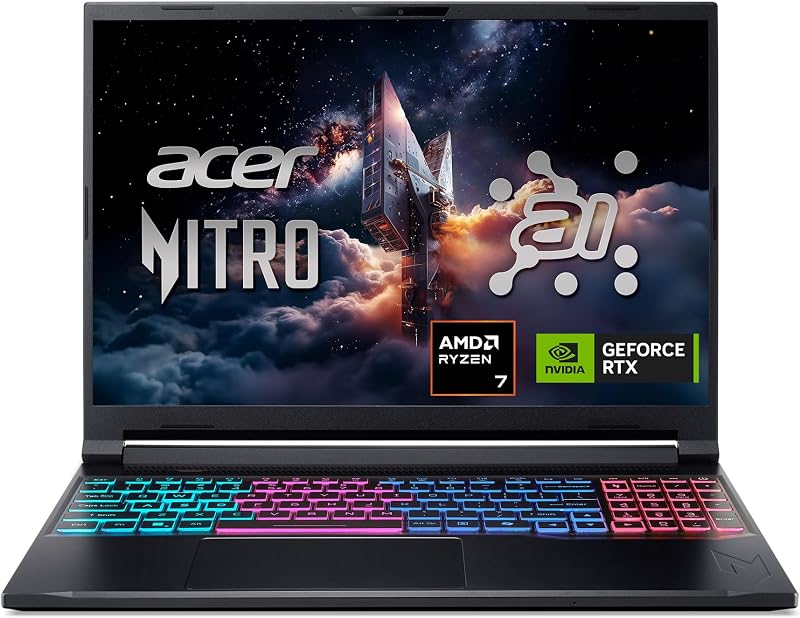
The Acer Nitro V 16S AI provides a smaller, more travel-friendly footprint for gamers who find an 18-inch laptop too bulky. Powered by the same AMD Ryzen 7 260 processor and an RTX 5060 GPU, it features a 16-inch WUXGA IPS panel with an even faster 180Hz refresh rate alongside 32GB of DDR5 memory and a 1TB Gen 4 SSD. Shoppers who value portability and higher refresh rates over maximum screen size should consider this 16-inch model.
msi Cyborg 17

The msi Cyborg 17 17.3″ FHD offers an alternate large-screen layout centered on an Intel architecture. It features a 17.3-inch 144Hz FHD display, an Intel Core 9-270H processor, and an RTX 5060 GPU housed in a translucent black chassis. Coming with 16GB of DDR5 RAM and a combined 2TB storage setup that includes an internal 1TB SSD plus a 1TB docking station set, it suits users who want an Intel CPU and extra bundled storage gear.
KAIGERR Gaming Laptop

The KAIGERR Gaming Laptop targets lightweight daily computing rather than intensive AAA gaming. Configured with an AMD Ryzen 7430U processor, 16GB of DDR4 memory, a 512GB SSD, a 1920P FHD display, and a physical webcam cover slide, it serves standard office and school workflows. Shoppers seeking a basic everyday utility laptop rather than a dedicated high-power gaming rig will find it an accessible option.
Final Verdict
The ASUS TUF Gaming A18 delivers an engrossing desktop replacement experience by uniting a sprawling 18-inch 144Hz panel with contemporary AMD processing and NVIDIA RTX 5060 graphics. Backed by 32 GB of DDR5 memory, a 1 TB NVMe SSD, and Windows 11 Pro, it handles complex everyday workloads and gaming marathons with consistent stability. The large chassis allows the Arc Flow cooling system to maintain manageable internal temperatures without generating distracting fan whine.
Ultimately, is asus tuf 18 worth it? If your priority is a spacious, durable command center that delivers immersive big-screen gaming and effortless multitasking at your desk, this laptop represents a capable, well-engineered solution. Provided you do not require featherweight mobility or high-density QHD resolution, the TUF Gaming A18 offers the build quality, performance headroom, and screen estate needed for serious entertainment.
FAQ
Is the ASUS TUF Gaming A18 display suitable for competitive gaming?
Yes, the display features a 144Hz refresh rate, a 3ms response time, and NVIDIA G-SYNC support, delivering fluid visual pacing and minimal input latency for fast-action games.
What makes the Ryzen 7 260 and RTX 5060 hardware pairing effective?
The 8-core, 16-thread AMD Ryzen 7 260 processor handles heavy multi-threaded processing while the RTX 5060 laptop GPU utilizes 8GB of modern GDDR7 memory to process detailed game assets smoothly at 1200p resolution.
Can the memory and storage on the ASUS TUF Gaming A18 be upgraded?
The notebook comes pre-equipped with 32 GB of DDR5 RAM and a 1 TB PCIe 4.0 SSD. The product listing states that the original seal was opened by the seller to install and verify these upgraded components prior to shipping.
How fast does the 90Wh battery charge on the ASUS TUF Gaming A18?
The laptop features fast-charging technology capable of bringing the integrated 90WHrs battery from zero to 50 percent capacity in approximately 30 minutes.
Does the ASUS TUF Gaming A18 come with Windows 11 Pro pre-installed?
Yes, the laptop comes pre-installed with Windows 11 Pro, providing advanced management tools and integrated Microsoft Copilot AI capabilities for gaming and productivity.
How these reviews are put together
- 540reviews published
- 2,271products with a buyer rating
- 2,222products with listed features
- 87brands covered
Every number, star and price on this site is read from the Amazon product listing. We do not run lab tests of our own, so scores here are out of 10, based on listed specifications and buyer feedback, not a verdict from a test bench. Prices change without notice; check the listing before buying.


