ASUS Vivobook 16 16GB RAM Breakdown: Entertainment & Efficiency Benchmarked
The ASUS Vivobook 16 enters the modern computing landscape as a specialized, efficiency-first notebook designed to balance a large-format display with cutting-edge ARM architecture. Powered by the Qualcomm Snapdragon X 8 Core SE processor, an integrated Qualcomm Adreno GPU, and a healthy 16GB of system memory, this machine represents a significant shift from traditional x86…
By Mark Archer
11 min read
As Amazon Associates, we earn from qualifying purchases. This means we may receive a small commission at no extra cost to you if you click through and make a purchase.
The ASUS Vivobook 16 enters the modern computing landscape as a specialized, efficiency-first notebook designed to balance a large-format display with cutting-edge ARM architecture. Powered by the Qualcomm Snapdragon X 8 Core SE processor, an integrated Qualcomm Adreno GPU, and a healthy 16GB of system memory, this machine represents a significant shift from traditional x86 laptops by offering cool, silent operation and sustained endurance. For entertainment lovers, media streamers, and general power users seeking an expansive canvas for daily work and video consumption, this laptop delivers a remarkably responsive and balanced user experience that easily handles everyday digital life.
This laptop is ideally suited for students, home office professionals, media enthusiasts, and casual gamers who value screen real estate, seamless window switching, and silent thermal performance over raw 3D gaming power. If you spend your day streaming high-definition video, managing dozens of browser tabs, running productivity suites, and enjoying lighter casual games, the hardware configuration here is exceptionally well-matched to your needs. However, buyers looking to run demanding modern AAA titles at high frame rates, or creative professionals who rely on specialized legacy x86 software plugins that lack native ARM compilation, will want to consider dedicated gaming rigs or traditional x86-based alternatives instead.
Snapdragon X Processing and Everyday Multitasking Performance
At the center of the hardware layout is the Qualcomm Snapdragon X 8 Core SE processor, paired with the X1-26-100 chipset, which redefines how mainstream laptops handle general computing loads. In evaluating the asus vivobook 16 snapdragon x performance, the primary advantage stems from ARM-based architecture designed from the ground up for extreme power efficiency. Unlike conventional silicon that often spins up aggressive cooling fans under modest productivity workloads, this 8-core CPU executes daily computing tasks smoothly while maintaining modest power draw. The integration of the Qualcomm Hexagon NPU, capable of up to 45 TOPS of dedicated neural processing, unlocks local Windows 11 Copilot+ AI features, providing swift assistance for creative tasks, communication tools, and automated system optimizations without bogging down the main CPU cores.
System memory plays an essential role in how smooth a modern operating system feels, and examining the asus vivobook 16 16gb ram specs reveals an ideal configuration for contemporary digital lifestyles. With 16GB of DDR5 SDRAM onboard, the asus vivobook 16 multitasking capabilities easily exceed what older or entry-level 8GB machines can deliver. Users can simultaneously run extensive browser sessions across multiple windows, stream music or video in the background, edit office spreadsheets, and participate in video calls without encountering aggressive memory compression or slowdowns. While more compact travel machines such as the asus vivobook 14 offer heightened mobility for quick trips, the Vivobook 16 uses its memory pool and larger internal design to provide sustained, unthrottled productivity for extensive desk sessions.
Storage responsiveness is handled by a 512GB PCIe 4.0 solid-state drive, ensuring rapid boot sequences, instantaneous file indexing, and fast load times for installed applications. The PCIe 4.0 interface provides ample communication throughput, so transferring large media files or high-definition movie libraries between directories happens with minimal waiting. For users managing extensive entertainment libraries, photo archives, and day-to-day documents, the 512GB capacity offers a reliable operational buffer, backed by the inherent speed advantages of modern solid-state technology.
Display Quality and Media Entertainment Experience
Entertainment enthusiasts will find a compelling visual setup on this laptop thanks to its 16-inch WUXGA display. Boasting a native resolution of 1920 x 1200, the panel utilizes a modern 16:10 aspect ratio that provides vertical space advantages over traditional 16:9 widescreen formats. When reviewing the asus vivobook 16 display quality, this extra vertical headroom allows streaming enthusiasts to browse playlists comfortably, while productivity users can view more rows of text or data without scrolling. ASUS engineers have calibrated the non-touch screen to deliver life-like colors, making movies, TV series, and web videos look vibrant and engaging in indoor environments.
The panel delivers 300 nits of sustained brightness, which is well-suited for typical indoor lighting conditions, bedrooms, lecture halls, and offices. While it does not achieve the ultra-deep, infinite contrast blacks found on specialized organic light-emitting displays like the asus vivobook s16 oled, the matte finish and even backlighting keep reflections to a minimum during daylight viewing. The 60Hz refresh rate maintains steady frame delivery for standard video playback, which matches standard broadcast streaming formats running at 24, 30, or 60 frames per second.
Complementing the visual performance is the spacious 16-inch diagonal measurement, which eliminates the cramped feeling commonly associated with smaller portable notebooks. Split-screen viewing is genuinely practical here: you can position a streaming video on one side of the screen while keeping a chat window, social media feed, or notes app open on the other side. For entertainment lovers who prefer watching movies directly on their laptop without needing a bulky external monitor, this 16-inch canvas hits a sweet spot between immersive scale and desktop footprint.
Qualcomm Adreno GPU and Casual Gaming Capabilities
Graphics rendering on this machine is driven by the integrated Qualcomm Adreno GPU, which features Qualcomm’s first-ever sliced-architecture GPU design. This architectural innovation partitions graphics computing clusters to maximize raw rendering throughput while actively reducing power draw during low-intensity workloads. When considering the asus vivobook 16 adreno gpu, users should understand that it is built primarily to accelerate visual user interfaces, fluid 4K media decoding, photo rendering, and modern casual games rather than replace high-wattage desktop graphics cards.
For gamers wondering about the viability of the asus vivobook 16 for gaming, expectations must be framed around the current ARM Windows gaming ecosystem. The integrated Adreno graphics engine handles lightweight indie games, popular casual platformers, puzzle titles, and games found natively within the Microsoft Store smoothly. Furthermore, it excels as a high-efficiency portal for cloud gaming platforms such as Xbox Cloud Gaming and GeForce NOW. Because cloud services offload demanding rendering calculations to remote servers, this Vivobook simply decodes the incoming video feed, providing smooth gameplay with low latency, zero fan roar, and minimal heat buildup.
The primary limitation to keep in mind involves demanding modern AAA 3D titles and games that rely on rigid x86 kernel-level anti-cheat software. Modern games designed exclusively for x86 architectures must run through emulation on Windows 11 ARM, which can result in inconsistent frame rates or compatibility hurdles in graphics-heavy titles. The 60Hz display refresh rate also reflects its focus as a multimedia and productivity device rather than a high-fps competitive esports platform. For gamers who stick to casual gaming, retro emulators, turn-based strategies, and cloud streaming, the Adreno GPU provides a competent and power-conscious foundation.
Battery Efficiency, Thermals, and Portability
One of the strongest selling points of the Snapdragon X hardware platform is its exceptional energy management. The listing highlights multi-day battery life potential, a claim made possible by the architectural efficiency of ARM silicon. In real-world daily operation, the asus vivobook 16 battery life benefits tremendously from the processor’s ability to idle at negligible power states when you are merely reading documents or watching local video. Because the CPU and integrated Adreno GPU do not generate the intense heat signatures of high-voltage x86 chips, the laptop remains quiet and cool under loads that would cause standard laptops to activate loud fans.
Portability on a 16-inch laptop often presents a challenge, but this model balances proportions thoughtfully. Tipping the scales at 3.9 pounds, it remains relatively light for a large-screen notebook, making it straightforward to carry between rooms, take to campus, or slide into a backpack. While substantial desktop alternatives such as the asus vivobook 17.3 demand stationary desk setups due to their oversized frames, this 16-inch model retains mobile practicality while still granting the viewer an immersive display experience.
The physical exterior is finished in an understated Quiet Blue colorway that looks sleek in professional, academic, and home environments. Peripheral compatibility is broad, with the system supporting external mice, keyboards, USB accessories, storage drives, secondary monitors, and Bluetooth audio gear like wireless headphones or desktop speakers. The limited warranty provided by ASUS offers foundational peace of mind against manufacturing defects, rounding out a well-constructed hardware package designed for everyday reliability.
ASUS Vivobook 16 Pros and Cons
Pros
- Snapdragon X 8-core processor with 45 TOPS NPU
- Generous 16GB DDR5 RAM for fluid multitasking
- Spacious 16-inch WUXGA display with 16:10 aspect ratio
- Fast 512GB PCIe 4.0 solid-state drive
- Quiet and cool energy-efficient ARM architecture
- Lightweight 3.9-pound build for a 16-inch laptop
Cons
- Standard 60Hz refresh rate lacks high-framerate smoothness
- Integrated Adreno GPU not built for demanding AAA gaming
- Display does not support touch or stylus input
Check ASUS Vivobook 16 on Amazon
Who Should Buy the ASUS Vivobook 16
Choosing the right laptop comes down to matching internal component capabilities with your everyday software routine. Below is a breakdown of situations where this configuration thrives, alongside scenarios where an alternative system may serve you better.
Buy It If
- You want a large 16-inch 16:10 display for media streaming, video entertainment, and comfortable side-by-side multitasking.
- You prioritize long-lasting battery efficiency and cool, quiet operation powered by Qualcomm’s Snapdragon X architecture.
- You need 16GB of system RAM to ensure smooth performance across dozens of open browser tabs and productivity applications without system lag.
- Your gaming routine consists primarily of casual titles, indie releases, mobile adaptations, and cloud streaming services like Xbox Cloud Gaming.
Skip It If
- You are a hardcore PC gamer seeking high-refresh-rate gaming beyond 60Hz and discrete graphics silicon for AAA titles.
- Your daily workflow requires specialized legacy x86 enterprise tools or kernel-level drivers that are incompatible with Windows 11 on ARM.
- You want a compact, ultra-small sub-14-inch chassis or require a touchscreen with active stylus support for digital illustration.
ASUS Vivobook 16 Alternatives Worth a Look
If you are exploring other options in the portable computing market, several alternative models cater to different portability, storage, and processing preferences.
2026-2027 edition

The 2026-2027 edition HP 14 Laptop Computer offers a compact 14-inch form factor equipped with an Intel N150 processor, 4GB of DDR5 RAM, a 128GB SSD, Windows 11, and bundled Microsoft 365 with 1 TB of cloud storage. This machine is geared toward users who prioritize smaller travel dimensions and bundled cloud productivity over the large 16-inch screen and 16GB multitasking headroom of the Vivobook.
Shoppers who want a lightweight, highly portable everyday notebook for basic word processing, school assignments, and web browsing will appreciate its modest footprint, though it offers substantially less memory and local solid-state capacity than the Vivobook 16.
Supports 1TB TF Card Expansion
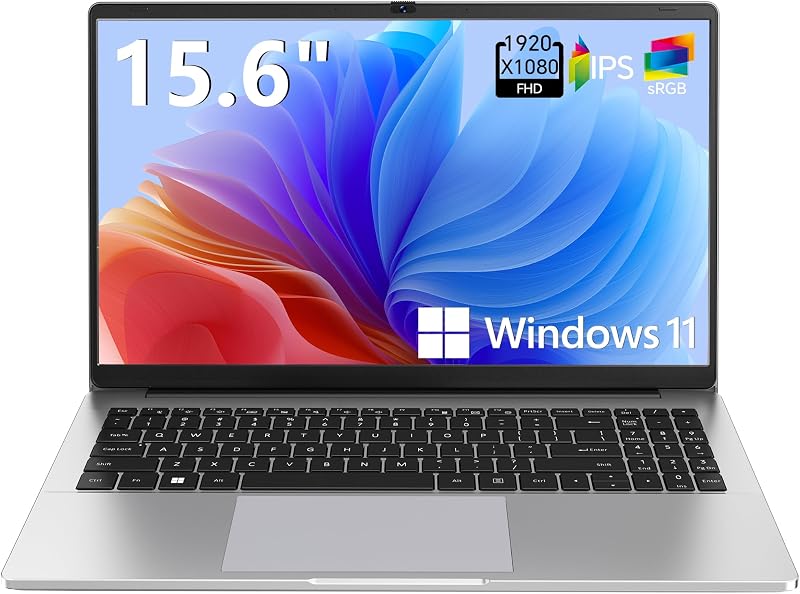
The Supports 1TB TF Card Expansion portable notebook features a 15.6-inch FHD LCD display, an Intel N4020 processor, 4GB of DDR4 RAM, 128GB of eMMC storage, and Windows 11 in a gray chassis designed for students and home offices. Its defining attribute is dedicated support for up to 1TB TF memory card expansion, allowing users to swap removable storage cards easily.
This laptop suits budget-conscious students or home office users needing a basic 15.6-inch screen for straightforward document viewing and light media tasks, though its N4020 processor and 4GB RAM offer significantly less processing and multitasking power than the Snapdragon X configuration.
Copilot AI

The Copilot AI Natural Silver HP 2026 Essential Laptop is built with an Intel processor, 128GB of storage, an LED display, Windows 11, Office 365, Copilot AI integration, and 1TB of cloud storage in a lightweight frame. It focuses on cloud-centric computing, basic productivity, and AI-assisted workflow integration.
Users who prefer an Intel-based architecture in a portable format with included Office software and cloud storage may find this appealing, while those wanting expansive local 512GB PCIe 4.0 storage and a spacious 16-inch WUXGA screen will favor the ASUS Vivobook.
Final Verdict
Concluding our asus vivobook 16 x1607qa review, this notebook successfully establishes itself as a modern, forward-looking device tailored for media consumption, everyday office productivity, and casual leisure. By pairing the power-efficient Qualcomm Snapdragon X 8 Core SE processor with 16GB of DDR5 RAM and a fast 512GB PCIe 4.0 SSD, ASUS has engineered a machine that tackles standard modern computing workloads with silence, stability, and speed. The 16-inch WUXGA 16:10 display provides an immersive window for video streaming and side-by-side multitasking, while the 45 TOPS Hexagon NPU equips the laptop for next-generation Windows Copilot+ AI features.
When asking whether the is asus vivobook 16 worth it, the answer depends entirely on your specific workload. If you are seeking a reliable, large-screen daily driver that offers multi-day battery potential, whisper-quiet operation, and seamless handling of media and productivity suites, this laptop represents an outstanding balance of size and efficiency. While it is not designed for dedicated AAA gaming or complex x86 emulation, it stands as an impressive, high-value choice for students, professionals, and entertainment lovers wanting modern ARM performance in a refined Quiet Blue chassis.
FAQ
Can the ASUS Vivobook 16 handle modern AAA gaming?
The ASUS Vivobook 16 is equipped with an integrated Qualcomm Adreno GPU, which is optimized for casual titles, indie games, and media playback rather than heavy AAA gaming. Demanding 3D titles require dedicated graphics hardware and native x86 compatibility to achieve playable frame rates. However, you can comfortably play modern games on this laptop by utilizing cloud streaming platforms like Xbox Cloud Gaming or GeForce NOW.
How does the Snapdragon X 8 Core processor perform in everyday multitasking?
The Snapdragon X 8 Core SE processor excels in daily multitasking by leveraging modern ARM architecture designed for rapid responsiveness and low thermal output. Combined with 16GB of DDR5 SDRAM and a 512GB PCIe 4.0 SSD, the processor allows you to switch seamlessly between web browser tabs, office productivity suites, video calls, and streaming media without experiencing interface stutter or system slowdowns.
What makes the 16-inch WUXGA display suitable for entertainment?
The 16-inch display features a 1920 x 1200 resolution with a 16:10 aspect ratio, providing extra vertical viewing area compared to standard widescreen panels. With 300 nits of sustained brightness and life-like color reproduction, it offers a crisp, clear, and spacious canvas that makes watching movies, streaming TV series, and viewing online video content engaging and comfortable.
Does the ASUS Vivobook 16 support external monitors and accessories?
Yes, the listing specifies that the laptop is compatible with external displays, USB devices, mice, keyboards, external storage drives, and Bluetooth-enabled peripherals such as wireless headphones and portable speakers. This enables you to easily connect standard desktop accessories or expand your workspace with an external monitor at home or in an office.
How long does the battery last on the ASUS Vivobook 16?
The manufacturer listing highlights multi-day battery life, enabled by the power-efficient design of the Qualcomm Snapdragon X chipset and ARM architecture. While exact battery runtime varies depending on display brightness, network usage, and application load, the system is engineered to consume far less power during idle states and media streaming than traditional high-voltage laptops.
How these reviews are put together
- 938reviews published
- 2,271products with a buyer rating
- 2,222products with listed features
- 87brands covered
Every number, star and price on this site is read from the Amazon product listing. We do not run lab tests of our own, so scores here are out of 10, based on listed specifications and buyer feedback, not a verdict from a test bench. Prices change without notice; check the listing before buying.


