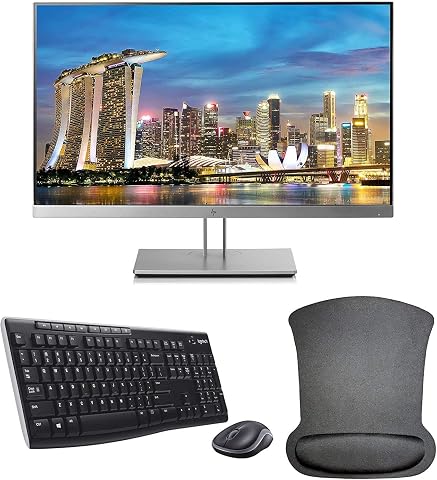
Dell P2419H Monitor Review: Ergonomics and Visuals for Everyday Entertainment
The Dell P2419H is a 24-inch Full HD desktop monitor engineered to combine dependable In-Plane Switching panel performance with extensive mechanical adjustability. Built with a clean aesthetic and minimal physical footprint, it targets users who need a balanced display for everyday entertainment, media consumption, and general multitasking. As desktop setups become more specialized, this screen…
By Grant Foster
9 min read
As Amazon Associates, we earn from qualifying purchases. This means we may receive a small commission at no extra cost to you if you click through and make a purchase.
The Dell P2419H is a 24-inch Full HD desktop monitor engineered to combine dependable In-Plane Switching panel performance with extensive mechanical adjustability. Built with a clean aesthetic and minimal physical footprint, it targets users who need a balanced display for everyday entertainment, media consumption, and general multitasking. As desktop setups become more specialized, this screen serves as a remarkably reliable secondary workstation display that prioritizes consistent viewing angles and clean cable routing over flashy exterior styling.
This monitor suits streamers, video editors, and casual gamers who want an agile auxiliary display for chat channels, timeline scrubbing, and casual gaming sessions. Thanks to its space-saving base and rotating stand, it integrates effortlessly into cramped desks and dual-screen environments. However, dedicated esports enthusiasts seeking lightning-fast frame transitions and competitive response times should look elsewhere, as its modest refresh rate and pixel response are built for stability rather than competitive twitch shooters.
Visual Fidelity and IPS Panel Performance
Evaluating the visual capabilities of the p2419h dell monitor starts with its core panel architecture. The 24-inch screen features a native Full HD resolution of 1920 x 1080, delivering crisp image definition across a standard 16:9 widescreen aspect ratio. Backed by In-Plane Switching technology, the display maintains rich, authentic color reproduction and consistent brightness across broad 178-degree horizontal and vertical viewing angles. Whether you are seated directly in front of the screen or viewing it from an off-axis angle as a side monitor, colors remain stable without the contrast washing typical of twisted nematic panels.
The panel delivers a static contrast ratio of 1000:1 alongside a peak brightness rating of 250 cd/m², creating sufficient luminance and shadow separation for indoor entertainment environments. While it does not offer the ultra-deep black levels of high-tier creative screens like the dell 27 plus s2725qs, its color gamut rating of 72 ensures natural saturation across casual games, web video playback, and streaming video platforms. The visual balance is well-calibrated for media consumption, avoiding oversaturated tones while keeping desktop graphics vibrant.
Dell outfits the screen with a matte anti-glare finish featuring a 3H hard coating. This surface treatment diffuses harsh ambient lighting, reducing reflections from overhead office bulbs and nearby windows. Content creators and home office workers operating in bright rooms will appreciate the reduced glare, as it allows for prolonged media viewing and document reading without specular highlights obscuring details in darker images or video scenes.
Gaming Performance and Refresh Rate Limitations
When assessing dell p2419h gaming performance, expectations must be framed around its technical specifications. The standard dell p2419h refresh rate is locked at 60Hz, allowing the screen to display a maximum of sixty frames per second. For role-playing games, strategy simulations, turn-based titles, and console gaming, 60Hz remains a functional and steady standard that delivers smooth visuals without putting demanding rendering loads on your graphics hardware.
However, motion clarity is heavily influenced by pixel transitions, and the dell p2419h response time is rated at 8ms. In fast-moving scenes, such as high-speed racing games or competitive first-person shooters, an 8ms pixel response time can result in noticeable motion blur and ghosting behind rapidly moving objects. Competitive players who rely on instant frame comprehension to track targets will find that high-motion clarity is constrained by this business-oriented panel timing.
For casual entertainment, simulation titles, and secondary display gaming utilities, the panel performs reliably. It presents single-player adventures, streaming video feeds, and retro emulation smoothly without stuttering or screen anomalies. Gamers who utilize this display to monitor broadcast parameters, manage stream chats, or run walkthrough guides alongside a primary gaming display will find the performance more than capable for auxiliary gaming tasks.
Ergonomics, Stand Adjustments, and Workspace Footprint
Physical adjustability is one of the standout strengths of this dell 24 inch ips monitor. With the dell p2419h ergonomics stand, users gain complete control over monitor placement to achieve an optimal viewing posture. The stand mechanism supports 130mm of smooth height adjustment, forward and backward tilt between -5 degrees and 21 degrees, and side-to-side swivel from -45 degrees to 45 degrees. This broad mechanical range ensures you can align the display directly with your line of sight, preventing neck strain during lengthy entertainment marathons.
The stand also features bi-directional pivot adjustments from -90 degrees to 90 degrees, allowing you to rotate the monitor completely into a vertical portrait orientation. Setting up the display vertically is immensely useful for live-streamers monitoring Twitch or YouTube chat, developers reviewing vertical scripts, and multitaskers managing Discord conversations alongside an active gaming window. The wide IPS viewing angles ensure that rotating the screen into portrait mode does not degrade color uniformity or introduce severe gamma shifts.
Beyond adjustability, Dell designed the stand with an exceptionally small base and a thin monitor profile. Measuring just 6.54 inches in total depth with the stand attached, the unit leaves substantial clearance on your desk surface for large mouse pads, standalone microphones, or audio interfaces. The compact footprint makes it a viable option for compact workstations where every square inch of desktop area is critical.
Eye Comfort and Blue Light Reduction
Extended gaming, streaming, and editing sessions can place substantial strain on vision, making integrated eye protection essential. The Dell P2419H addresses visual fatigue directly through TUV certification for flicker-free operation and low blue light emission. Traditional LED backlights often use pulse-width modulation that causes subtle micro-flicker, contributing to eye fatigue and headaches over time; this monitor utilizes direct current regulation to ensure steady, flicker-free backlighting.
Complementing the flicker-free circuitry is dell p2419h comfortview, a specialized feature that reduces harmful blue light emissions. Blue light wavelengths are recognized for causing visual discomfort and disrupting natural circadian rhythms during late-night desktop sessions. By activating ComfortView, the screen shifts toward a warmer visual profile that softens bright white backgrounds, making long reading tasks, web browsing, and late-night media enjoyment significantly easier on the eyes.
Connectivity and Multi-Display Integration
The connection hub on the Dell P2419H provides versatile compatibility with modern graphics cards, legacy systems, and entertainment consoles. The monitor features a DisplayPort connection, an HDMI port, and an analog VGA port. Having both digital DisplayPort and HDMI connections enables you to keep a gaming PC and a secondary console connected at the same time, switching between sources without the hassle of swapping cables.
Building a dell p2419h dual monitor setup is exceptionally straightforward thanks to the three-sided ultrathin bezel design. The ultra-narrow borders on the top and sides minimize the visual gap between adjacent screens, creating an uninterrupted panoramic viewing experience. Dell notes that utilizing dual monitors can increase workplace productivity by up to 18%, and the minimal bezel perimeter ensures that dragging video timelines or web windows across displays feels fluid and natural.
The display also functions as a desktop peripheral hub, sporting integrated USB upstream and downstream ports. Users can connect their mouse, keyboard, or flash storage devices directly into the monitor to reduce cable clutter around the PC tower. For modern multi-monitor desks powered by desktop docking systems such as the dell d3100 docking station or high-throughput alternatives like the wd19tbs docking station, the broad input selection ensures effortless integration into complex routing workflows.
Dell P2419H Pros and Cons
Pros
- Fully adjustable stand with portrait pivot
- Consistent IPS colors with wide viewing angles
- Three-sided ultrathin bezels for dual displays
- Compact base footprint frees up desk space
- TUV certified flicker-free screen with ComfortView
Cons
- Standard 60Hz refresh rate limits competitive gaming
- 8ms response time causes motion blur
- Modest 250 cd/m² peak brightness
Who Should Buy the Dell P2419H
Buy It If
- You need a fully adjustable stand that offers 130mm height travel, tilt, swivel, and full portrait pivot for stream monitoring or reading.
- You want accurate IPS color consistency and wide 178-degree viewing angles for casual entertainment and media consumption.
- You plan to assemble a clean multi-monitor array utilizing three-sided ultrathin bezels to minimize display gaps.
- You work on a compact desk and require a small monitor footprint with integrated USB hub connectivity.
Skip It If
- You prioritize competitive gaming where high refresh rates and ultra-low 1ms response times are mandatory.
- You require integrated audio, as the listing does not specify built-in speakers on this display.
- You want a resolution higher than standard Full HD 1080p for large-scale 4K visual workflows.
Dell P2419H Alternatives Worth a Look
While the Dell P2419H remains an outstanding ergonomic choice for standard desktop use, specific gaming preferences or portable setups might lead you toward specialized alternatives. Here are three alternatives worth considering depending on your workspace demands.
Sceptre New 22-Inch Gaming Monitor

The Sceptre New 22-Inch Gaming Monitor delivers Full HD 1080p resolution with refresh rates reaching up to 144Hz, featuring HDMI, DisplayPort, and built-in speakers. Players who want higher fluid frame rates for fast-paced action gaming will favor this model over the 60Hz Dell P2419H, though it features a slightly smaller 22-inch display canvas.
1ms

The 1ms Acer 27-inch gaming monitor provides an expanded visual area featuring Full HD resolution, an IPS panel, a 120Hz refresh rate, and AdaptiveSync support. With a 1ms response time rating, 99% sRGB color gamut, bluelight filtering, and VESA mount capability, it represents an appealing upgrade for gamers who want a larger display surface and faster pixel responsiveness than the Dell P2419H provides.
15.6″ FHD IPS HDR

The 15.6″ FHD IPS HDR portable screen provides mobile flexibility with a Full HD 60Hz IPS panel, HDR capability, and a protective smart case. Equipped with a USB-C one-cable solution compatible with laptops, gaming consoles, and mobile devices, it is tailored for travelers who need an auxiliary entertainment screen on the move rather than a stationary desktop monitor.
Final Verdict
Deciding whether is the dell p2419h worth it ultimately depends on your intended desktop role. As a primary screen for competitive gaming, its 60Hz refresh rate and 8ms response time cannot compete with dedicated high-speed esports displays. Yet, evaluating it purely through the lens of competitive gaming overlooks its exceptional utility as an ergonomic, space-conscious auxiliary monitor. The IPS panel delivers reliable color reproduction, broad viewing angles, and effective anti-glare diffusion that makes daily entertainment and multitasking effortless.
A closer look at the complete dell p2419h specs shows that its real value lies in its versatile stand and practical chassis engineering. With extensive height adjustment, smooth portrait rotation, versatile video inputs, and a compact base, it solves desktop real estate challenges while supporting healthy posture. If you need a secondary monitor for streaming chats, Discord feeds, or media playback, the Dell P2419H provides dependable engineering that excels across daily entertainment workflows.
FAQ
What is the native refresh rate of the Dell P2419H?
The Dell P2419H operates at a native refresh rate of 60Hz across its Full HD 1920 x 1080 resolution. This 60Hz ceiling provides stable visual output for everyday entertainment, media streaming, and casual desktop gaming.
Can the Dell P2419H rotate into a vertical portrait orientation?
Yes, the included mechanical stand features full pivot adjustability from -90 degrees to 90 degrees. This allows users to easily turn the screen into a vertical orientation, making it ideal for monitoring live stream chat, reading documents, or organizing Discord channels.
Does the Dell P2419H include built-in speakers?
The listing does not specify built-in speakers for the Dell P2419H. Users who require audio playback for gaming or video entertainment will need to connect dedicated computer speakers or a gaming headset to their PC or audio interface.
What video connections are supported on the Dell P2419H?
The monitor provides a versatile array of connectivity options, including DisplayPort, HDMI, and VGA video inputs. It also features integrated USB upstream and downstream ports, allowing you to connect desktop peripherals directly to the screen.
How does Dell ComfortView help reduce eye fatigue?
Dell ComfortView is a TUV-certified eye care feature that actively filters out harmful blue light emissions from the LED backlight. Combined with flicker-free direct current backlighting, it reduces visual strain during late-night gaming marathons or long productive desktop sessions.
How these reviews are put together
- 976reviews published
- 2,271products with a buyer rating
- 2,222products with listed features
- 87brands covered
Every number, star and price on this site is read from the Amazon product listing. We do not run lab tests of our own, so scores here are out of 10, based on listed specifications and buyer feedback, not a verdict from a test bench. Prices change without notice; check the listing before buying.