DJI OM Multifunctional Module In-Depth Look: Smart Tracking and Lighting Unpacked
Smartphone videography often demands compromises between onboard processing power and smooth automated subject tracking, which is where the DJI OM Multifunctional Module 2 positions itself as an essential upgrade. This miniature hardware accessory combines standalone computational vision with an adjustable lighting array, functioning directly alongside your stabilizer to offload processor-heavy tasks from your phone. Our…
9 min read
As Amazon Associates, we earn from qualifying purchases. This means we may receive a small commission at no extra cost to you if you click through and make a purchase.
Smartphone videography often demands compromises between onboard processing power and smooth automated subject tracking, which is where the DJI OM Multifunctional Module 2 positions itself as an essential upgrade. This miniature hardware accessory combines standalone computational vision with an adjustable lighting array, functioning directly alongside your stabilizer to offload processor-heavy tasks from your phone. Our evaluation shows that by shifting recognition algorithms away from the mobile operating system and directly onto dedicated silicon, this add-on delivers a responsive and reliable filming companion for creators who need continuous framing without overheating their phones.
This compact device suits solo content creators, livestreamers, and mobile vloggers who require independent subject tracking and integrated illumination while operating compatible Osmo stabilizers. However, mobile videographers using older stabilizer models or those who do not require physical tracking assistance and supplemental lighting can comfortably skip this accessory in favor of basic software-driven setups.
AI Tracking Architecture and Precision
The centerpiece of this accessory is its dedicated vision processor, which establishes an autonomous tracking workflow independent of your smartphone screen. Traditional gimbal tracking relies heavily on your phone running computer vision models inside an app, which frequently triggers thermal throttling and dropped frames during extended recording sessions. By operating as a self-contained osmo mobile ai tracking module, this unit processes visual data on its own hardware, allowing smooth gimbal movement while your smartphone remains cool and dedicated purely to capturing high-bitrate video footage.
In practice, the dji om multifunctional module tracking capabilities cover a versatile array of subjects. The system natively identifies people, cats, dogs, and vehicles without requiring complex initial calibration. For dynamic scenes where you move across the room, the module reads movement patterns directly and signals the gimbal motors through the physical interface, keeping you centered in frame without the latency commonly seen in software-only tracking bridges. If you are comparing dedicated tracking accessories across ecosystems, you may notice similarities with concepts discussed in our look at the dji intelligent tracking module.
When tracking arbitrary objects outside of humans, animals, or vehicles, specific technical rules apply. The listing specifies that object tracking requires a manual box selection. Furthermore, the tracking system relies on defined environmental parameters: the designated object must possess clear outlines, provide high contrast against its backdrop, and occupy more than 10% of the visual frame. The effective range scales with the physical dimensions of the item, making it ideal for tabletop product demonstrations or isolated foreground elements rather than tiny, distant targets.
- Autonomous recognition for humans, pets, and vehicles without application overhead.
- Manual bounding box targeting for general items with clear visual contrast.
- Hands-free operational activation via built-in gesture control sensors.
Integrated Lighting Capabilities and Illuminance
Proper illumination is critical when capturing mobile video, and the built-in light on this unit provides direct, forward-facing fill to lift shadows on your subject. The dji om fill light illuminance reaches a rated maximum output of 40 lux, measured at an operational distance of 0.6 meters from the subject. While this level of luminance is not intended to light up an entire room, it provides the precise intensity needed to eliminate harsh facial shadows when shooting at arm’s length or presenting directly to a tripod-mounted gimbal.
Versatility is enhanced through integrated adjustment settings. The module provides 8 distinct levels spanning brightness and color temperature adjustments, allowing creators to balance output according to ambient lighting. Whether filming under warm indoor lighting or cooler outdoor daylight, matching the fill light to your scene prevents unnatural skin tones and reduces post-production color grading time. This all-in-one approach eliminates the bulk of mounting separate battery-powered cold shoe lights to your mobile rig.
Because the light shares the physical mounting point and power interface of the vision sensor, it maintains consistent alignment with whatever the gimbal points toward. When the tracking sensor pans to follow your movement, the fill light moves in tandem, ensuring your lighting angle never falters as you shift around the recording space. For content creators working in unpredictable ambient conditions, having uniform illumination tied directly to tracking movement solves one of the most frustrating aspects of solo production.
Hardware Design, Setup, and Compatibility
The physical footprint of the module reflects strict engineering constraints required for balanced gimbal operation. Measuring 1.69 by 2.83 by 0.75 inches and weighing approximately 13 grams (0.459 ounces), the device adds negligible mass to your setup. Because gimbal balance is sensitive to off-center weight, keeping the physical payload near a fraction of an ounce ensures that the stabilizer motors operate within their ideal efficiency band without drawing excess power or experiencing motor strain.
The dji om multifunctional module setup is designed around a tool-free plug-and-play architecture. It connects physically and electrically through the roll axis USB-C port of the stabilizer, utilizing a quick reversible mount. This reversible mechanical design allows users to point both the optical tracker and the fill light forward toward the rear camera array or backward toward the operator for front-facing framing. It works natively alongside all official DJI OM magnetic clamps and the Magnetic Quick-Release Mount, preserving rapid phone attachment and detachment.
Regarding dji om multifunctional module compatibility, the manufacturer lists explicit support for the Osmo Mobile 8 and Osmo Mobile 8P stabilizers. Users operating alternative platforms like the dji gimbal 7p should verify hardware compatibility before purchasing, as roll-axis port designs differ between generations. Furthermore, phone connectivity requires consideration: if your phone uses a legacy Lightning port, the listing specifies that you must purchase a separate USB-C to Lightning phone charging cable to maintain the necessary connection.
Solo Content Creation and Workflow Efficiency
Using the dji om multifunctional module for vlogging significantly streamlines the friction associated with solo filming. In standard mobile setups, framing a walking shot or cooking tutorial requires constantly walking back to the screen to verify framing, setting self-timers, or relying on a secondary assistant. With gesture control integrated directly into the vision module, solo operators can trigger tracking or initiate capture from across the room with clear physical hand signals, entirely bypassing manual touchscreen interaction.
Another major advantage lies in application freedom. Because the computer vision operates on the physical module rather than exclusively within a proprietary camera app, users gain greater flexibility over their recording software. Whether you prefer native camera applications for maximum video bitrates or dedicated third-party streaming tools, having an external optical eye tracking your position keeps you centered without locking you into a single software ecosystem. This operational freedom makes solo streaming and dynamic presenting far more manageable.
When asking whether the dji om multifunctional module 2 enhances overall production quality, the efficiency gains speak for themselves. You spend less time troubleshooting frame drift, managing external light brackets, or dealing with overheating smartphones, and more time focusing on content delivery. For creators balancing multi-camera setups or transitioning between mobile stabilizers and heavier rigs like the dji rs4 mini combo, having a dedicated modular tool for fast, lightweight mobile shoots creates a frictionless production workflow.
DJI OM Multifunctional Module 2 Pros and Cons
Pros
- Ultra-lightweight 13-gram compact form factor
- Autonomous on-device AI tracking processing
- Tracks people, pets, vehicles, and objects
- Built-in 8-level adjustable fill light
- Quick reversible roll-axis USB-C mount
- Integrated gesture control for hands-free shooting
Cons
- Compatible only with Osmo Mobile 8 series
- Requires separate cable for Lightning phones
- General object tracking requires strict contrast parameters
Check DJI OM Multifunctional Module 2 on Amazon
Who Should Buy the DJI OM Multifunctional Module 2
Buy It If
- You own an Osmo Mobile 8 or Osmo Mobile 8P and want autonomous hardware tracking without draining your smartphone processor.
- You frequently shoot solo vlogs, live broadcasts, or tutorials where hands-free gesture control simplifies recording.
- You need an integrated, adjustable fill light that moves synchronously with your gimbal framing.
- You prefer an ultra-compact setup that mounts cleanly without adding bulky third-party brackets or heavy external batteries.
Skip It If
- You use an older generation stabilizer or a setup that lacks the necessary roll-axis USB-C interface.
- You film static shots on a traditional tripod where dynamic tracking and portable fill lighting are unnecessary.
- Your primary tracking targets are small, low-contrast items that occupy less than 10% of your camera frame.
DJI OM Multifunctional Module 2 Alternatives Worth a Look
If you are exploring the mobile stabilization market or looking for complete stabilizer packages rather than standalone modular add-ons, several alternative listings offer different approaches to mobile tracking and stabilization.
AI Native Tracking with Audio
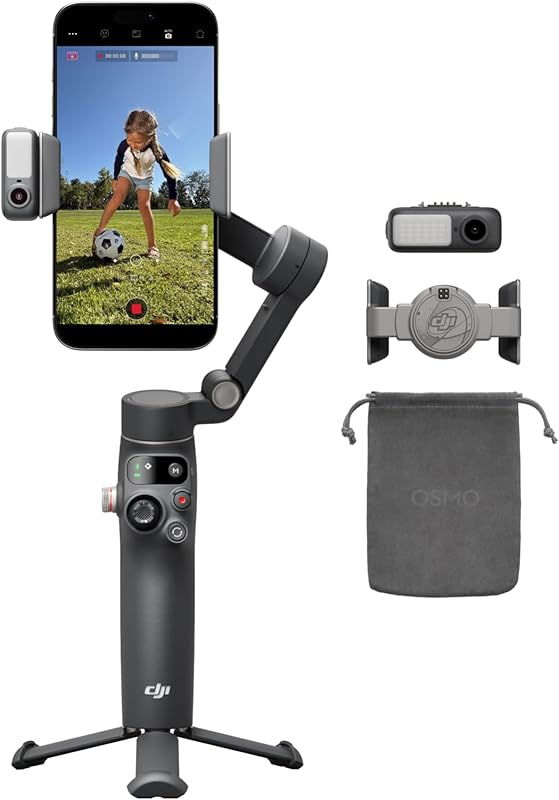
The AI Native Tracking with Audio listing offers a complete stabilizer system that includes native tracking, integrated lighting, 360-degree pan rotation, a built-in extension rod, and an integrated tripod. Content creators who do not already own an Osmo Mobile 8 body will find this comprehensive kit a more direct route to acquiring stabilization, audio integration, and tracking in a single all-inclusive package.
360° Omnidirectional High-Torque 2-Axis Expandable

Targeted at robotics enthusiasts, makers, and development projects, the 360° Omnidirectional High-Torque 2-Axis Expandable pan-tilt module is engineered for Raspberry Pi 5 and 4B hardware rather than commercial smartphones. Builders seeking open serial bus servo control and physical robotic camera articulation will prefer this developer-centric platform over consumer mobile gimbal accessories.
Lighting

The Lighting package, featuring the DJI Osmo Mobile 7P, provides a full 3-axis stabilizer with quick launch, one-tap editing, built-in extension rod and tripod, native tracking, and phone charging capabilities. Shoppers considering older hardware ecosystems like the dji osmo mobile 7p gimbal stabilizer for iphone, android, native tracking, lighting, 3-axis phone gi can look to this bundle for a self-contained filming solution.
Final Verdict
The DJI OM Multifunctional Module 2 succeeds by solving two of the most persistent issues in mobile video production: device thermal strain and inconsistent lighting. By packaging a dedicated AI visual tracking chip and an 8-level adjustable fill light into a featherweight 13-gram chassis, it transforms compatible gimbals into truly autonomous camera operators. The plug-and-play reversible mount integrates seamlessly with the roll-axis USB-C port, preserving the magnetic quick-release functionality that defines modern mobile rigs.
Ultimately, when deciding if the dji om multifunctional module specs justify the purchase, the answer comes down to your production style. If you already own an Osmo Mobile 8 series gimbal and routinely film yourself without a camera operator, the combination of robust gesture recognition, reliable subject framing, and calibrated fill light makes it an indispensable workflow upgrade. It delivers professional framing reliability in an unobtrusive, precision-engineered form factor.
FAQ
Which gimbals are compatible with the DJI OM Multifunctional Module 2?
The listing specifically designates compatibility for the Osmo Mobile 8 and Osmo Mobile 8P gimbals, connecting via the roll-axis USB-C interface.
How bright is the integrated fill light on this module?
The fill light produces an illuminance of 40 lux, measured at a maximum brightness distance of 0.6 meters from the subject, and features 8 adjustable brightness and color temperature settings.
What subjects can the onboard AI track automatically?
The on-device AI system natively identifies and tracks people, cats, dogs, and vehicles smoothly without requiring app-level computational tracking.
What are the requirements for tracking general objects?
For general objects outside of people, animals, and vehicles, the system requires manual box selection. The target must have clear outlines, exhibit high contrast against its background, and fill more than 10% of the visual frame.
Do I need an additional cable to connect my iPhone?
If your smartphone utilizes a Lightning port, the listing notes that you will need to purchase a USB-C to Lightning phone charging cable separately to connect your device.
Does the module require batteries or external charging?
The module mounts directly via the roll axis USB-C port on the stabilizer, drawing its operational connection directly from the gimbal interface without requiring standalone battery packs.
How these reviews are put together
- 1,107reviews published
- 2,271products with a buyer rating
- 2,222products with listed features
- 87brands covered
Every number, star and price on this site is read from the Amazon product listing. We do not run lab tests of our own, so scores here are out of 10, based on listed specifications and buyer feedback, not a verdict from a test bench. Prices change without notice; check the listing before buying.


