Honeycomb Alpha Flight Controls Review: Precision Cockpit Realism
Serious virtual aviators understand that desktop hardware defines the boundary between playing a game and commanding an aircraft. The Honeycomb Alpha Flight Controls serves as a purpose-built flight simulator yoke with switch panel designed by aerospace engineers and pilots to bring true-to-life mechanics directly to your workstation. Combining a robust mechanical core with realistic cockpit…
9 min read
As Amazon Associates, we earn from qualifying purchases. This means we may receive a small commission at no extra cost to you if you click through and make a purchase.
Serious virtual aviators understand that desktop hardware defines the boundary between playing a game and commanding an aircraft. The Honeycomb Alpha Flight Controls serves as a purpose-built flight simulator yoke with switch panel designed by aerospace engineers and pilots to bring true-to-life mechanics directly to your workstation. Combining a robust mechanical core with realistic cockpit controls, this primary flight controller delivers exceptional fidelity, smooth resistance, and authentic switchgear in a single chassis.
This hardware is an outstanding match for dedicated simulation pilots who operate general aviation or commercial aircraft on desktop platforms and seek mechanical precision without loose center detents. Aviators looking for an all-in-one console solution or lightweight, easily portable gear will want to consider alternative designs, but those building an authentic flight simulator yoke setup will find the Honeycomb Alpha Yoke engineered to meet exacting enthusiast standards.
Mechanical Movement and Structural Realism
The core mechanical architecture of the Honeycomb Alpha Yoke represents a deliberate departure from toy-grade plastic controllers. At the center of the unit lies a solid steel shaft supported by two linear ball bearings. This structural choice directly addresses the friction, sticking, and binding issues common in entry-level hardware during delicate pitch and roll adjustments. Whether you are flaring over a runway in crosswinds or executing subtle trim corrections in turbulent cruise, the dual ball-bearing assembly ensures continuous, uniform travel across the entire stroke.
A signature attribute is the authentic honeycomb alpha 180 rotation. Many lower-tier flight yokes restrict horizontal travel to 90 degrees total (45 degrees to each side), which compresses control sensitivity and leads to erratic roll response. The Alpha provides a full 90 degrees left and 90 degrees right, matching standard civilian cockpits. This broad mechanical throw allows virtual pilots to execute coordinated turns with proportional control inputs, avoiding the twitchiness typical of short-throw alternatives.
Honeycomb Aeronautical implemented a dampened, self-centering mechanism built specifically without a physical center notch. In real aircraft control yokes, you do not feel an artificial plastic click or center deadzone when transitioning through neutral. The Alpha mimics this aerodynamic reality by providing smooth, uninterrupted resistance across the pitch and roll axes. The minimal deadzone ensures that even micro-adjustments register instantly in the simulator, making delicate instrument approaches far more intuitive.
Integrated Switch Panel and Cockpit Lighting
Beyond its responsive flight yoke mechanism, the unit integrates a complete lower avionics and electrical console. The honeycomb alpha switch panel eliminates the need to reach for a computer keyboard or mouse during critical departure and arrival phases. Mounted directly across the lower console face, these heavy-duty physical toggles mimic the layout found in popular general aviation trainer aircraft like the Cessna 172 and Beechcraft Bonanza.
The switch array gives pilots tactile control over essential aircraft subsystems before the engine even turns over:
- Master Electrical: Dedicated split-rocker toggles for battery and alternator circuits.
- Avionics Bus: Dual primary and secondary avionics master switches.
- Exterior Lighting: Independent rocker switches for beacon, land, taxi, nav, and strobe arrays.
- Ignition Management: A true five-position rotary ignition switch supporting off, right, left, both, and start positions.
Operating in low-light environments is enhanced by integrated red LED backlighting. The gentle red glow illuminates the lower panel switches without washing out room lighting or blinding the pilot during night-time visual flight rules operations. The backlighting ensures clear legibility of switch labels while preserving the immersive ambience of a dark cockpit.
Handle Controls and Ergonomic Mapping
The yoke handles themselves are shaped to support ergonomic hand positions during prolonged flight segments. Finished in durable black composite materials, each grip accommodates distinct operational roles. Honeycomb incorporated 33 distinct inputs across the chassis, giving simmers vast flexibility when binding controls for complex procedures.
The left grip functions as the primary flight control cluster. It features an 8-way round-view hat switch intended for panning cockpit cameras or looking around the virtual airspace. Accompanying the hat switch are two vertical 2-way rocker switches often assigned to electric elevator trim, along with a dedicated push-to-talk button positioned naturally under the index finger for online air traffic communication networks.
The right grip provides two horizontal 2-way rocker switches and three auxiliary pushbuttons. These inputs can be custom-mapped to autopilot disconnect, aileron trim, cowl flaps, or timer functions. Because every switch is discrete, the flight controller avoids internal button multiplexing issues, delivering immediate, error-free command inputs during high-workload flight phases.
Mounting Versatility and Physical Footprint
At 4.9 kg and measuring 19 x 13.1 x 10.3 inches, the Honeycomb Alpha Yoke is a substantial piece of desktop hardware. Managing this mass during aggressive control deflections requires an uncompromised anchor system. Honeycomb addresses this challenge by supplying a versatile dual mounting solution out of the box, catering to diverse workstation configurations.
The primary attachment system uses two heavy-duty steel c-clamps that fasten directly beneath the mounting plate. These clamps tighten firmly onto desks of standard thickness, securing the unit against pitch and roll forces. For thicker executive desks or glass tabletops where conventional clamps cannot fit or might cause surface damage, Honeycomb includes a proprietary micro-suction pad. This pad generates up to 40 pounds of tensile holding strength, holding the chassis firmly against the desk without surface marring.
When mapping your flight simulator room layout, planning adequate desk depth is essential. Because the steel shaft moves inward and outward during pitch maneuvers, the controller demands clear space behind and above the mounting surface. Simmers pairing this device with dedicated rudder hardware such as the charlie rudder pedals will appreciate how the rigid mounting plate establishes a stable, wobble-free foundation for the entire flight deck.
System Setup and Flight Simulator Compatibility
Physical installation is straightforward thanks to modern USB-C connectivity. Honeycomb supplies a detachable USB-C to USB cable, allowing you to disconnect the yoke without dismantling your desk clamps. Built exclusively for personal computers, honeycomb alpha pc compatibility extends across modern Windows platforms and leading simulation platforms.
Deploying the honeycomb alpha for msfs is seamless. Microsoft Flight Simulator features native recognition profiles for the Alpha Flight Controls, pre-binding the steel-shaft axes, primary rockers, and the ignition switch to appropriate default aircraft functions. While custom profiles can be built for complex payware aircraft, the stock profiles allow pilots to begin flying almost immediately after connection.
A structured approach ensures that your initial honeycomb alpha flight controls setup operates without calibration errors:
- Secure the mounting plate to your desktop using either the dual mechanical clamps or the micro-suction pad.
- Slide the Alpha chassis onto the mounting bracket and fasten the retention screws.
- Connect the included USB-C cable directly into a powered USB port on your PC.
- Launch your simulator software and verify that all 33 inputs and primary flight axes register in the controller sensitivity settings.
Honeycomb Alpha Yoke Pros and Cons
Pros
- Full 180-degree rotation on a solid steel shaft
- Linear ball bearings provide detent-free travel
- Integrated switch panel with five-position ignition
- Dual mounting options via clamps or micro-suction pad
- Soft red LED backlighting for dark cockpits
Cons
- Heavy 4.9 kg weight demands significant desk space
- Lacks integrated throttle levers for complete single-unit engine management
- Designed strictly for PC setups without console compatibility
Check Honeycomb Alpha Yoke on Amazon
Who Should Buy the Honeycomb Alpha Yoke
Buy It If
- You primarily pilot general aviation or multi-engine aircraft in desktop flight simulators and desire authentic 180-degree roll travel.
- You want integrated switchgear and an authentic rotary ignition to reduce keyboard dependencies during cockpit workflows.
- You demand a high-precision steel shaft and ball-bearing mechanism free from plastic center detents.
- You fly frequently in dark environments and appreciate functional red LED panel backlighting.
Skip It If
- You need a cross-platform controller for console gaming, as this unit does not feature native support for a flight sim xbox setup.
- You have extremely limited desk depth or require an ultra-compact controller that stows instantly in a backpack.
- You want integrated throttle and mixture levers inside the main yoke housing rather than purchasing a standalone quadrant.
Honeycomb Alpha Yoke Alternatives Worth a Look
While the Honeycomb Alpha sets a benchmark for mechanical feel, several alternative hardware packages offer distinct advantages depending on your budget, available cockpit space, and preferred aircraft types.
Logitech G Pro Flight Yoke
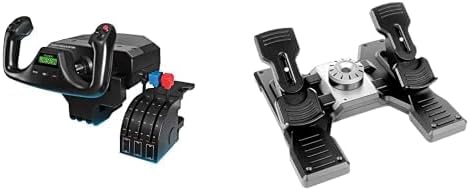
The Logitech G Pro Flight Yoke system comes bundled with both a yoke and dedicated three-lever throttle quadrant, as well as rudder pedals in select configurations. While its shaft movement utilizes lighter spring resistance and features a distinct center detent with 90 degrees of total rotation, it provides an all-in-one flight package for pilots wanting engine levers included out of the box.
Turtle Beach VelocityOne Flight Universal

Simmers who split their flight hours between PC and home gaming consoles should look at the Turtle Beach VelocityOne Flight Universal. Unlike the PC-dedicated Honeycomb hardware, this controller connects directly to Xbox consoles and PC systems, incorporating integrated modular throttle levers, a trim wheel, and an status indicator display. You can read our detailed turtle beach velocity one guide to see how its integrated feature set compares against modular flight gear.
Professional Simulation System

The Professional simulation yoke assembly offers an alternative layout with three operating modes and configurable knobs designed for multi-tier control switching. Pilots who prioritize multi-mode control mapping on a traditional desktop chassis may consider this platform when configuring modular instrument layouts.
Final Verdict
When asking is honeycomb alpha worth it, the answer depends entirely on your commitment to flight simulation realism. For pilots who value structural integrity, smooth linear ball bearings, and realistic mechanical travel over cheap all-in-one compromises, the Alpha stands out as a genuine achievement. By combining a 180-degree solid steel shaft with a tactile switch panel, Honeycomb Aeronautical elevated consumer desktop simulation hardware into authentic pilot training territory.
While pilots must plan around its 4.9 kg bulk and pair it with a separate throttle system for engine management, the mechanical precision and detent-free travel justify the commitment. This honeycomb alpha flight controls review confirms that for PC aviators seeking true cockpit fidelity, the Alpha Flight Controls remains an essential cornerstone for any serious virtual hangar.
FAQ
Does the Honeycomb Alpha Yoke include throttle levers?
The listing does not specify any included throttle levers in this standalone package. The unit includes the yoke assembly, integrated switch panel, mounting clamps, micro-suction pad, and USB-C cable. Aviators wanting physical engine levers typically pair the Alpha with an external dedicated throttle quadrant.
Can the Honeycomb Alpha be used on home gaming consoles?
The listing specifies that this hardware platform is PC only. While listing highlights mention compatibility with PC and Mac computers, it does not feature native compatibility with Xbox or PlayStation consoles.
How does the micro-suction pad keep the yoke secure?
The micro-suction pad utilizes thousands of microscopic suction pockets that bond flat against smooth surfaces without sticky adhesives, generating up to 40 pounds of tensile strength. This provides an alternative clamp-free anchor method for thick tabletops.
What does the five-position rotary ignition switch control?
The five-position rotary ignition switch replicates an authentic general aviation magneto key, featuring off, right, left, both, and spring-loaded start positions. This lets pilots crank the engine using realistic tactile cockpit procedures.
Does the Honeycomb Alpha have a center detent?
The Alpha is engineered with a dampened, self-centering mechanism specifically built without a center detent. This prevents the mechanical sticking or distinct centering click common to entry-level controllers, ensuring smooth roll and pitch transitions.
How these reviews are put together
- 203reviews published
- 2,271products with a buyer rating
- 2,222products with listed features
- 87brands covered
Every number, star and price on this site is read from the Amazon product listing. We do not run lab tests of our own, so a score here is the average rating left by buyers, not a verdict from a test bench. Prices change without notice; check the listing before buying.


