Lenovo ThinkPad E16 Gen 3: Performance, Arc Graphics, and Media Tested
The Lenovo ThinkPad E16 Gen 3 brings contemporary hybrid processing power into an enterprise-oriented form factor, coupling an Intel Core Ultra 5 225H processor with integrated Intel Arc graphics inside an expansive 16-inch chassis. Engineered as a dependable daily driver for analysts, corporate professionals, and developers, this machine pairs business-grade security safeguards with modern silicon…
By Mark Archer
9 min read
As Amazon Associates, we earn from qualifying purchases. This means we may receive a small commission at no extra cost to you if you click through and make a purchase.
The Lenovo ThinkPad E16 Gen 3 brings contemporary hybrid processing power into an enterprise-oriented form factor, coupling an Intel Core Ultra 5 225H processor with integrated Intel Arc graphics inside an expansive 16-inch chassis. Engineered as a dependable daily driver for analysts, corporate professionals, and developers, this machine pairs business-grade security safeguards with modern silicon enhancements intended to manage demanding spreadsheets, extensive web multitasking, and basic creative production. Its integrated hardware architecture provides a noticeable processing uplift over traditional enterprise notebooks, establishing a functional bridge between rigorous daytime office tasks and relaxed evening media streaming.
This laptop serves office professionals, remote knowledge workers, and technical users who value comfortable keyboard ergonomics, broad physical connectivity, and a taller 16:10 workspace. Casual entertainment enthusiasts will appreciate the large anti-glare screen and capable integrated media decoding for video streaming and lightweight gaming sessions. However, power users hunting for blistering graphical frame rates in fast-paced competitive esports or demanding modern AAA releases should bypass this productivity notebook and consider a specialized gaming machine like the lenovo loq 5060 instead.
Processor Architecture and Everyday Multitasking
Central to the overall appeal of the notebook is the Intel Core Ultra 5 225H processor, which fundamentally redefines how compute resources are allocated during complex productivity workflows. Built around an advanced hybrid core topology, the chip integrates 14 individual physical cores spanning 4 Performance cores, 8 Efficient cores, and 2 Low-Power Efficient cores. Across 20 processing threads and maximum clock frequencies reaching 4.9GHz, the CPU adapts responsively whether you are crunching complex calculation models, compiling source code, or cycling through dozens of browser tabs during deep research sessions.
Beyond raw compute throughput, this Meteor Lake architecture introduces a dedicated AI Boost neural processing unit delivering 13 TOPS of local inferencing power. In modern business software suites like Windows 11 Pro, this hardware layer handles background camera framing, noise suppression, and local generative assistance without starving the primary performance cores. The included 16GB of DDR5 memory provides rapid data bandwidth, ensuring that multi-application multitasking remains fluid and responsive even when background virtual machines or large database management utilities run concurrently.
Compared to earlier office configurations like the baseline lenovo thinkpad e16, this updated generation demonstrates marked gains in responsiveness and thermal handling during sustained enterprise computing. The system keeps background processes neatly separated on the low-power efficiency islands, preventing brief utility tasks from generating excessive heat or interrupting active foreground workflows.
Intel Arc Graphics and Casual Gaming Reality
Visual output on this enterprise laptop is driven by integrated Intel Arc 130T graphics, representing a significant architectural evolution over legacy integrated display coprocessors. Because the Arc architecture shares the laptop’s 16GB DDR5 system memory rather than relying on an isolated pool of dedicated video RAM, graphic-heavy operations depend heavily on the system’s memory bandwidth. For routine office duties, digital presentation decks, basic video editing, and light CAD drafting, the Arc 130T handles complex geometric acceleration and hardware-accelerated video decoding with effortless stability.
When assessing the lenovo e16 gen 3 for gaming, prospective buyers must maintain grounded expectations regarding performance boundaries. The integrated GPU possesses sufficient horsepower to run popular casual titles, older classics, and lightweight competitive esports games like Rocket League, League of Legends, or Teamfight Tactics smoothly at 1080p resolution on moderate visual presets. Low-overhead indie platformers and turn-based strategy titles also run comfortably, making the laptop a functional companion for low-stress travel entertainment.
However, players attempting to launch modern graphic-intensive AAA blockbusters or heavily unoptimized competitive shooters will encounter clear limitations. Without dedicated discrete VRAM or high-wattage cooling profiles, demanding contemporary titles require aggressive drops to sub-1080p rendering and minimal fidelity settings to achieve acceptable frame pacing. The system is unreservedly tuned for enterprise stability and casual media consumption rather than competitive gaming performance.
Display Clarity, Audio, and Entertainment Experience
Visual presentation is anchored by a 16-inch WUXGA display featuring a native resolution of 1920×1200 pixels. The 16:10 aspect ratio provides noticeable vertical canvas advantages over conventional 16:9 panels, allowing users to view additional rows inside large data spreadsheets, read extensive code blocks, and scroll less frequently through business contracts. The IPS panel technology delivers wide viewing angles that keep text sharp and contrast uniform when sharing presentations with colleagues seated across a conference table.
With an anti-glare matte coating and a peak brightness rating of 300 nits, the screen mitigates distracting reflections caused by overhead fluorescent lighting or nearby office windows. While this brightness ceiling remains ideal for typical indoor work and indoor media streaming, working directly outside under bright natural sunlight will wash out darker cinematic scenes. Color reproduction is tuned primarily for everyday office document rendering, productivity navigation, and video playback rather than professional-grade color grading for commercial print.
The media experience is rounded out by integrated HARMAN speakers powered by HD Audio processing, which emphasize vocal clarity and crisp speech definitions. This tuning benefits conference meetings on Zoom or Teams while delivering clear dialogue when watching movies, instructional videos, or web broadcasts. Visual conferencing is managed by a full high-definition 1080p FHD IR camera equipped with a physical privacy shutter, providing sharp meeting capture alongside hardware-level physical privacy whenever calls conclude.
Build Quality, Ports, and Hardware Expansion
Retaining classic ThinkPad heritage, the notebook sports an understated Jet Black clamshell chassis measuring 14.01 by 9.8 by 0.69 inches and tipping the scales at 3.8 pounds. Considering its sizable 16-inch display footprint, this sub-four-pound weight remains manageable for professionals commuting between home workstations and office desks. The chassis integrates legendary ThinkPad durability standards alongside a full-sized backlit keyboard complete with a dedicated numeric keypad, offering tactile key travel and comfort during extended typing sessions.
Connectivity is among the notebook’s greatest strengths, removing the frustration of carrying external expansion dongles. The physical interface includes a high-speed Thunderbolt 4 port, USB-C with Power Delivery, an HDMI 2.1 display output, and an RJ45 Ethernet port for stable wired local networks. Wireless communication is handled via modern Wi-Fi 6E protocols and integrated Bluetooth, ensuring swift cloud synchronization and seamless pairing with peripheral mice, keyboards, and wireless audio gear.
Storage is managed by a rapid 512GB PCIe x4 NVMe solid-state drive, ensuring fast Windows 11 Pro system boot times, instantaneous file transfers, and minimal application load delays. While the enterprise listing notes dual 512GB redundancy configurations in its product description, users eyeing long-term upgrades should recognize that internal storage and memory slots provide a reliable path for maintenance over multi-year corporate deployments, contrasting with premium ultra-thin competitors like the lenovo thinkpad t16 gen 3.
Lenovo ThinkPad E16 Gen 3 Pros and Cons
Pros
- Intel Core Ultra 5 14-core hybrid architecture
- Sharp 16-inch 16:10 WUXGA anti-glare display
- Generous port selection including Thunderbolt 4 and HDMI 2.1
- Integrated Intel Arc graphics with AI acceleration
- Tactile backlit keyboard with dedicated numeric keypad
Cons
- Integrated graphics unsuitable for demanding modern AAA gaming
- 300-nit maximum display brightness limits outdoor visibility
- 8-pound footprint less portable than 14-inch alternatives
Check Lenovo ThinkPad E16 Gen 3 on Amazon
Who Should Buy the Lenovo ThinkPad E16 Gen 3
Buy It If
- You need a durable, full-sized productivity laptop featuring an ergonomic backlit keyboard, dedicated numpad, and a tall 16:10 WUXGA anti-glare display for office workflows.
- Your typical computing routine involves heavy multi-application multitasking, compiling code, or manipulating large data models that benefit from 14 CPU cores and 16GB DDR5 memory.
- You want a business machine capable of playing casual indie titles and lightweight esports games without purchasing a hot, heavy, and power-hungry dedicated gaming rig.
- You depend on robust physical ports, requiring direct access to Thunderbolt 4, HDMI 2.1, and an onboard RJ45 Ethernet connection for desk docking.
Skip It If
- You primarily want a high-performance gaming laptop to run modern graphically demanding AAA releases at high frame rates and ultra graphical settings.
- You frequently work outdoors in direct sunlight where an anti-glare panel rated at 300 nits can feel visually dim.
- You require an ultra-compact, featherweight sub-three-pound notebook designed specifically for constant ultra-portable travel.
Lenovo ThinkPad E16 Gen 3 Alternatives Worth a Look
If the hardware profile or form factor of the ThinkPad E16 does not precisely match your computing requirements or portability preferences, several market alternatives provide contrasting hardware configurations.
2026-2027 edition

Shoppers seeking a more compact, bare-minimum travel computer for basic text editing and web browsing can evaluate the 2026-2027 edition HP 14 Laptop Computer. Featuring a smaller 14-inch chassis, an Intel N150 processor, 4GB of DDR5 RAM, 128GB of local SSD storage, and bundled Microsoft 365 with 1TB of cloud storage, this lightweight alternative targets basic student writing over high-core business execution.
Supports 1TB TF Card Expansion
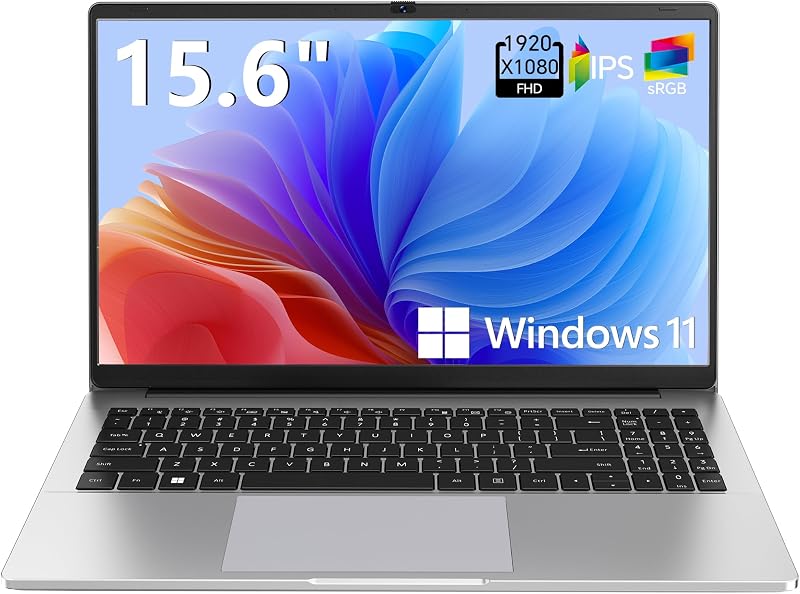
For shoppers focusing purely on entry-level home office utility or secondary student homework duty, the Supports 1TB TF Card Expansion Gray 15.6 Inch Laptop Computer offers an alternative configuration. It runs on an Intel Celeron N4020 processor paired with 4GB of DDR4 RAM, 128GB of eMMC storage, an FHD LCD display, and expandable card storage, making it suitable strictly for lightweight internet browsing.
Copilot AI

Another travel-friendly computing option is the Natural Silver HP 2026 Essential Laptop titled Copilot AI. Equipped with an Intel processor, 128GB of internal storage, Windows 11, Office 365, an LED display, and 1TB of cloud storage, this portable machine suits students or budget-conscious home users who only need light cloud-focused productivity.
Final Verdict
The Lenovo ThinkPad E16 Gen 3 establishes a dependable, balanced position in the enterprise business market. By unifying Intel Core Ultra 5 processing silicon with integrated Intel Arc graphics, 16GB of rapid DDR5 memory, and a spacious 16-inch WUXGA workspace, it comfortably handles modern data multitasking, digital collaboration, and everyday corporate software without breaking a sweat. Its rock-solid input ergonomics, complete port selection including Thunderbolt 4, and enterprise security safeguards ensure smooth integration into any hybrid work routine.
While the machine cannot substitute for a dedicated gaming rig when tackling graphically intense modern blockbusters, its capable integrated Arc GPU effortlessly handles casual gaming, classic titles, and multimedia playback after hours. For analysts, business professionals, and productivity-focused users seeking a dependable, durable workhorse that provides extra screen real estate and competent casual entertainment performance, the ThinkPad E16 Gen 3 represents a sensible and reliable investment.
FAQ
Can the Lenovo ThinkPad E16 Gen 3 handle casual PC gaming?
Yes, the integrated Intel Arc 130T graphics processor easily handles casual indie games, turn-based titles, and popular lightweight competitive esports games like League of Legends or Rocket League at 1080p on modest settings. However, it lacks dedicated video memory, meaning graphically intensive modern AAA games will struggle to achieve playable frame rates.
What display resolution and brightness does this laptop offer?
The notebook features a 16-inch WUXGA IPS anti-glare display with a resolution of 1920×1200 pixels in a 16:10 aspect ratio. It features a peak brightness rating of 300 nits, which is well-suited for standard office and home indoor lighting environments.
What processor powers the Lenovo ThinkPad E16 Gen 3?
The laptop is driven by an Intel Core Ultra 5 225H processor featuring 14 cores, 20 threads, and boost frequencies reaching up to 4.9GHz. It also includes an integrated AI Boost NPU delivering 13 TOPS of dedicated artificial intelligence acceleration.
What ports and physical connections are available on this model?
The ThinkPad E16 Gen 3 includes a Thunderbolt 4 port, USB-C with Power Delivery, an HDMI 2.1 video output, an RJ45 Ethernet port, and wireless support for both Wi-Fi 6E and Bluetooth devices.
Does the laptop feature physical security and privacy hardware?
Yes, the laptop is equipped with an integrated TPM 2.0 security chip, a fingerprint reader built into the power button, and a physical privacy shutter on the 1080p FHD IR camera.
How these reviews are put together
- 976reviews published
- 2,271products with a buyer rating
- 2,222products with listed features
- 87brands covered
Every number, star and price on this site is read from the Amazon product listing. We do not run lab tests of our own, so scores here are out of 10, based on listed specifications and buyer feedback, not a verdict from a test bench. Prices change without notice; check the listing before buying.


