LG C4 42-Inch OLED Review: Peak Performance for Desk Setups
The LG C4 42-Inch OLED is a compact flagship display engineered with self-illuminating pixel hardware and advanced artificial intelligence processing to serve as a high-end desktop gaming display. Our evaluation confirms it is an exceptional choice that bridges the gap between a reference-grade cinematic television and a tournament-ready computer monitor. This display is ideal for…
8 min read
As Amazon Associates, we earn from qualifying purchases. This means we may receive a small commission at no extra cost to you if you click through and make a purchase.
The LG C4 42-Inch OLED is a compact flagship display engineered with self-illuminating pixel hardware and advanced artificial intelligence processing to serve as a high-end desktop gaming display. Our evaluation confirms it is an exceptional choice that bridges the gap between a reference-grade cinematic television and a tournament-ready computer monitor.
This display is ideal for PC and console gamers seeking true black levels, instantaneous pixel response, and expansive variable refresh rate synchronization on an immersive desktop footprint. Those who play competitive esports on shallow desks or who prefer a minimalist computer monitor without smart television operating systems should look elsewhere.
Desktop Gaming Responsiveness and Motion Clarity
Evaluating the lg c4 oled 42 for gaming reveals an architecture tuned specifically for high-speed interaction. Because OLED panels illuminate every diode autonomously without an active LED backlight grid, the rated lg c4 oled response time reaches an ultra-fast 0.1ms. This near-instantaneous pixel transition eliminates the visible ghosting, smearing, and trailing artifacts common to standard IPS and VA desktop screens during rapid viewpoint adjustments.
System latency remains tightly managed through dedicated hardware pipelines. Gamers monitoring lg c4 42 input lag will appreciate the inclusion of the Game Optimizer and Game Dashboard, which surface critical adjustments such as black stabilizers, low-latency toggles, and frame rate counters directly in an accessible overlay. Compared to dedicated desktop panels like the alienware aw3225qf 32 inch 4k qd-oled gaming monitor, this display provides a noticeably more expansive visual field while maintaining the motion fidelity necessary for tracking moving targets.
Frame pacing stability is reinforced by certified synchronization standards. The panel delivers proven lg c4 oled g-sync performance alongside AMD FreeSync Premium and standard HDMI Variable Refresh Rate support across all four HDMI 2.1 ports. Combined with OLED Motion enhancement technology, competitive players get fluid frame delivery without image tearing or judder during intense graphical spikes.
Visual Fidelity and High Dynamic Range Performance
Image quality on this display relies on over 8.3 million self-lit smart pixels that produce Perfect Black and Perfect Color. With pixel-level dimming, each individual diode can switch off entirely, yielding infinite contrast ratios. This prevents the haloing, backlight bleed, and luminance blooming that typically obscure dark scenes and high-contrast user interfaces on traditional mini-LED monitors.
Assessing the lg c4 42 inch hdr performance highlights its support for Dolby Vision, HDR10, and HLG. The Alpha 11 AI Processor Gen3 and its Dual AI Engine power AI Picture and AI Brightness Control, which actively analyze incoming signals to balance shadow delineation against highlight intensity. The onboard High Dynamic Range Expression Enhancer enhances visual separation in complex environments, while FILMMAKER MODE with Ambient Light Technology maintains original director intent without aggressive post-processing artifacts.
Color presentation remains uniform across wide angles. The self-luminous panel avoids the off-axis color shifts and gamma washouts associated with standard desktop panels, making it an effective choice for entertainment enthusiasts who demand exact color grading alongside high-intensity video gaming.
Form Factor and Ergonomics for Desktop Setups
Integrating a 42-inch panel into a workstation requires deliberate spatial planning. For an effective lg c4 oled desktop setup, the physical footprint must be accommodated: the unit measures 36.7 inches wide, 22.7 inches high, and 6.7 inches deep with the stand installed, weighing 22.3 pounds. Without the stand, the thickness drops to 1.6 inches with a height of 21.3 inches, allowing it to mount cleanly to heavy-duty monitor arms or back walls.
Deploying the lg c4 oled 42 as pc monitor requires appropriate desk depth. Users sitting closer than 30 inches may experience eye and neck fatigue when scanning interface corners, whereas a viewing distance between 32 and 36 inches provides an enveloping peripheral view that maximizes the 4K resolution. As detailed in our comprehensive review of the larger lg c4 oled series, the 42-inch format is the only entry in the lineup that realistically integrates into standard computer desk setups without overwhelming the room.
Long-term panel health is managed through integrated hardware defenses. Because desktop computer workflows introduce static elements like taskbars, browser headers, and software palettes, the manufacturer incorporates dedicated OLED Care technology. These automated routines regulate pixel wear and perform maintenance cycles to protect panel integrity over extended sessions.
Smart Platform, Audio, and Hardware Connectivity
Connectivity options and display throughput form the core of the lg c4 oled 42 specs. In terms of refresh metrics, the panel lists a native 120Hz display refresh rate while offering advanced gaming feature support for up to a 165Hz lg c4 oled refresh rate on compatible systems. The inclusion of four HDMI 2.1 ports ensures full bandwidth support for modern PCs and modern gaming consoles simultaneously, eliminating the hassle of manually swapping input cables.
The screen operates on the webOS 2026 platform powered by Google Gemini, delivering responsive navigation across applications like Netflix, Disney Plus, Prime Video, Apple TV, and YouTube. Viewers also gain direct access to over 400 free channels via LG Channels alongside more than 10,000 on-demand titles. When gaming sessions end, the LG Gallery Plus feature turns the screen into an ambient art display, blending the hardware into the room.
Audio processing is handled through integrated speakers supporting Dolby Atmos immersive sound, with audio return options accessible via HDMI. For shoppers deciding between a dedicated desk display and a larger secondary room screen like the lg – 55 class b4 series oled 4k uhd smart webos tv (2024), this 42-inch model delivers equivalent processing capabilities in a much more desktop-friendly physical scale.
LG C4 42-Inch OLED Pros and Cons
Pros
- Self-lit pixels with Perfect Black and infinite contrast
- Ultra-fast 0.1ms response time eliminates motion ghosting
- Certified NVIDIA G-SYNC and AMD FreeSync Premium support
- Four full-bandwidth HDMI 2.1 ports
- Dolby Vision and Dolby Atmos processing
- Built-in OLED Care features for panel protection
Cons
- Wide 36.7-inch frame requires deep desk space
- Heavier 22.3-pound build than standard monitors
- Smart TV operating system adds menu complexity
Check LG C4 42-Inch OLED on Amazon
Who Should Buy the LG C4 42-Inch OLED
Buy It If
- You own a deep desk and want maximum gaming immersion without stepping up to an unwieldy 48-inch or 55-inch television.
- You prioritize true per-pixel black levels, zero backlight blooming, and a fast 0.1ms response time for gaming.
- You require certified variable refresh rate performance across NVIDIA G-SYNC, AMD FreeSync Premium, and HDMI 2.1 VRR.
- You want an all-in-one workstation screen that also provides streaming apps and over 400 free streaming channels.
Skip It If
- You play competitive esports exclusively and require a compact 24-inch or 27-inch monitor to keep all HUD elements within immediate central focus.
- Your workstation desk is shallow, making a 36.7-inch wide display uncomfortable to view from normal seated distances.
- You want a barebones computer monitor that powers on without smart TV menus, operating system prompts, or remote controls.
LG C4 42-Inch OLED Alternatives Worth a Look
If the 42-inch form factor, smart television operating system, or self-lit OLED panel does not match your specific setup requirements, several alternate displays offer different panel sizes and operating platforms.
INSIGNIA 50″ Class F50 Series
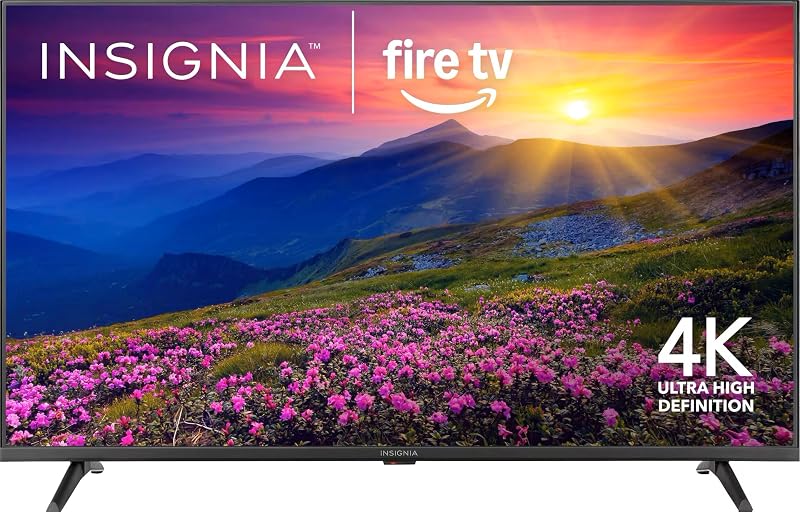
The INSIGNIA 50″ Class F50 Series is an LED 4K UHD Smart Fire TV featuring an Alexa voice remote and live television streaming without cable. Shoppers wanting a larger 50-inch screen for casual living room entertainment rather than a low-latency, pixel-dimming desktop gaming station will prefer this model.
Flat Screen QLED Television

The Flat Screen QLED Television is a 55-inch Roku Select Series 4K QLED display featuring a voice remote, Wi-Fi, and Bluetooth headphone mode. Users who prefer quantum dot LED technology on a larger display footprint paired with the straightforward Roku streaming platform should explore this option.
XR Processor with AI Technology

The XR Processor with AI Technology is a large-format 77-inch Sony BRAVIA XR8C OLED 4K HDR Smart Google TV featuring Dolby Vision, Dolby Atmos, and exclusive features for PlayStation 5. Entertainment enthusiasts building a spacious home theater or dedicated console lounge will find this massive 77-inch display far more appropriate than a 42-inch desktop screen.
Final Verdict
Determining whether is lg c4 oled 42 worth it depends on your performance priorities and desktop dimensions. By combining 8.3 million self-lit pixels, a 0.1ms response time, certified adaptive sync support, and four full-spec HDMI 2.1 connections, the LG C4 42-Inch OLED establishes a leading standard for visual fidelity and responsiveness at the desktop level.
While the 36.7-inch width demands an intentional desk setup with adequate viewing depth, the visual payoff is immediate. For PC gamers and multi-platform players who want uncompromising black levels, vibrant HDR highlights, and ultra-smooth frame delivery, this 42-inch display remains an elite centerpiece for modern gaming setups.
FAQ
What is the refresh rate of the LG C4 42-Inch OLED?
The display panel features a native 120Hz display refresh rate for standard content, with advanced gaming specifications supporting up to a 165Hz refresh rate for compatible gaming setups over HDMI 2.1.
Can the LG C4 42-Inch OLED be used as a PC monitor?
Yes, it functions effectively as a computer monitor on desks with at least 30 to 36 inches of viewing depth. It offers 4K resolution, Game Optimizer controls, 4 HDMI 2.1 ports, and built-in OLED Care maintenance features.
Does this display support adaptive sync technology?
Yes, the display supports NVIDIA G-SYNC, AMD FreeSync Premium, and standard HDMI Variable Refresh Rate (VRR) to eliminate screen tearing and stuttering.
What HDR formats are supported on this screen?
The display natively supports Dolby Vision, HDR10, and HLG, processed through the Alpha 11 AI Processor Gen3 and FILMMAKER MODE.
What smart television features are included?
The screen runs webOS 2026 powered by Google Gemini, featuring apps like Netflix, Disney Plus, Prime Video, Apple TV, YouTube, LG Channels with over 400 free streaming channels, and LG Gallery Plus.
How these reviews are put together
- 203reviews published
- 2,271products with a buyer rating
- 2,222products with listed features
- 87brands covered
Every number, star and price on this site is read from the Amazon product listing. We do not run lab tests of our own, so a score here is the average rating left by buyers, not a verdict from a test bench. Prices change without notice; check the listing before buying.


