Mackie CR3.5 Studio Monitors: Desktop Audio Built for Gamers and Creators
Finding desktop speakers that balance clinical audio accuracy with engaging everyday performance is a persistent challenge for creators and gamers alike. The Mackie CR3.5 Creative Reference powered studio monitors solve this dilemma by pairing transparent stereo reproduction with on-the-fly tonal customization, making them an adaptable audio hub for compact workspaces. Whether you are cutting video…
By Grant Foster
10 min read
As Amazon Associates, we earn from qualifying purchases. This means we may receive a small commission at no extra cost to you if you click through and make a purchase.
Finding desktop speakers that balance clinical audio accuracy with engaging everyday performance is a persistent challenge for creators and gamers alike. The Mackie CR3.5 Creative Reference powered studio monitors solve this dilemma by pairing transparent stereo reproduction with on-the-fly tonal customization, making them an adaptable audio hub for compact workspaces. Whether you are cutting video clips, tracking dialogue, or sinking into an evening gaming session, these cr3 studio monitors deliver balanced nearfield audio that honors your original mix while leaving room for punchy entertainment playback. In this thorough mackie cr3.5 review, we analyze how this compact stereo pair handles diverse desktop audio duties.
These compact tabletop monitors are engineered specifically for desktop content creators, live streamers, video editors, and PC gamers who demand accurate spatial imaging without sacrificing lively bass response. The inclusion of an analog tone shaping knob allows quick transitions from honest reference tracking to enhanced media consumption without opening digital menus. However, producers working on bass-heavy electronic tracks or seeking sub-bass frequencies below the range of a three-and-a-half-inch woofer will require a larger monitoring setup or a standalone subwoofer. Similarly, those searching for out-of-the-box wireless connectivity will need to look elsewhere or use external adapters, as this system relies strictly on direct analog cable inputs.
Mackie CR3.5 Sound Quality and Driver Performance
Evaluating nearfield audio performance requires examining driver synergy and enclosure physics. The mackie cr3.5 sound quality centers around a two-way dynamic driver array featuring a 3.5-inch woofer paired with a 1.0-inch tweeter. Sized specifically for small rooms and crowded workstations, this combination emphasizes dialogue intelligibility, crisp transients, and a stereo soundstage that places instruments and vocal tracks cleanly across the horizontal plane. Because the monitors deliver true two-channel stereo separation, soundstage width is noticeably more defined than what all-in-one wireless soundbars or lifestyle enclosures produce.
When deployed in pure reference listening scenarios, the Mackie CR3.5 avoids the artificial midrange scooped voicing common in generic computer peripherals. Mix elements such as vocal sibilance, background room noise, and subtle guitar plucks remain distinct rather than smeared together. Listeners transitioning from consumer smart speakers like the samsung music studio 5 will immediately notice a drier, more direct sonic presentation. Rather than throwing ambient sound in every direction, the CR3.5 focuses its dynamic drivers straight toward your ears at your workstation, letting you hear your source material exactly as it was captured.
Low-end reproduction is handled by the 3.5-inch dynamic driver within a rigid metal and plastic enclosure. While the listing does not specify exact frequency response limits in Hertz, physical driver diameter dictates natural bass thresholds. The bass response is tight and controlled through upper and mid-bass registers, providing clear punch for kick drums and bass guitars. However, true sub-bass rumble will naturally roll off at the lower extremes. For users editing podcasts, monitoring YouTube voiceovers, or tracking indie rock arrangements, the low-end performance remains tight, articulate, and completely free from artificial enclosure resonance.
Tone Control and Acoustic Voicing Flexibility
The standout physical design feature on this monitor pair is the mackie cr3.5 tone control knob located on the chassis. Standard studio reference monitors are intentionally flat, which is vital when diagnosing mix imperfections but can occasionally sound sterile during casual media sessions. Mackie addresses this trade-off by placing continuous tone shaping directly on the front panel. Turning the knob clockwise gradually shifts the speaker output from an unvarnished, transparent studio voicing into an engaging, expressive profile with boosted bass presence and additional high-frequency sparkle.
This dial-based system gives creators the freedom to alternate between professional responsibilities and casual entertainment without touching software equalizers or wading through operating system settings. During an audio editing pass, leaving the tone knob centered maintains flat transparency so you can cut background hum and balance speech levels accurately. Once work concludes, a quick turn of the dial adds low-end weight to game soundscapes and extra shimmer to treble details, injecting excitement into electronic soundtracks and cinematic sequences.
Acoustic placement is further refined through the built-in Location Switch located on the rear panel. When desktop speakers are placed flush against a wall or nestled deep inside a bookshelf cavity, boundary effects naturally amplify bass frequencies, causing a muddy, boomy build-up. The CR3.5 Location Switch lets you toggle between desktop mode and bookshelf mode, electronically correcting boundary gain. This ensures that whether your monitors sit out in free air on dedicated stands or tight against a studio wall, the bass remains articulate and balanced.
Gaming Immersion and Multimedia Experience
Deploying cr3 studio monitors for gaming offers distinct tactical advantages over typical consumer desktop peripherals. The two-channel dynamic driver architecture provides pinpoint directional cues that help gamers track player movements, footsteps, and environmental cues across competitive multiplayer arenas. Sound designers craft video game audio using nearfield reference monitors, meaning the uncolored stereo presentation of the CR3.5 presents sound effects, character dialogue, and spatial reverberation precisely as the developers intended.
For cinematic single-player campaigns, the physical tone knob allows players to tailor explosion impacts and atmospheric bass without muddying crucial dialogue frequencies. While artistic lifestyle speaker systems like the aura studio 5 prioritize decorative lighting and diffused dispersion, the CR3.5 prioritizes direct acoustic coupling with the player. The stereo field delivers sharp separation between left and right channels, eliminating the phase smear and virtual surround processing artifacts that frequently plague budget gaming headsets.
Long-session comfort is another compelling reason to integrate studio monitors into a gaming desk. Wearing closed-back headphones for eight hours of streaming or content production inevitably leads to physical fatigue and heat buildup. The Mackie CR3.5 fills your immediate desk zone with immersive, articulate audio while freeing your ears entirely. Broadcast streamers will also appreciate that the directional dispersion makes it straightforward to position the speakers off-axis from a cardioid broadcast microphone, minimizing audio bleed during live commentary.
Desk Integration, Build Quality, and Connection Options
Physical construction and integration options are crucial for compact setups. The mackie cr3 specs highlight a sturdy enclosure constructed from metal and high-density plastic, wrapped in a clean black vinyl wrap. This exterior gives the monitors a subdued, professional aesthetic that blends cleanly into professional editing suites and minimalist streaming battlestations. The tabletop mount configuration keeps desktop footprint minimal, while the included acoustic isolation pads decouple the speakers from your desk surface to prevent hollow reflections and desk rumble.
Analyzing the mackie cr3 connection options reveals essential professional and consumer versatility. The rear panel incorporates balanced/unbalanced 1/4-inch TRS inputs alongside standard unbalanced RCA stereo inputs. This allows direct integration with dedicated USB audio interfaces, mixing boards, desktop headphone DACs, and consumer electronics without messy adapters. According to the manufacturer listing, the monitors maintain wide compatibility across desktops, laptops, MP3 players, video projectors, smartphones, tablets, and televisions.
Out of the box, Mackie includes both monitors, acoustic foam isolation pads, and the start-up audio cables needed to establish an immediate connection. One monitor serves as the powered active unit housing the amplification and input circuitry, while the second passive monitor connects via included speaker wire. The hardware also integrates touch-based control methods alongside physical rotary knobs for unified system management. Because the monitors carry an official non-waterproof rating, they are strictly intended for indoor, dry tabletop studio environments.
Mackie CR3.5 Pros and Cons
Pros
- Dual TRS and RCA analog inputs
- Included acoustic isolation pads and start-up cables
- Continuous hardware tone knob for fast sound shaping
- Rear location switch corrects boundary bass buildup
- Compact 3.5-inch footprint ideal for crowded desks
Cons
- No integrated Bluetooth wireless streaming
- Compact dynamic woofers cannot reproduce deep sub-bass
- Enclosure is non-waterproof for indoor use only
Who Should Buy the Mackie CR3.5
Selecting desktop monitors requires matching your daily audio workflow with hardware capabilities. The Mackie CR3.5 bridges the gap between surgical audio monitoring and versatile entertainment playback, making it an outstanding fit for specific workstation profiles.
Buy It If
- You need transparent, accurate stereo monitoring for YouTube editing, podcast mixing, or livestream audio on a small desk.
- You want instant, menu-free sound adjustment to swap between flat reference mixing and bass-heavy gaming sessions.
- Your desk space is limited and you want an all-in-one bundle with isolation pads and connecting cables included in the box.
- You use audio interfaces or PC soundcards that utilize standard 1/4-inch TRS or RCA analog outputs.
Skip It If
- You produce sub-bass heavy genres like dubstep or trap and require low-end extension below the physical reach of a 3.5-inch dynamic woofer.
- You require integrated wireless Bluetooth streaming out of the box without purchasing additional external adapters.
- You need outdoor or water-resistant audio equipment for patio or mobile entertainment setups.
Mackie CR3.5 Alternatives Worth a Look
If you are exploring the wider desktop monitor category, several competing options offer different acoustic designs, cabinet dimensions, and wireless capabilities to suit varying workspace priorities.
PreSonus Eris 3.5
The PreSonus Eris 3.5 is a direct competitor in the compact desktop monitoring space. Featuring a 50-watt amplification structure, a woven-composite low-frequency driver, and a silk-dome tweeter, these active nearfield monitors emphasize smooth high-frequency dispersion and defined mid-bass. Content creators who prefer traditional rear acoustic tuning knobs over a front-facing tone dial may find the PreSonus architecture particularly appealing for dedicated audio production desks.
Yamaha HS4 Powered Studio Monitor
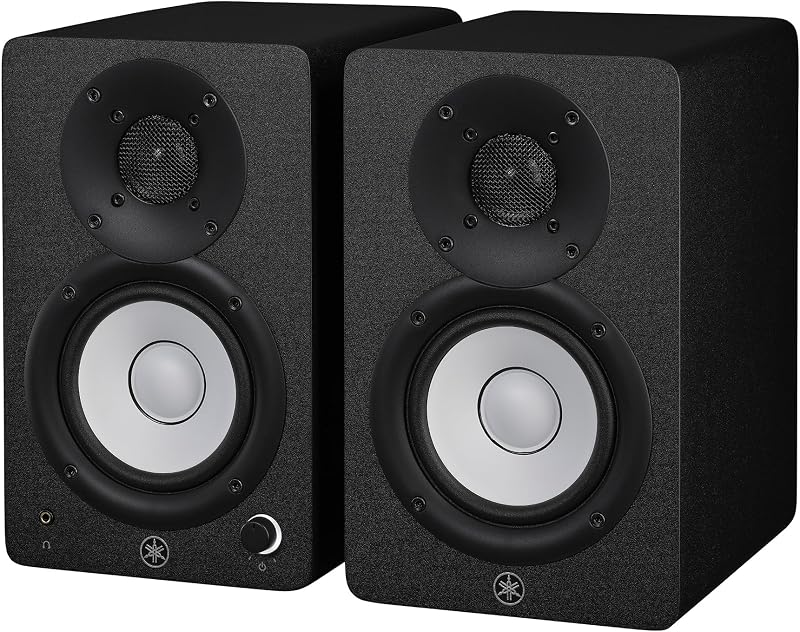
For those with slightly larger desktop real estate who desire standard reference monitoring heritage, the Yamaha HS4 Powered Studio Monitor pair offers a larger four-inch driver design. Sized above the 3.5-inch category, the HS4 provides extra cabinet volume and broader low-end stability for home recording enthusiasts who prioritize studio tracking over casual entertainment features.
Ortizan C7 Powered Studio Monitors
Users who prioritize wire-free daily connectivity should investigate the Ortizan C7 Powered Studio Monitors. This compact monitor pair features built-in Bluetooth 5.3 alongside wired connectivity, housed in a distinct white chassis designed for home studios, multimedia gaming, and content creation. If your desk routine involves streaming music directly from your smartphone without powering on your computer, the Ortizan C7 provides the integrated wireless convenience that the analog-focused CR3.5 omits.

Final Verdict
Determining whether the is mackie cr3.5 worth it comes down to how much you value versatility at your desk. Many studio monitors demand complex software calibration or force users to endure a clinical, bass-light experience during leisure hours. The Mackie CR3.5 sidesteps this limitation entirely through its intuitive front-panel tone dial and boundary-correcting location switch. It delivers honest, detailed reproduction when you are editing dialogue or balancing mix tracks, then immediately transforms into a lively, bass-rich sound system when game night begins.
With its durable metal and plastic construction, compact desktop footprint, TRS and RCA connectivity, and included acoustic isolation pads, this pair eliminates the guesswork of desktop audio upgrades. While dedicated music producers seeking earth-shaking sub-bass will eventually want a larger driver setup, the mackie cr3 desktop speakers stand out as a practical, high-performance audio solution for content creators, streamers, and PC gamers seeking professional clarity without sacrificing entertainment punch.
FAQ
What audio cables and accessories are included in the box with the Mackie CR3.5?
The Mackie CR3.5 package includes both the active and passive studio monitors, acoustic foam isolation pads for tabletop placement, and all necessary start-up connection cables to link the pair to your computer or audio device immediately.
How does the front tone knob function on the Mackie CR3.5?
The tone knob provides continuous hardware equalization directly from the speaker chassis. At its base setting, it provides flat, transparent reference sound for accurate audio editing. Turning the dial gradually boosts low-end bass presence and adds high-frequency sparkle for casual music listening, movies, and gaming.
What does the rear location switch do on these studio monitors?
The location switch adjusts the internal frequency response to compensate for physical speaker placement. It allows users to switch between desktop mode for open tabletop surfaces and bookshelf mode, which corrects excessive bass buildup caused by placing speakers close to walls or corners.
What connection inputs are available on the Mackie CR3.5?
The Mackie CR3.5 features standard dual 1/4-inch TRS inputs and stereo RCA inputs. These connections enable straightforward analog integration with PC soundcards, dedicated USB audio interfaces, audio mixers, televisions, and mobile devices.
Are the Mackie CR3.5 speakers waterproof or suitable for outdoor use?
No, the Mackie CR3.5 monitors carry an official non-waterproof rating. The enclosure materials and dynamic driver components are designed exclusively for indoor desktop workstations and home studio environments.
Content creators filming cooking tutorials can explore equipment guides at Stand Mixer Hub to optimize their kitchen workspace while relying on the CR3.5 monitors for editing clean voiceover audio. With the proper desktop placement, these speakers deliver dependable reference playback for every stage of your production workflow.
How these reviews are put together
- 506reviews published
- 2,271products with a buyer rating
- 2,222products with listed features
- 87brands covered
Every number, star and price on this site is read from the Amazon product listing. We do not run lab tests of our own, so scores here are out of 10, based on listed specifications and buyer feedback, not a verdict from a test bench. Prices change without notice; check the listing before buying.


