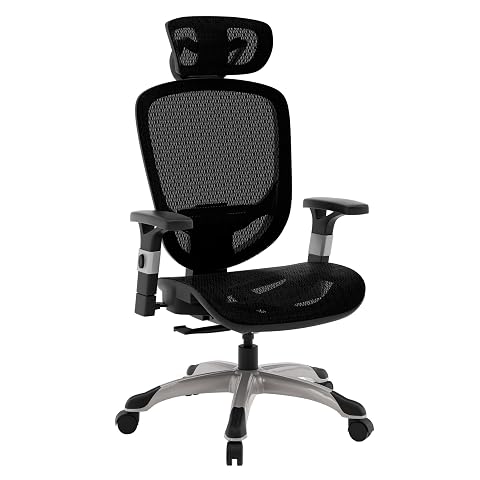
Steelcase Amia Review: Built for Marathon Gaming Sessions
The Steelcase Amia is an understated, commercial-grade task chair designed to eliminate physical fatigue across grueling workdays and competitive gaming marathons. Our one-line verdict: the Amia delivers exceptional spinal support, highly adaptable 4D armrests, and pressure-relieving seat cushioning that make it one of the most reliable ergonomic desk chairs on the market. In this steelcase…
By Eric Monroe
8 min read
As Amazon Associates, we earn from qualifying purchases. This means we may receive a small commission at no extra cost to you if you click through and make a purchase.
The Steelcase Amia is an understated, commercial-grade task chair designed to eliminate physical fatigue across grueling workdays and competitive gaming marathons. Our one-line verdict: the Amia delivers exceptional spinal support, highly adaptable 4D armrests, and pressure-relieving seat cushioning that make it one of the most reliable ergonomic desk chairs on the market. In this steelcase amia review, we evaluate how its engineering directly translates into posture stability when you are locked in front of a monitor for hours at a time.
This chair suits PC gamers, programmers, and creators who need serious steelcase amia ergonomics without flashy racing-bucket aesthetics. If you sit for prolonged stretches and prioritize physical well-being, the Amia hits the mark. However, users seeking deep recline loungers or tall neck cradles should look elsewhere, or consider options like the Steelcase Leap v2 or the entry-level Steelcase Series 1.
Dynamic LiveLumbar Support and Lower Back Alignment
Maintaining spinal health during intensive desk sessions requires dynamic reinforcement rather than rigid lumbar blocks. Tucked away inside the trim backrest of the Amia is the patent-pending LiveLumbar flexor system. Unlike task chairs that press a static plastic piece against your spine, the Amia uses an internal lattice of flexors that contour directly to your back. As you shift posture, lean forward to game, or sit back to read, these flexors adjust to your movement, delivering continuous lower back support.
This dynamic design provides steady spinal stability without forcing your lumbar region into an exaggerated arch. In practice, steelcase amia livelumbar support helps prevent the slouching and lower back aches that develop after several hours in standard chairs. Because the flexor system is hidden beneath the Buzz2 black fabric, you get active posture reinforcement without bulky external dials or brackets cluttering your setup.
The lumbar support can also be adjusted vertically to align with the curve of your lower back, allowing the flexible backrest to do the rest. For competitive gamers who lean forward during high-stress matches and lean back between rounds, this adaptive backrest keeps your spine properly aligned and minimizes muscular tension throughout the day.
Steelcase Amia 4D Armrests and Desk Setup Flexibility
Arm positioning directly affects shoulder tension, neck fatigue, and wrist comfort during extended computing sessions. The steelcase amia 4d armrests solve this challenge with comprehensive adjustability across four dimensions: height, width, depth, and pivot. You can raise or lower the arms to match your desk height, slide the pads forward or backward, change arm width, and angle the pads inward or outward.
For PC gamers, the depth and pivot adjustments are especially valuable. When aiming with low mouse sensitivity, fixed armrests often hit the desk edge or force your elbows into wide, fatiguing angles. The Amia lets you slide the arm pads back and pivot them inward, supporting your forearms while keeping your elbows close to your torso. This prevents forearm fatigue and reduces shoulder strain during extended play.
Console players and controller users also benefit from the inward pivot function. When holding a gamepad, forearms angle naturally toward the center of your body. Pivoting the Amia armrests inward matches that angle, providing steady support beneath your elbows. The arm pads offer a firm yet forgiving surface that cushions your elbows without bottoming out.
Seat Cushioning, Flexible Edges, and Long Sitting Comfort
Poor seat cushions often bottom out over time, while rigid front edges can press into your thighs and restrict blood flow. The Steelcase Amia addresses both problems with thoughtful seat architecture. Designed to ensure pressure-free sitting for 8-10 hours, the seat utilizes high-grade cushioning that distributes body weight evenly. Unlike rigid foam racing seats, the Amia provides balanced comfort that supports you through long grinds.
A key ergonomic feature is the flexible front seat edge. Many office chairs have a firm plastic lip at the front edge that exerts pressure on the hamstrings, causing leg numbness. The front edge of the Amia flexes downward under pressure, bending naturally as your legs shift. This dynamic edge ensures healthy blood flow, delivering genuine steelcase amia long sitting comfort whether your feet are flat or tucked slightly backward.
In addition, the seat includes pneumatic height control and an integrated seat-depth slider. Adjusting the seat depth lets users of different heights maintain proper clearance between the front edge and the back of the knees. Paired with breathable Buzz2 fabric, the seat avoids the sticky heat buildup common in faux leather options like the Razer Iskur X.
Recline Mechanics, Frame Rigidity, and Build Quality
The foundation of the Steelcase Amia rests on commercial-grade materials and sturdy construction standards. Steelcase backs the chair with a 5-year limited warranty, reflecting confidence in its components. It is also a Carbon Neutral certified product, supporting a greener home office setup.
The recline mechanism provides smooth backward motion across its full recline range. When you want to lean back to watch a video or take a break, the chair moves smoothly while supporting your upper back. For tasks requiring strict posture, the upright back lock secures the backrest firmly in a vertical position. While it lacks multi-stage recline angles, the upright lock gives you a stable platform for intense competitive gaming or focused typing.
The included hard rolling casters glide easily across firm indoor floors, office mats, and low-pile carpet. As a dedicated steelcase amia desk chair, its high manufacturing standards prevent loose armrests, squeaking bases, or wobbly joints over time, ensuring a dependable seating platform that holds up to daily use.
Steelcase Amia Pros and Cons
Pros
- Dynamic LiveLumbar flexors contour to back movement
- Full 4D armrest adjustment with inward pivot
- Flexible front seat edge prevents thigh pressure
- Cushioned seat engineered for 8-10 hour comfort
- Certified Carbon Neutral sustainable construction
Cons
- Recline lock only secures in upright position
- No integrated headrest or neck support
- Hard casters less suited for deep carpet
Check Steelcase Amia on Amazon
Who Should Buy the Steelcase Amia
Buy It If
- You spend 8 to 10 hours daily at your computer and need active lumbar flexors to support your spine.
- You want highly adaptable 4D armrests that adjust in height, width, depth, and pivot for mouse or controller setups.
- You experience leg numbness from stiff seat edges and need a flexible front rim to maintain blood flow.
- You value sustainable, Carbon Neutral certified manufacturing backed by a 5-year manufacturer warranty.
Skip It If
- You want a multi-angle tilt lock that lets you recline at deep intermediate angles for casual movie viewing.
- You require an integrated high-back headrest for neck support during desk breaks.
- You prefer aggressive racing-bucket styling with side bolsters over a clean, understated fabric design.
Steelcase Amia Alternatives Worth a Look
While the Amia delivers exceptional commercial ergonomics, different desk setups and posture preferences may make another chair more suitable.
Furmax Office Executive Chair High

The Furmax Office Executive Chair High is a high-back managerial computer desk chair featuring black PU leather upholstery, swivel functionality, and built-in lumbar support. Shoppers looking for a traditional executive leather look and a taller back profile rather than fabric upholstery and 4D armrests may prefer this option.
Office Chair

This big and tall executive office chair features air-lumbar support, a wide cushion seat, breathable materials, and flip-up armrests on a rolling swivel base. Readers who need flip-up armrests to tuck the chair beneath compact desks or who want air-based lumbar support should consider this model.
Marsail Ergonomic Office Chair

The Marsail Ergonomic Office Chair is a high-back mesh chair equipped with 3D armrests, adjustable lumbar support, rolling wheels, and an integrated headrest. Users who want dedicated neck support and a breathable open mesh back instead of fabric-covered padding will appreciate this alternative.
Final Verdict
Evaluating the steelcase amia for gaming and productivity reveals a chair built around genuine human physiology rather than marketing gimmicks. With its hidden LiveLumbar flexors, pressure-relieving seat cushion, flexible front edge, and versatile 4D armrests, the Amia keeps you comfortable and properly supported through 8-10 hours of non-stop computing. It provides the posture stability required for high-focus work and competitive play.
So, is steelcase amia worth it for your desk setup? If you are looking for an ergonomic investment backed by a 5-year warranty, sustainable Carbon Neutral manufacturing, and proven engineering, it is an outstanding choice. While it omits deep tilt locking and a headrest, its task-oriented performance makes the Amia one of the finest ergonomic chairs you can buy.
FAQ
How does the Steelcase Amia LiveLumbar support work?
The Amia uses an internal system of flexors hidden within the backrest that contour to the natural shape of your spine. As you move throughout the day, the flexors adapt dynamically to your lower back, providing continuous support without the rigid pressure points common to fixed lumbar pads.
What adjustments do the Steelcase Amia 4D armrests offer?
The 4D armrests adjust across four dimensions: height, width, depth, and pivot. This allows you to raise or lower the arms, slide the pads forward or backward, adjust their width, and angle them inward or outward to support your arms during typing or gaming.
Can the Steelcase Amia recline lock at different angles?
According to the product specifications, the Amia features a full recline range that locks specifically in the upright position. It does not provide multiple locking angles during recline, functioning as an active dynamic recline when unlocked and an upright task chair when locked.
Is the Steelcase Amia comfortable for 8-10 hours of sitting?
Yes. The manufacturer specifies that the Amia is built with extra seat cushioning, an adjustable seat depth, and a flexible front seat edge designed to provide pressure-free sitting for 8-10 hours, making it ideal for full work shifts and long gaming sessions.
Does the Steelcase Amia come with a manufacturer warranty?
Yes, the Steelcase Amia comes with a 5-year limited manufacturer warranty. This coverage protects against manufacturing and structural defects across the frame, pneumatic cylinder, and mechanical adjustment components.
How these reviews are put together
- 203reviews published
- 2,271products with a buyer rating
- 2,222products with listed features
- 87brands covered
Every number, star and price on this site is read from the Amazon product listing. We do not run lab tests of our own, so a score here is the average rating left by buyers, not a verdict from a test bench. Prices change without notice; check the listing before buying.