ASUS ROG Strix G15 Deep Dive: Pure Esports Capability
The ASUS ROG Strix G15 is an entry-tier competitive gaming notebook engineered to extract maximum frame rates from its discrete graphics silicon through high-wattage power delivery and direct display routing. Equipped with an AMD Ryzen 7 6800HS processor, an NVIDIA GeForce RTX 3050 Laptop GPU running at an uncapped 95W Max TGP, and an integrated…
By Mark Archer
10 min read
As Amazon Associates, we earn from qualifying purchases. This means we may receive a small commission at no extra cost to you if you click through and make a purchase.
The ASUS ROG Strix G15 is an entry-tier competitive gaming notebook engineered to extract maximum frame rates from its discrete graphics silicon through high-wattage power delivery and direct display routing. Equipped with an AMD Ryzen 7 6800HS processor, an NVIDIA GeForce RTX 3050 Laptop GPU running at an uncapped 95W Max TGP, and an integrated hardware MUX switch, this machine prioritizes raw esports responsiveness over heavy visual effects. Our analysis of the hardware specifications and architecture reveals a portable PC built specifically to provide consistent frame pacing in competitive multiplayer games without succumbing to the thermal throttling that frequently plagues compact chassis designs.
This laptop suits competitive players, student gamers, and esports enthusiasts who prioritize fast refresh rates in titles like Counter-Strike 2, Valorant, Overwatch 2, and Rocket League where low display latency directly impacts match outcomes. It provides an efficient platform for players who value rapid response times and high system stability during long multiplayer sessions. However, gamers seeking 4K visual fidelity, high-density ray tracing capabilities, or massive internal video memory buffers to run unoptimized blockbuster open-world titles will find the 4GB graphics allocation restrictive and should consider higher-tier alternatives such as the asus scar 16 instead.
Esports Frame Rates and Dedicated MUX Switch Performance
Evaluating the asus rog strix g15 gaming performance requires an understanding of how power limits influence mobile silicon. While many budget and mid-tier systems implement the RTX 3050 at heavily reduced power targets to control temperatures, the asus rog strix g15 rtx 3050 operates at a 95W Max TGP. This high ceiling allows the graphics core to sustain higher core clocks and voltage levels during rendering tasks. The dedicated graphics processor utilizes 4 GB of DDR5 SDRAM, creating an agile processing pipeline for 1080p competitive games that do not saturate high-resolution texture buffers.
The defining competitive feature of this laptop is the physical asus rog strix g15 mux switch. In traditional gaming laptops without a multiplexer, the dedicated graphics card renders frames and routes them through the processor integrated graphics before sending them to the display screen. This hybrid pathway creates an unavoidable data bottleneck and introduces measurable input lag. By incorporating a hardware MUX switch, the G15 enables a direct route from the GeForce RTX 3050 straight to the panel, eliminating hybrid routing latency and producing noticeable frame rate gains in CPU-bound esports titles.
For players focused on competitive rankings, this routing makes an immense practical difference. Titles such as Rainbow Six Siege and League of Legends experience higher minimum frame rates and cleaner frame times when the integrated graphics pipeline is bypassed. While the 4 GB VRAM limit prevents cranking maximum graphic presets on modern single-player titles without risking memory overflow, users dedicated to esports titles will find that the 95W power limit and direct MUX output push entry-tier discrete graphics to its highest potential rendering thresholds.
Ryzen 7 Processing and Memory Architecture
Powering the machine is the rog strix g15 ryzen 7 6800hs, an octa-core mobile processor built on modern AMD architecture designed specifically for high-efficiency mobile compute. Competitive esports titles are notoriously dependent on single-core instruction speeds and rapid CPU cache access to maintain high tick rates and synchronize game states. The Ryzen 7 6800HS delivers robust compute capability that ensures the dedicated graphics processor receives a continuous, unhindered stream of draw calls during chaotic multiplayer skirmishes.
The processing unit is paired with 16GB of high-frequency DDR5-4800MHz memory. DDR5 delivers substantially higher memory bandwidth compared to older DDR4 standards, providing a wider highway for high-speed data transfers between the system RAM, storage drives, and processor cache. This 16GB density permits smooth background operations, allowing gamers to run communication apps like Discord, competitive anti-cheat software, and music streaming tools simultaneously without causing sudden memory swapping or performance hitches inside active matches.
Storage is handled by a 512GB PCIe 4×4 solid-state drive operating over high-speed PCIe Gen 4 lanes. This interface ensures rapid Windows 11 boot sequences, swift installation of competitive patches, and brief level loading times. The primary trade-off rests in capacity; modern game installations frequently exceed 80 to 100 gigabytes each, meaning the 512GB drive requires disciplined space management. Gamers who plan on maintaining large, uncurated game libraries across multiple genres will need to prioritize installations carefully or invest in compatible external storage connected via USB.
ROG Intelligent Cooling and Liquid Metal Thermals
Sustaining high component wattages within a mobile chassis demands effective thermal mitigation. The asus rog strix g15 thermals are anchored by the ROG Intelligent Cooling architecture, which incorporates liquid metal thermal compound applied directly to the AMD processor die. Compared to standard silicone thermal paste, liquid metal features dramatically higher thermal conductivity. This allows heat generated by the Ryzen 7 6800HS under full boost clock loads to transfer rapidly across the vapor and heat pipe assembly away from critical processor structures.
This thermal transfer efficiency directly combats thermal throttling, a common problem where internal laptop components automatically drop their operating frequencies to prevent overheating during long gaming sessions. In competitive gaming environments where matches can stretch across hours, thermal throttling causes micro-stutters, sudden frame rate dips, and erratic mouse response. By stabilizing core temperatures, the liquid metal interface allows the Ryzen 7 CPU to sustain high clock speeds over extended gaming marathons.
The chassis internal layout routes thermal exhaust through dedicated airflow channels to disperse heat away from the keyboard deck and primary peripheral zones. This design ensures that the 95W discrete graphics card and the Ryzen CPU can both draw their requisite operating power simultaneously from the 20-volt electrical power supply. While enthusiasts looking for desktop-replacement scale cooling might explore larger configurations like the asus rog strix scar 18 (2025), the Strix G15 utilizes its thermal headroom effectively for a compact form factor.
144Hz Adaptive-Sync Display and Competitive Ergonomics
Visual feedback on the machine is handled by a fast 15-inch Full HD display featuring a native 144Hz refresh rate. The asus rog strix g15 144hz panel incorporates Adaptive-Sync technology, which synchronizes the display refresh cycle directly with the output frame rate of the GeForce RTX 3050. This real-time synchronization eliminates distracting horizontal screen tearing and minimizes display stuttering without introducing the sluggish input latency historically tied to software vertical sync methods.
The chassis itself measures 13.94 inches in length, 10.2 inches in width, and 0.81 inches in thickness, finished in an Eclipse Gray aesthetic that balances aggressive gaming styling with a clean desktop footprint. The listing specifies an item weight of 8.7 pounds, indicating a solid, substantial system optimized to remain anchored firmly to a desk during intense mouse movements rather than serving as an ultralight travel companion. For competitive setups, the platform supports essential peripherals including external displays via HDMI, low-latency gaming mice and mechanical keyboards via USB, and low-latency audio via wireless or wired connections.
Wireless networking is managed by Wi-Fi 6E connectivity, which provides access to modern 6GHz wireless frequency bands. In competitive multiplayer environments where ping spikes and packet loss can cost matches, Wi-Fi 6E ensures clear, high-throughput signal stability when connected to compatible home networks. Players comparing mid-range and boutique configurations such as the redmagic blaze 16 pro gaming laptop will find that the Strix G15 retains a dedicated focus on the essential physical interfaces and screen ergonomics that esports competitors rely on daily.
ASUS ROG Strix G15 Pros and Cons
Pros
- Hardware MUX switch routes discrete frames directly
- 95W Max TGP maximizes RTX 3050 performance
- Liquid metal thermal interface prevents CPU throttling
- Fluid 144Hz Full HD panel with Adaptive-Sync
- Fast 16GB DDR5-4800MHz memory configuration
Cons
- 4GB VRAM limits ultra settings in modern AAA titles
- 512GB internal SSD requires careful space management
- Substantial 8.7-pound weight reduces travel portability
Check ASUS ROG Strix G15 on Amazon
Who Should Buy the ASUS ROG Strix G15
The overall asus rog strix g15 specs present a very specific balance of processing throughput, display agility, and discrete graphics capability. Deciding if this machine fits your setup comes down to your primary gaming genres, travel habits, and visual performance expectations.
Buy It If
- You prioritize competitive multiplayer esports titles such as Valorant, CS2, Rocket League, and Rainbow Six Siege where 1080p frame stability and low input latency reign supreme.
- You want direct GPU output via a hardware MUX switch and a high 95W Max TGP to maximize frame delivery on an RTX 3050 card.
- You require robust long-session thermal management that uses liquid metal on the CPU to prevent mid-match clock degradation and stuttering.
- You want modern baseline platform standards including 16GB of DDR5-4800MHz memory, PCIe 4×4 storage, and Wi-Fi 6E connectivity.
Skip It If
- You intend to play demanding modern AAA single-player blockbusters at ultra graphics settings, where the 4GB DDR5 VRAM limit will lead to texture bottlenecks.
- You need an ultralight, highly portable notebook for daily campus or commute carry, as the 8.7-pound weight and power hardware favor desk deployment.
- You store dozens of massive contemporary games simultaneously and do not wish to manage a 512GB internal solid-state drive.
ASUS ROG Strix G15 Alternatives Worth a Look
If the specific hardware configuration of the G15 does not fully match your gaming workload or storage requirements, several other laptops offer different hardware balances within the current PC ecosystem.
Acer Nitro V 16S AI
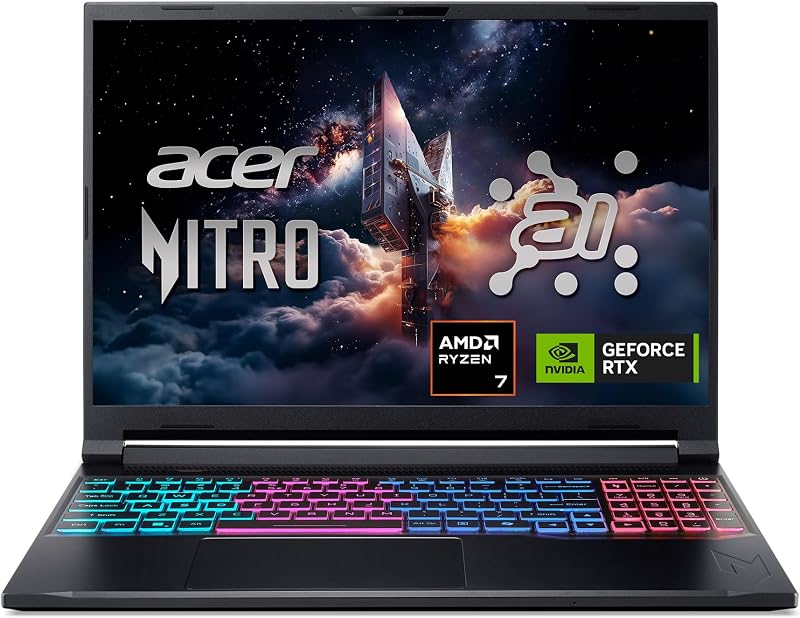
The Acer Nitro V 16S AI is an updated gaming laptop equipped with an AMD Ryzen 7 260 processor and an NVIDIA GeForce RTX 5060 Laptop GPU. It features a larger 16-inch WUXGA IPS panel with an even faster 180Hz refresh rate, paired with 32GB of DDR5 memory and a 1TB Gen 4 SSD. Shoppers who need twice the RAM, double the storage space, and next-generation graphics power should choose this alternative over the G15.
msi Cyborg 17

The msi Cyborg 17 17.3″ FHD features an Intel Core 9-270H processor, an NVIDIA GeForce RTX 5060 graphics card, 16GB of DDR5 memory, and a translucent black chassis. It provides an expansive 17.3-inch 144Hz display and includes a 2TB total storage package consisting of a 1TB SSD plus a 1TB docking station set. Gamers who want a much larger display footprint and extensive bundled storage will prefer this system.
KAIGERR Gaming Laptop

The KAIGERR Gaming Laptop is built around an AMD Ryzen 7430U processor running up to 4.3GHz, 16GB of DDR4 RAM, a 512GB SSD, a 1920P FHD display, and a physical webcam cover slide. Shoppers seeking an everyday general-purpose machine for basic productivity and lightweight, casual tasks rather than a dedicated 95W high-performance gaming platform might evaluate this alternative.
Final Verdict
When asking is asus rog strix g15 worth it, the answer depends entirely on your gaming priorities. ASUS engineered this machine with a singular mission: delivering maximum esports responsiveness on entry-tier graphics silicon. By combining a 95W Max TGP RTX 3050 GPU with a dedicated hardware MUX switch, 16GB of DDR5 memory, and liquid metal cooling on the Ryzen 7 6800HS, the notebook overcomes the common bandwidth bottlenecks that restrict typical budget systems. It turns 1080p competitive titles into fluid, tear-free experiences on its 144Hz Adaptive-Sync display.
The trade-offs remain well-defined. The 4GB video memory allocation restricts graphical ambition in heavy AAA releases, and the 512GB solid-state drive demands careful storage allocation. However, if your gaming library revolves around competitive titles where input response, high frame rates, and consistent thermal stability determine victory, the rog strix g15 for competitive gaming represents an exceptionally capable and targeted machine built to hold frame rates under pressure.
FAQ
Does the ASUS ROG Strix G15 have a MUX switch?
Yes, the ASUS ROG Strix G15 includes a dedicated hardware MUX switch. This feature allows the laptop to route frames directly from the NVIDIA GeForce RTX 3050 discrete graphics card to the display panel, bypassing the integrated graphics processor to reduce input latency and boost frame rates in competitive titles.
Can the ASUS ROG Strix G15 run competitive games at 144Hz?
Yes, the laptop is equipped with a 15-inch Full HD 144Hz display featuring Adaptive-Sync. In popular esports titles such as Valorant, Counter-Strike 2, and Rocket League, the 95W Max TGP RTX 3050 and AMD Ryzen 7 6800HS processor possess sufficient throughput to drive frame rates that fully utilize the 144Hz refresh rate.
What are the graphics card specifications in this G15 model?
This configuration features an NVIDIA GeForce RTX 3050 Laptop GPU configured at a 95W Max TGP with 4 GB of dedicated DDR5 SDRAM. The high 95W power limit allows the card to run at higher sustained frequencies compared to lower-wattage mobile RTX 3050 implementations.
How does liquid metal cooling work on the ASUS ROG Strix G15?
The ROG Intelligent Cooling system applies liquid metal thermal compound directly to the AMD Ryzen 7 6800HS processor die. Liquid metal provides superior thermal conductivity compared to standard silicone paste, transferring heat away from the processor cores into the heat dissipation assembly quickly to prevent thermal throttling during extended gameplay.
What external displays and accessories can connect to the G15?
According to the product specifications, the ASUS ROG Strix G15 is compatible with external displays via HDMI input, standard USB devices, and wireless peripherals including keyboards, mice, and gaming headphones. It also features Wi-Fi 6E for high-speed wireless network connectivity.
How these reviews are put together
- 488reviews published
- 2,271products with a buyer rating
- 2,222products with listed features
- 87brands covered
Every number, star and price on this site is read from the Amazon product listing. We do not run lab tests of our own, so scores here are out of 10, based on listed specifications and buyer feedback, not a verdict from a test bench. Prices change without notice; check the listing before buying.