Kodak Mini 2 Retro Review: 4PASS Pocket Photo Printing Examined
The Kodak Mini 2 Retro is a pocket-sized instant photo printer engineered to turn smartphone snapshots into tangible physical keepsakes through specialized thermal dye-sublimation hardware. Instead of relying on chemical film or zero-ink paper, this compact machine uses dedicated kodak 4 pass technology to apply separate layers of colored dye followed by a clear protective…
9 min read
As Amazon Associates, we earn from qualifying purchases. This means we may receive a small commission at no extra cost to you if you click through and make a purchase.
The Kodak Mini 2 Retro is a pocket-sized instant photo printer engineered to turn smartphone snapshots into tangible physical keepsakes through specialized thermal dye-sublimation hardware. Instead of relying on chemical film or zero-ink paper, this compact machine uses dedicated kodak 4 pass technology to apply separate layers of colored dye followed by a clear protective seal directly onto glossy paper. For mobile enthusiasts, digital shutterbugs, and casual memory keepers seeking sharp, durable credit-card-sized prints right out of a jacket pocket, it delivers consistent visual fidelity and dependable smudge resistance.
This portable printer best serves smartphone photographers, scrapbook creators, and journaling hobbyists who value color accuracy and physical print protection over sheer output size. Its compact profile makes it an effortless companion for gatherings, travel logs, and creative craft sessions. However, users seeking standard 4×6 home framing prints, ultra-fast batch output for heavy office duties, or adhesive sticker paper right out of the box will be better served by larger stationary photo printers or dedicated label-oriented alternatives.
Kodak 4PASS Print Quality and Dye Sublimation Performance
Evaluating the kodak 4pass print quality requires an understanding of how dye sublimation differs from conventional consumer methods. The printer utilizes true CMYK ink ribbon processing where the paper cycles into the chassis four individual times. During each pass, thermal elements transfer yellow, magenta, and cyan dyes as a gas into the specialized glossy photo paper, bonding the pigment directly into the surface before sealing the photo beneath a transparent protective lamination. This multi-stage process creates smooth continuous tone transitions without visible dot patterns, delivering accurate skin tones, deep contrast, and natural color gradients that resemble traditional darkroom output far more closely than competing instant technologies.
When comparing kodak 4 pass vs zink printing, the visual disparities become immediately clear to anyone who inspects pocket photo prints. Zero-ink Zink systems rely on paper infused with heat-activated color crystals, which frequently yields muddy shadows, noticeable color casts, and poor resistance to ambient heat or direct sunlight. In contrast, the kodak 4 pass technology employed here seals every picture against outside elements. The final lamination pass delivers distinct anti-fingerprint, waterproof, and fade-resistant properties, ensuring that wallet prints survive daily handling without smudging or losing dynamic range. Users digitizing vintage negatives through the kodak slide n scan film and slide scanner can comfortably reprint those historic frames knowing the dye sublimation layer preserves delicate highlights.
For photo enthusiasts asking is kodak 4 pass worth it, the answer hinges on visual fidelity versus pocketable convenience. Operating at a resolution of 291 x 300 dpi, this portable dye sublimation printer captures crisp facial details, fine textures, and clean text overlays on a 2.1 x 3.4 inch media surface. While larger home photo printers offer broader physical dimensions, the density achieved on this credit-card-sized canvas ensures that mobile snapshots look vibrant and remarkably sharp. The glossy finish adds depth to saturated scenes, making travel memories, festival portraits, and casual snapshots stand out with authentic photographic warmth.
Print Speed, Cartridge Handling, and Mechanical Workflow
The physical printing process on the Kodak Mini 2 Retro reflects the mechanical reality of four-pass dye sublimation. Producing a finished print takes approximately 55 seconds from the moment data transfer completes. Watching the paper advance and retreat four consecutive times provides a captivating visual progression as the bare paper gains yellow dye, blends in magenta, adds cyan to establish full color depth, and finally emerges dry to the touch beneath its protective overcoat. While 55 seconds is slower than single-pass thermal cameras, the deliberate pacing ensures ink cures properly without messy wet rollers or smearing hazards.
The mechanics of this kodak 4 pass printer rely on integrated all-in-one cartridges that house both the transfer ribbons and the feed mechanisms. The manufacturer includes 4 cartridges and 38 sheets in the bundle, giving users plenty of initial media to calibrate their printing routine. The internal tray handles a maximum sheet capacity of 15 sheets at a time, preventing excessive bulk while accommodating extended printing sessions at social events. Because the paper path must remain free of dust to maintain print cleanliness, the enclosed feed design shields the glossy media during operation.
From an operational standpoint, pairing the printer with your mobile shooting workflow is seamless. Creators who capture candid portraits with compact retro gear such as the kodiak pixpro fz55 can transfer digital files directly to a smartphone and send them straight to the print queue. The single-processor architecture handles memory spooling reliably, allowing the device to output credit-card-sized keepsakes consistently without mechanical stalls or overheating during back-to-back print jobs.
Portability, Build Quality, and Hardware Design
A key component of this kodak mini 2 retro review is assessing how effortlessly the device integrates into everyday carry. Measuring 3 inches deep, 5 inches wide, and just 1 inch thick, the chassis slips comfortably into a jacket pocket, small handbag, or daypack compartment. Tipping the scales at a featherweight 255 grams, the unit adds virtually no noticeable drag when carried along to parties, vacation destinations, or weekend outings. Its clean rectangular geometry and tactile styling evoke vintage analog charm while remaining thoroughly modern in build and ergonomics.
Modern convenience is reinforced by the inclusion of a USB Type-C charging port, letting users recharge the internal battery with standard cables already utilized by modern smartphones and laptops. The exterior housing resists scuffs while remaining sturdy enough for outdoor social environments. The single paper exit slot and minimal button layout ensure that anyone can operate the device without prior technical background. Whether passed around a birthday gathering or kept on a creative crafting desk, the physical footprint remains unobtrusive.
The practical payoff of this portable design shows up in how readily you can share physical tokens. Street photographers who enjoy the spontaneous analog workflow of a kodak funsaver disposable camera often miss the immediacy of sharing prints on the spot. The Mini 2 Retro bridges that gap by offering instant physical sharing without requiring a darkroom. The resulting 2.1 x 3.4 inch prints tuck smoothly into phone cases, billfolds, planners, and scrapbook layouts, delivering tangible mementos wherever you find yourself shooting.
The Kodak Photo Printer App Experience
Mobile control is executed entirely through the official kodak photo printer app, which communicates with the device over wireless Bluetooth. Available for both iOS and Android smartphones, the application serves as the central command center for photo selection, image correction, and queue management. The wireless pairing sequence is direct and straightforward, requiring no intricate local network configurations or external Wi-Fi routers. Users simply turn on the printer, launch the software, and establish a connection within moments.
Inside the app, users gain access to a collection of creative editing tools tailored for the 2.1 x 3.4 inch aspect ratio. You can crop photos to ensure subjects sit squarely within the print frame, fine-tune basic color parameters such as brightness and contrast, and experiment with artistic borders. The preview screen accurately mirrors the framing of the final print, helping prevent unexpected cropping along the margins. The app also includes photo booth templates and collage options, expanding the creative utility for scrapbooking and party souvenirs.
The stability of the mobile app directly supports the hardware performance outlined in the kodak mini 2 retro specs. Data transmission between the smartphone and printer transfers efficiently, minimizing lag before the 55-second dye sublimation process initiates. For entertainment fans and casual mobile creators who want an intuitive printing pipeline without steep learning curves, the combination of responsive Bluetooth communication and accessible creative controls makes the overall printing experience smooth and rewarding.
Kodak Mini 2 Retro Pros and Cons
Pros
- Genuine 4PASS dye sublimation continuous color output
- Waterproof, fade-resistant, and anti-fingerprint protective lamination
- Ultra-compact 255 g body fits into pockets
- Includes 4 cartridges and 38 photo sheets
- Modern USB Type-C charging and Bluetooth connectivity
Cons
- Takes approximately 55 seconds per print
- Limited to 2.1 x 3.4 inch print size
- Internal tray holds a maximum of 15 sheets
Check Kodak Mini 2 Retro on Amazon
Who Should Buy the Kodak Mini 2 Retro
Buy It If
- You want pocket-sized 2.1 x 3.4 inch prints featuring durable, water-resistant, and anti-fingerprint lamination.
- You value authentic dye-sublimation color fidelity and smooth tonal gradations over the grainy output typical of zero-ink paper.
- You travel frequently and want a lightweight 255 g printer that slips into a pocket and charges via modern USB Type-C.
- You want an out-of-the-box bundle that includes 4 cartridges and 38 sheets of glossy photo paper ready to print.
Skip It If
- You require standard 4×6 inch photographic prints for traditional framing, large albums, or wall displays.
- You need high-speed batch output or office document handling capable of processing multipage letter-sized media.
- You are looking for adhesive-backed sticker paper right out of the box for labeling and craft surfaces.
Kodak Mini 2 Retro Alternatives Worth a Look
While the Kodak Mini 2 Retro delivers exceptional pocket portability and durable laminated miniature prints, different photo formats and office demands may call for alternative hardware solutions.
Liene M100 4×6” Photo Printer

The Liene M100 4×6” Photo Printer is a dedicated thermal dye sublimation machine designed for larger prints. Delivering full-color 4×6 inch standard photos, this unit connects over Wi-Fi and includes 100 papers and 3 cartridges in its package. Mobile photographers wanting full-frame desktop portrait prints for traditional photo albums should choose the Liene model over a credit-card-sized pocket printer.
Fast Color Printing Up to

For users who need a multifunction office solution, the Fast Color Printing Up to 27 ppm with Automatic Duplex Printing Brother MFC-L3765CDW Wireless Color All-in-One Laser Printer serves an entirely different purpose. It offers high-speed duplex color laser printing, scanning, and copying for office paperwork. Anyone seeking a high-volume productivity device rather than a handheld photo snapshot unit will find this machine much better suited to their workflow.
Instant Color Inkjet Printer
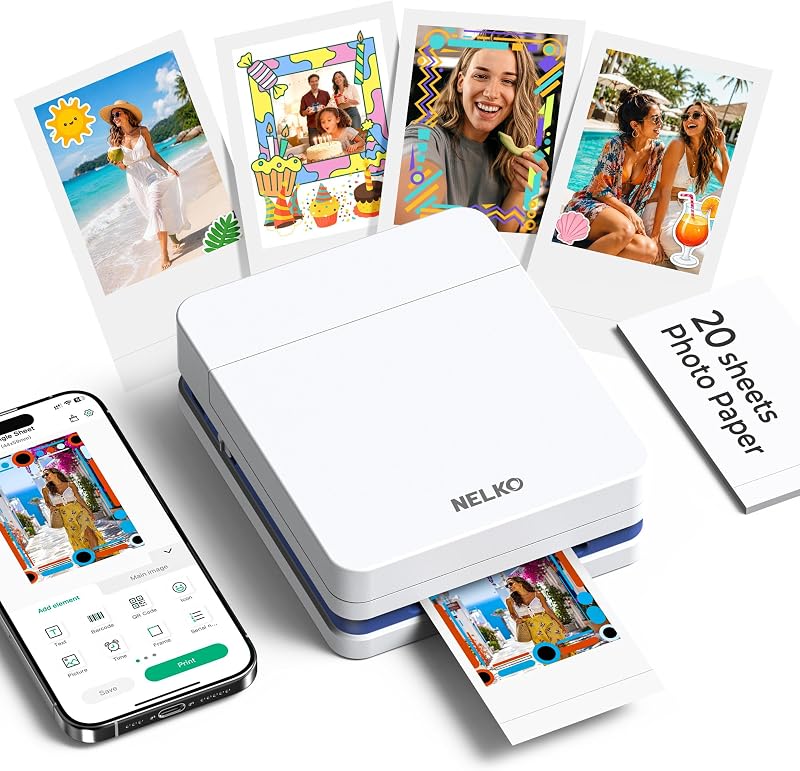
The Instant Color Inkjet Printer for Smartphone from Nelko offers 2×3 portable printing with an emphasis on sticky-back photos, Bluetooth connectivity, and AI app editing. Journal keepers and crafters who specifically desire adhesive peel-and-stick photo stickers rather than standard non-adhesive laminated cards will appreciate this alternative pocket format.
Final Verdict
The Kodak Mini 2 Retro proves that pocket-sized printing does not require settling for flat colors or fragile paper. By integrating genuine 4PASS dye-sublimation technology into a 255-gram enclosure, the device bridges the gap between smartphone convenience and authentic photographic preservation. The multi-layer CMYK application paired with a protective lamination overcoat ensures that your credit-card-sized memories resist water, fingerprints, and fading over time.
While its 55-second print cycle requires patience compared to zero-ink alternatives, the superior tonal depth, color consistency, and durability justify the brief wait. For mobile creators, travelers, and scrapbooking enthusiasts who want durable physical snapshots to slip into wallets or share at social gatherings, this compact dye-sublimation printer delivers outstanding everyday performance.
FAQ
How does Kodak 4PASS technology work?
Kodak 4PASS technology uses thermal dye sublimation to apply yellow, magenta, and cyan color ribbons in three separate passes. A fourth pass applies a transparent protective laminate layer that seals the photo against moisture, fingerprints, and fading.
How long does it take to print one photo?
It takes approximately 55 seconds to produce a single photo. During this time, the glossy paper moves through the printer four times as each color layer and the protective overcoat are successively applied.
What size photos does the Kodak Mini 2 Retro produce?
The printer produces credit-card-sized prints measuring 2.1 x 3.4 inches. This compact format is designed to fit neatly inside wallets, journals, phone cases, and miniature photo albums.
How do you connect your phone to the printer?
The printer connects wirelessly via Bluetooth to compatible iOS and Android smartphones. You use the dedicated KODAK Photo Printer app to manage your photos, adjust cropping, apply creative edits, and initiate the print job.
What is included in the box with the Kodak Mini 2 Retro?
The bundle includes the Mini 2 Retro printer, 4 all-in-one cartridges, 38 sheets of glossy photo paper, a USB Type-C charging cable, and a user guide to start printing right away.
Can the printer produce sticker-backed photos?
The included media consists of standard glossy photo paper without adhesive backing. The listing does not specify support for sticky-back media bundles with this model.
How these reviews are put together
- 203reviews published
- 2,271products with a buyer rating
- 2,222products with listed features
- 87brands covered
Every number, star and price on this site is read from the Amazon product listing. We do not run lab tests of our own, so a score here is the average rating left by buyers, not a verdict from a test bench. Prices change without notice; check the listing before buying.


