Logitech Z150 Multimedia Speakers: Desktop Audio Breakdown
The Logitech Z150 is a compact 2.0 desktop speaker system designed to deliver straightforward stereo sound for computer setups, personal workspaces, and casual entertainment nooks without introducing cord clutter or demanding complex sound card configuration. Engineered with twin two-inch drivers that produce six watts of peak power, this powered tabletop unit delivers dependable acoustic clarity…
9 min read
As Amazon Associates, we earn from qualifying purchases. This means we may receive a small commission at no extra cost to you if you click through and make a purchase.
The Logitech Z150 is a compact 2.0 desktop speaker system designed to deliver straightforward stereo sound for computer setups, personal workspaces, and casual entertainment nooks without introducing cord clutter or demanding complex sound card configuration. Engineered with twin two-inch drivers that produce six watts of peak power, this powered tabletop unit delivers dependable acoustic clarity for everyday PC tasks, background music playback, and voice communication. As an analytical appraisal reveals, it stands out as an uncomplicated audio utility that prioritizes speech intelligibility, direct physical control, and dual-source input over room-filling bass or cinematic low-end rumble.
This compact system suits space-conscious desktop gamers, remote professionals, and students who need dependable stereo output for dialogue, notifications, YouTube videos, and casual gaming without sacrificing desk real estate. Users who constantly switch between listening on a phone and a PC will find the secondary auxiliary input exceptionally convenient. Conversely, entertainment enthusiasts desiring bone-rattling sub-bass or immersive multi-channel soundscapes should bypass a basic 2.0 configuration and consider larger sub-equipped options such as the logitech z407 speakers instead.
Acoustic Profile and Sound Clarity
Evaluating the logitech z150 sound quality requires understanding the physical boundaries of a two-driver setup operating without a dedicated low-frequency enclosure. The system relies on two 2-inch drivers engineered to push six watts of peak power, with Logitech reporting that the acoustics were tested and tuned in their dedicated audio labs. In practice, this tuning manifests as a clean, mid-forward sound signature that renders human speech, podcasts, and spoken dialogue with notable crispness. Voices in video conferences and narrative audio tracks come through sharply, avoiding the boxy or muffled resonance common among integrated monitor speakers.
Because each satellite utilizes a compact two-inch woofer diameter without a separate subwoofer cabinet, low-end reproduction remains inherently lean. Sub-bass frequencies below the mid-bass threshold roll off steeply, meaning low-frequency impacts such as cinematic explosions, heavy basslines, and orchestral percussion lack physical thump. However, the mid-range and treble registers stay articulate at reasonable listening levels. Instruments like acoustic guitars, piano leads, and vocal harmonies retain clear separation, provided the system is kept within its intended desktop nearfield listening envelope.
When deploying the logitech z150 for gaming, the stereo output delivers accurate left-to-right panning that assists in identifying directional audio cues in casual titles, strategy games, and indie adventures. Esports titles benefit from the clean treble and upper midrange, making reload clicks and verbal callouts easy to parse. However, players seeking cinematic atmospheric rumble or deep tactical immersion will eventually want to swap to a dedicated headset like the astro a50 xbox for competitive sessions where sub-bass frequencies and subtle footsteps demand high acoustic isolation.
Connectivity and Dual Source Flexibility
A primary mechanical advantage of this unit is its dual-device input architecture. The logitech z150 dual 3.5mm inputs include a standard rear audio cable alongside an easily accessible 3.5 mm auxiliary line. This configuration enables listeners to connect a primary computer tower or laptop while simultaneously wiring a smartphone, tablet, or handheld console into the auxiliary port. Rather than crawling under a desk or unplugging cables to swap audio sources, users can keep both devices hooked up concurrently, expanding utility across multi-device desktop workstations.
Managing the logitech z150 setup is completely driver-free and requires no software configuration. Operating via a corded electric power supply, the unit provides plug-and-play operation across any source outputting an analog 3.5 mm signal. The listing specifications also note the presence of one USB 2.0 port and a built-in microphone, offering added hardware utility directly on the desktop. The audio signal routes cleanly through the twin enclosures, keeping signal latency at absolute zero since it bypasses digital conversion protocols and wireless pairing sequences entirely.
This simple physical routing is particularly beneficial for complex desk layouts. Gamers and simulation fans who already occupy multiple ports with demanding flight sticks or throttle systems such as the logitech g x56 will appreciate that the speakers do not burden host PC operating systems with background audio utilities, software suites, or complicated driver updates. You simply connect the 3.5 mm cord to your motherboard line-out, plug in the corded electric power lead, and immediately gain functional stereo output.
Integrated Controls and Headphone Passthrough
The control scheme on the front panel addresses everyday ergonomics directly. The logitech z150 volume control combines the master power switch and gain attenuation into a single, smooth-turning rotary knob positioned on the front baffle of the primary satellite. Turning the knob clockwise powers on the unit and progressively raises the volume, giving the user tactile, immediate control without forcing them to adjust sound sliders inside the computer operating system or press awkward keyboard shortcuts during intense gameplay.
Alongside the volume knob sits a dedicated logitech z150 headphone jack. This 3.5 mm passthrough allows listeners to plug in their favorite wired headphones or earbuds directly into the speaker cabinet. When a headset is connected, the speakers mute the external drivers and route the stereo signal straight to the headphones, providing a seamless transition from open-room listening to total privacy. This eliminates the hassle of hunting for the headphone port behind a bulky desktop computer tower.
The listing also denotes a touch control method alongside its corded electric operation and built-in microphone. This consolidation of physical knobs, passthrough audio ports, and front-facing input access transforms the right speaker satellite into a functional desktop hub. Users who routinely switch between open desktop audio for casual browsing and private headphone audio for late-night multimedia consumption gain significant day-to-day convenience from this arrangement.
Enclosure Durability and Desktop Footprint
Desk real estate is a major consideration for compact battlestations, and the logitech z150 desktop performance is shaped substantially by its physical dimensions. Featuring a tabletop mount orientation, the twin satellites possess a slim vertical profile that sits comfortably beneath standard desktop monitors or alongside dual-screen arrangements. Unlike bulky bookshelf cabinets, these speakers occupy a remarkably small footprint, leaving ample room for wide mousepads, mechanical keyboards, and desktop accessories.
The listing outlines a metal enclosure material, providing structural rigidity and resistance to daily desktop wear and tear. Finished in a uniform matte black aesthetic, the speakers maintain a clean, understated profile that blends neatly into home office environments, dorm desks, and minimalist gaming stations alike. There are no garish design accents or oversized badges to distract the eye during daily productivity tasks.
For gamers who prefer uncluttered desks over expansive multi-speaker arrays and bright RGB lighting like that found on the logitech g560 speakers, the Z150 offers an intentional departure toward simplicity. The robust housing shields internal components, while the front driver grilles protect the delicate two-inch cones from stray objects or accidental desktop impacts. It is worth noting that the listing confirms the product is not waterproof, meaning it should remain strictly in dry indoor desktop environments.
Logitech Z150 Pros and Cons
Pros
- Dual 3.5mm inputs for simultaneous device connectivity
- Compact tabletop footprint ideal for crowded desks
- Convenient front-panel integrated volume and power dial
- Durable build featuring metal enclosure materials
- Front-facing headphone jack for private listening
Cons
- Modest six-watt peak output limits maximum volume
- No dedicated subwoofer for deep low-end bass
- Not waterproof for outdoor environments
Who Should Buy the Logitech Z150
Buy It If
- You need a compact tabletop stereo pair that fits easily onto space-constrained desks and workstations.
- You want to wire both a PC and a secondary mobile device simultaneously using dual 3.5 mm audio inputs.
- You prioritize clear vocal reproduction for video meetings, lectures, dialogue-heavy media, and casual gaming.
- You prefer physical front-panel controls for volume, power toggling, and instant headphone passthrough.
Skip It If
- You require deep, floor-shaking sub-bass output for cinematic film viewing or bass-heavy music genres.
- You need high-wattage acoustic performance to fill large living rooms or party environments.
- You plan to use the speakers in outdoor or moisture-prone areas where waterproof construction is essential.
Logitech Z150 Alternatives Worth a Look
If the compact profile or two-channel boundaries of this model do not perfectly match your workspace requirements, several alternatives from the same category offer different acoustic balances and feature sets.
Multimedia Subwoofer
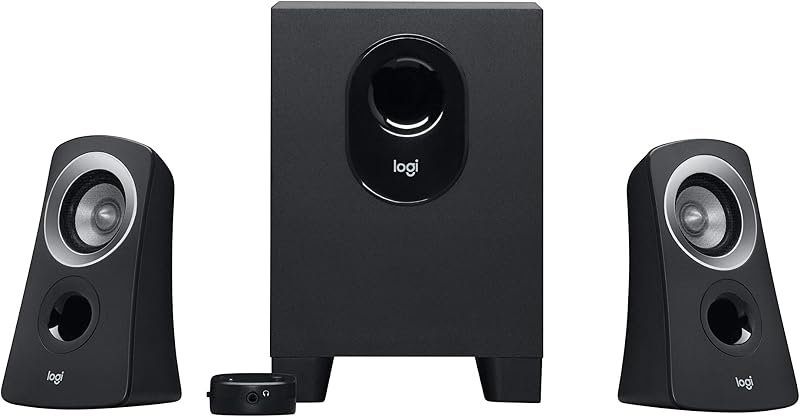
The Multimedia subwoofer system (Logitech Z313) provides a 2.1-channel architecture that includes a dedicated standalone subwoofer alongside two compact satellite speakers. Because it features full-range audio reproduction and 3.5 mm inputs compatible with PC, consoles, TVs, and tablets, it delivers significantly deeper bass extension than a standard 2.0 system. Choose this alternative if your desk can accommodate an under-desk floor box and you want rich low-end rumble for movies and gaming.
Field Desktop Speakers for Music

The Field Desktop Speakers for Music (PreSonus Eris 3.5) represent an active nearfield studio monitor setup that delivers 50 watts of total power. Equipped with 3.5-inch woven-composite woofers and silk-dome tweeters, these desktop monitors are engineered specifically for music production, gaming, and hi-fi audio clarity. Content creators and home studio producers who require broader frequency separation, higher volume ceiling, and studio-grade tonal accuracy should select these over basic multimedia desktop units.
Amazon Basics Stereo 2.0 Speakers

The Amazon Basics Stereo 2.0 Speakers offer an ultra-simple 2.0 channel setup powered directly via USB rather than a traditional wall outlet. Featuring standard 3.5 mm auxiliary line connectivity and an integrated volume control, this pair is tailored for laptop users and minimalist desk setups where wall outlets are scarce. If you want maximum portability and basic stereo sound driven purely by your computer USB ports, this pair serves as a direct alternative.
Final Verdict
When determining whether the system is worth your investment, your decision should come down to spatial practicality and core acoustic needs. The system does not attempt to mimic a high-fidelity studio monitor or a theater-grade surround sound package. Instead, it fulfills a clearly defined role: delivering reliable, clear, and direct two-channel desktop sound with zero technical friction. Its six watts of peak power provide ample output for nearfield tasks, and the inclusion of front-mounted volume and headphone jacks makes everyday operation completely seamless.
For listeners seeking straightforward audio output for casual gaming, video streams, office tasks, and speech-driven content, this unit proves to be an exceptionally sensible addition to any desk. The dual 3.5 mm connection capability brings genuine multi-device utility, allowing you to juggle audio from a phone and a computer without rewiring cables. Provided you do not expect visceral sub-bass performance from its compact two-inch drivers, this speaker set offers a durable, clean-looking, and highly functional desktop audio upgrade.
FAQ
What are the primary Logitech Z150 multimedia speakers specs?
The system features two 2-inch drivers delivering six watts of peak audio output across a stereo sound profile. It includes a metal enclosure, tabletop mounting orientation, corded electric power supply, a 3.5 mm primary input, an auxiliary line, a front headphone jack, one USB 2.0 port, and a built-in microphone.
Can I connect two audio devices to the speakers at the same time?
Yes. The speaker system provides dual 3.5 mm audio connectivity, allowing you to plug in your desktop computer or laptop via the main line while simultaneously connecting a smartphone, tablet, or portable player into the auxiliary input.
How does the front headphone jack operate?
The headphone port is mounted directly on the front panel of the primary speaker satellite. When you plug your wired headphones or earbuds into this 3.5 mm jack, the speaker drivers automatically mute and route the audio signal to your headphones for private listening.
Is the Logitech Z150 waterproof for outdoor use?
No. The manufacturer specifications confirm that the speaker set is not waterproof. It is designed solely for indoor tabletop operation and should be protected from liquids, excessive humidity, and outdoor elements.
Does this speaker system require software or driver installation?
No software or specialized driver package is needed. The speakers receive their audio signal via universal analog 3.5 mm connections and run on standard corded electric power, ensuring instant plug-and-play functionality across Windows, macOS, ChromeOS, and gaming hardware.
How these reviews are put together
- 1,107reviews published
- 2,271products with a buyer rating
- 2,222products with listed features
- 87brands covered
Every number, star and price on this site is read from the Amazon product listing. We do not run lab tests of our own, so scores here are out of 10, based on listed specifications and buyer feedback, not a verdict from a test bench. Prices change without notice; check the listing before buying.


