Anker 675 USB-C Docking Station Review: Monitor Stand Meets 12-in-1 Hub
Managing desk clutter while driving an entertainment or productivity battlestation often forces a compromise between sprawling port hubs and elevated monitor risers. The Anker 675 Docking Station bridges that gap by embedding an extensive anker 12 in 1 docking station directly into a rigid desktop monitor riser. Combining comprehensive port expansion with a sleek riser…
By Eric Monroe
8 min read
As Amazon Associates, we earn from qualifying purchases. This means we may receive a small commission at no extra cost to you if you click through and make a purchase.
Managing desk clutter while driving an entertainment or productivity battlestation often forces a compromise between sprawling port hubs and elevated monitor risers. The Anker 675 Docking Station bridges that gap by embedding an extensive anker 12 in 1 docking station directly into a rigid desktop monitor riser. Combining comprehensive port expansion with a sleek riser design and built-in wireless charging, it offers a streamlined desktop consolidation platform whose main compromise is limiting display routing to a single external screen.
This hybrid organizer caters directly to laptop users, media streamers, and desktop minimalists who operate a single primary screen and want their accessories, hardwired network, and mobile charging consolidated into one footprint. However, multi-monitor power users who need dual or triple extended displays and competitive gamers pursuing ultra-high refresh rates will find the display layout restrictive and should consider conventional multi-monitor docks instead.
Workspace Organization and Stand Ergonomics
The defining appeal of the anker 12 in 1 docking station monitor stand is its structural role as an all-in-one workspace organizer. Measuring 21.26 inches long, 8.66 inches wide, and 3.54 inches high, the unit physically elevates your display to eye level. Raising the screen promotes a healthier upright posture, reducing neck strain during long gaming marathons or intensive creative editing sessions. The dark gray finish delivers a clean, modern aesthetic that blends seamlessly beneath premium gaming monitors or office displays.
Underneath the raised platform lies dedicated clearance designed to store your keyboard, mouse, and other desk peripherals when not in active use. Stashing input devices beneath the stand immediately frees up desk mat surface area for writing, snacking, or controller play. By placing the primary docking hardware inside the structure of the riser, Anker eliminates the loose cables, dongles, and adapter bricks that typically wander across an entertainment setup.
Cable routing is similarly streamlined because the primary host cord connects neatly beneath the stand to your laptop. Side and rear cutouts keep high-bandwidth cords, like the upstream laptop connection and Ethernet cable, hidden from plain view. This physical consolidation creates a serene, intentional desktop environment that conventional desktop docks sitting alongside a standalone riser simply cannot reproduce.
Display Capabilities and Entertainment Performance
When assessing the unit for media playback and entertainment setups, video output performance is paramount. Video routing on this hub runs through a single dedicated HDMI port capable of driving an external monitor at 4K resolution with a 60Hz refresh rate. For 4K movie streaming, casual console feeds, and general desktop tasks, the anker 675 4k 60hz hdmi performance provides sharp visual clarity and fluid 60 frames-per-second motion without screen stutter or tearing.
However, users must be mindful of the anker 675 single display limitation. The listing explicitly states that this docking station only supports display output via its single HDMI port, and none of the USB-C ports support video passthrough. If your workflow requires dual monitors for streaming chats, editing timelines, and gaming simultaneously, this dock cannot feed both displays independently. It is built strictly around a clean, single-screen entertainment center.
For players considering an anker 12 in 1 docking station for gaming, the 4K 60Hz ceiling suits standard 60Hz 4K panels, ultrawide productivity monitors that accept 60Hz HDMI signals, and big-screen entertainment setups. Competitive eSports players seeking 144Hz or 240Hz refresh rates through DisplayPort connections will need to route directly to their graphics hardware instead of relying on the single HDMI output provided here.
Power Delivery and Wireless Charging Ecosystem
Power distribution is an area where the stand demonstrates genuine versatility for modern workstations. The dock features an upstream USB-C connection providing anker 675 100w power delivery directly to the host computer. This 100W maximum capacity provides sufficient wattage to charge demanding modern machines such as a MacBook Pro, MacBook Air, or ThinkPad under normal workloads while maintaining peripheral connectivity through a single cable.
In addition to host charging, the stand includes two downstream USB-C Power Delivery ports that share 45W of output. This secondary power bank easily charges tablets, handheld accessories, wireless headsets, or battery banks right from the side of the riser. Rather than keeping a separate bedside brick or an anker prime wireless charging station on your desk, the unit integrates power distribution directly into the stand body.
Adding further convenience is the wireless charging pad embedded directly into the top surface of the stand. Resting your phone on the top deck keeps notifications in peripheral view while replenishing its battery without dangling charging cords across the desk. Having a dedicated pad built into your monitor riser keeps desktop real estate open for mouse swipes and entertainment gear.
Data Transfer Speeds and Peripheral Connectivity
Diving into the anker 675 docking station specs reveals a competent suite of data connections designed for both legacy peripherals and modern high-speed storage. The stand houses two USB-C ports and three USB-A ports, all rated for data transfer speeds up to 10Gbps. This bandwidth is fast enough to transfer large 4K video files, game captures, and backup archives to external solid-state drives without bottlenecks.
Creative hobbyists will appreciate the inclusion of both full-size SD and microSD (TF) memory card slots on the chassis. Having card readers integrated directly into the front-facing reach of the riser saves users from digging behind computers or hunting down loose dongles when transferring camera footage. While users seeking multi-lane external GPU bandwidth might research an anker prime thunderbolt 5 dock, this 10Gbps USB setup provides ample speed for standard content creation and external game libraries.
Network reliability is reinforced with a dedicated Ethernet port built into the chassis, ensuring low-latency multiplayer gaming and interruption-free streaming that Wi-Fi connections often struggle to maintain. Whether linking a desktop laptop or routing auxiliary gear like a syntech 6-in-1 steam deck docking station for tabletop usage, the variety of ports ensures stable communication across everyday peripherals.
Anker 675 Docking Station Pros and Cons
Pros
- Integrated monitor stand improves posture and clears desk space
- Full 100W upstream USB-C laptop power delivery
- Convenient top-surface wireless phone charging pad
- High-speed 10Gbps transfer on USB-A and USB-C ports
- Built-in SD and microSD card slots plus Ethernet
Cons
- Limited to a single external HDMI display
- No video output support via USB-C ports
- Video capped at 4K at 60Hz
Check Anker 675 Docking Station on Amazon
Who Should Buy the Anker 675 Docking Station
Buy It If
- You prioritize a minimal, clutter-free desk and want a monitor riser that doubles as a comprehensive 12-port hub.
- Your desktop workflow revolves around a single 4K 60Hz display paired with a USB-C laptop like a MacBook Pro or ThinkPad.
- You want fast 100W upstream charging for your computer along with an integrated phone wireless charging surface.
- You frequently swap SD or microSD cards and connect 10Gbps USB external drives.
Skip It If
- You require a dual-monitor or triple-monitor extended desktop workstation.
- You are a competitive gamer requiring high-refresh DisplayPort 1.4 or HDMI 2.1 video output beyond 60Hz.
- You already mount your display on an articulated monitor arm and have no use for a desktop stand.
Anker 675 Docking Station Alternatives Worth a Look
While the integrated stand design of the Anker 675 is ideal for desk organization, shoppers with multi-screen requirements or different port priorities may want to examine alternative docking solutions.
Universal Dock

Shoppers seeking expansive multi-monitor capabilities can look toward the Universal Dock, an office-ready dock featuring DisplayPort and HDMI outputs with support for quad displays. While it lacks the physical monitor riser and wireless charging surface found on the Anker unit, it offers 100W charging, Ethernet, and multi-screen video distribution tailored for complex desktop setups.
for Windows and Mac

For users who need dual external HDMI screens on a simpler budget of ports, the for Windows and Mac universal docking station provides dual HDMI display support, Gigabit Ethernet, an audio jack, and six USB ports. It sits as a traditional horizontal or vertical hub on the desk, making it a viable alternative for dual-display office workstations where an elevated monitor platform is unnecessary.
AnkerDual 4K HDMI USB C
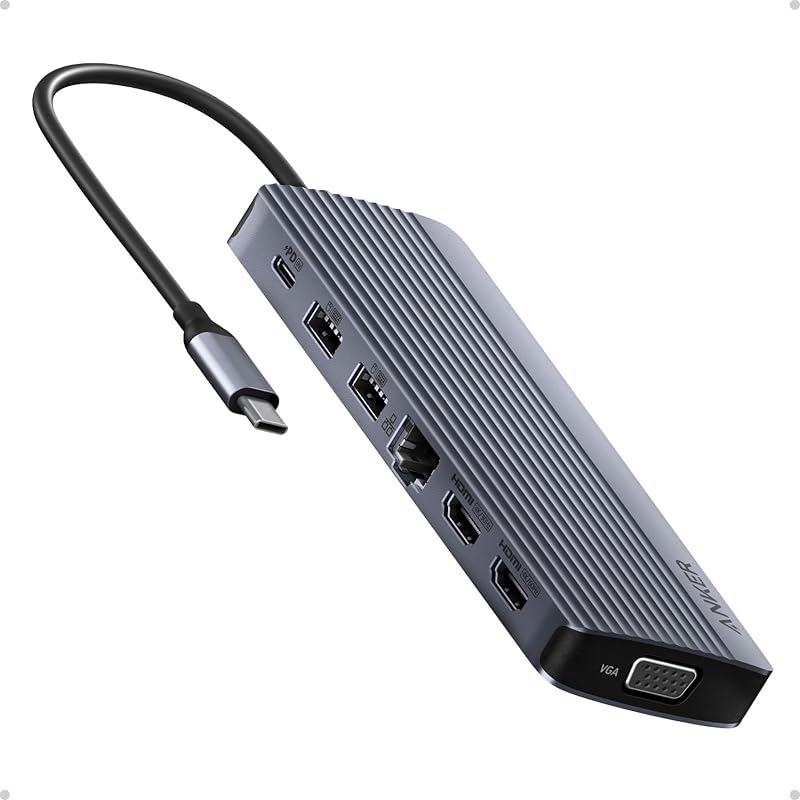
Users who prefer staying within the Anker brand family but require triple-screen functionality should consider the AnkerDual 4K HDMI USB C dock. This 14-in-1 hub supports up to three external monitors via dual 4K HDMI and VGA, delivers up to 80W Power Delivery, and packs multiple USB-A and USB-C data ports in a standard tabletop enclosure.
Final Verdict
The Anker 675 succeeds by combining two pieces of desk gear that are almost always purchased separately: a rigid monitor riser and a feature-rich USB-C dock. By providing 100W host charging, 10Gbps transfer speeds, an integrated wireless pad, and space to slide your keyboard out of sight, it transforms a cluttered desk into an organized, ergonomic workstation with a single upstream cord.
When asking is anker 675 worth it, the answer depends squarely on your display requirements. If your setup depends on dual or triple monitors, the single HDMI output is an immediate dealbreaker. But if you run a single 4K 60Hz monitor or television and value an impeccably clean battlestation, this anker 12 in 1 usb-c dock review finds it to be an exceptionally practical centerpiece for work and entertainment.
FAQ
Does the Anker 675 Docking Station support dual monitors?
No. The Anker 675 only supports video output through its single HDMI port. The listing explicitly specifies that video output is not supported through any of the USB-C ports, limiting your external display setup to one monitor.
How much charging power does the dock provide to a connected laptop?
The docking station provides up to 100W maximum Power Delivery through its upstream USB-C port, allowing it to charge compatible laptops like MacBook Pro, MacBook Air, and ThinkPad systems while handling data.
Can the USB-C ports on the side be used for video output?
No. The downstream USB-C ports are designed strictly for 10Gbps data transfer and peripheral charging (sharing up to 45W Power Delivery). They do not transmit video signals to external monitors.
What are the dimensions of the monitor stand?
The Anker 675 measures 21.26 inches in length, 8.66 inches in width, and 3.54 inches in height, weighing approximately 3.7 pounds. The clearance beneath provides storage room for full-size keyboards and mice.
What accessories are included in the box?
According to the product listing, you receive the Anker 675 USB-C Docking Station (12-in-1, Monitor Stand, Wireless), a welcome guide, and an 18-month warranty.
How these reviews are put together
- 203reviews published
- 2,271products with a buyer rating
- 2,222products with listed features
- 87brands covered
Every number, star and price on this site is read from the Amazon product listing. We do not run lab tests of our own, so a score here is the average rating left by buyers, not a verdict from a test bench. Prices change without notice; check the listing before buying.