Lenovo USB-C Dual Display Travel Dock: Real-World Multi-Monitor Performance
The Lenovo USB-C Dual Display Travel Dock is an ultra-portable expansion hub designed to solve one of the biggest headaches for mobile computing: driving two ultra-high-definition screens away from a stationary desk. Engineered around modern DisplayPort 1.4 and HDMI 2.0 interfaces alongside high-speed 10 Gbps peripheral channels, this 7-port unit packages serious display bandwidth into…
By Eric Monroe
10 min read
As Amazon Associates, we earn from qualifying purchases. This means we may receive a small commission at no extra cost to you if you click through and make a purchase.
The Lenovo USB-C Dual Display Travel Dock is an ultra-portable expansion hub designed to solve one of the biggest headaches for mobile computing: driving two ultra-high-definition screens away from a stationary desk. Engineered around modern DisplayPort 1.4 and HDMI 2.0 interfaces alongside high-speed 10 Gbps peripheral channels, this 7-port unit packages serious display bandwidth into a lightweight travel form factor. In a market crowded with generic hubs that compromise on display fidelity or data speeds, this hardware stands out as a focused, robust workstation accessory for users who demand uncompromised screen acreage without carrying heavy desktop hardware.
This dock directly suits mobile professionals, software engineers, and multimedia enthusiasts who travel between work sites and need a reliable multi-monitor rig powered by a single USB Type-C connection. It also appeals to mobile gamers seeking clean connectivity for external gaming monitors and wired gigabit networks while on the move. However, power users running demanding desktop replacement battlestations that require over 100 watts of sustained power delivery, or creatives relying on built-in SD card readers and legacy analog audio jacks, will need to consider dedicated desktop docking alternatives such as the anker 12 in 1 docking station instead.
Dual 4K Video Output and Display Configuration
The headline feature of the Lenovo USB-C Dual Display Travel Dock is its ability to route video to two ultra-high-definition panels simultaneously. Built with one DisplayPort 1.4 port and one HDMI 2.0 output, this dock allows users to construct an expansive visual workspace wherever they land. Pairing DisplayPort and HDMI gives users great flexibility when connecting modern business monitors, portable gaming screens, or hotel room entertainment systems without having to pack specialized video dongles. The compact chassis functions as a true portable dual 4k monitor dock, providing productivity gains that single-display adapters cannot match.
Achieving dual high-resolution output over a standard USB-C bus requires intelligent bandwidth allocation. The dock relies on industry-standard USB-C DisplayPort Alternate Mode protocols to carry both high-speed data and native video signals. Users researching a lenovo travel dock dual 4k 60hz configuration must evaluate their host laptop’s graphics pipeline and DisplayPort specification. While the hardware provides DisplayPort 1.4 and HDMI 2.0 ports capable of handling 4K video streams, the listing does not specify whether dual 4K runs simultaneously at 60Hz or drops to 30Hz depending on whether the host machine supports Display Stream Compression (DSC) or DisplayPort 1.4 bandwidth limitations over multi-stream transport (MST).
For mobile workstation users, this lenovo usb-c dock displayport hdmi layout eliminates clutter when anchoring dual desktop displays. The side-by-side positioning of the display outputs allows clean routing for standard video cables, making it easy to establish an organized workstation on hotel desks, co-working tables, or mobile command centers. The physical separation between the video ports and adjacent USB channels ensures that thicker display cables do not obstruct peripheral access.
Power Delivery and Charging Flexibility
Power management is a crucial consideration when deploying a compact travel hub. The lenovo usb-c travel dock power delivery architecture offers tiered charging options to balance travel weight against notebook energy requirements. The retail package includes a 100-watt USB-C wall adapter, which translates into 65 watts of continuous power delivery passthrough directly to the connected notebook. This 65-watt profile easily satisfies standard ultrabooks, lightweight productivity machines, and commercial enterprise laptops during standard computing tasks.
For users operating more demanding machines, the dock provides an upgrade path. By pairing the unit with an optional 135-watt USB-C power supply, the dock elevates its host charging output up to 100 watts of power delivery. This higher ceiling provides adequate energy replenishment for power-hungry notebooks and mobile creator rigs running continuous CPU and GPU loads. Having the flexibility to scale charging performance prevents battery drain during intensive rendering or multitasking sessions without requiring an entirely separate desktop docking block.
In addition to powering the primary host, the unit features an always-on charging capability through one of its dedicated USB ports. Delivering up to 5V/2.4A of continuous current, this port remains active even when the host notebook is disconnected or powered down. This allows users to charge companion mobile devices or tablets such as the lenovo tab m9 overnight without keeping the laptop running, effectively turning the travel dock into a standalone charging hub.
High-Speed Data Ports and Peripheral Connectivity
Many lightweight travel docks compromise on peripheral bandwidth by utilizing older USB 2.0 or 5 Gbps USB 3.0 controllers. In contrast, the lenovo usb-c dual display travel dock specs reflect high-performance data engineering, boasting 10 Gbps speeds across all three of its integrated USB ports. The configuration includes one USB-A 3.2 Gen 2 port alongside two USB-C 10 Gbps ports, granting users the speed necessary to interface with high-velocity external NVMe solid-state drives, rapid backup media, and professional capture hardware.
A stable wired connection remains essential for high-throughput enterprise tasks, video streaming, and low-latency gaming. The integrated RJ45 ethernet port supports 10/100/1000 Mbps network transmission with plug-and-play functionality. By circumventing congested wireless networks in hotels, conference facilities, and dormitories, the gigabit port provides clean, uninterrupted packet delivery for mission-critical uploads or gaming sessions.
- 1 x USB-A 3.2 Gen 2: Up to 10 Gbps bandwidth for rapid file transfers with flash drives and peripherals.
- 2 x USB-C 10 Gbps: Dual modern Type-C data lanes, including one always-on port for device charging.
- 1 x Gigabit RJ45: Reliable high-speed wired internet access without requiring additional driver installations.
Portability, Build Quality, and Sustainable Design
Measuring just 4.72 inches long, 2.6 inches wide, and 0.79 inches tall, the dock occupies an exceptionally small footprint in any gear bag. At a feathery 4.8 ounces, it adds minimal weight to travel backpacks, making it a natural companion for road warriors who refuse to compromise on interface availability. The Eclipse Black exterior provides a sleek, understated aesthetic that matches professional ThinkPad lineups as well as modern stealth gaming laptops.
Cable management is a frequent pain point with mobile hubs, as loose dangling cables can snag or wear out over time. Lenovo addresses this with an integrated host cable equipped with an adjustable cable management channel. This design allows users to neatly stow the connection cable flush against the dock body during transit, protecting the USB Type-C connector from accidental bending or debris accumulation while sliding in and out of luggage pockets.
Beyond physical dimensions, the chassis integrates environmental considerations directly into its manufacturing. The housing incorporates 66% post-consumer recycled content (PCC) plastic, representing a conscious effort to minimize the use of virgin plastics. Despite the high recycled material content, the structural rigidity remains solid, resisting flexing under hand pressure and providing an enduring protective shell for the internal circuit boards.
Mobile Entertainment and Gaming Performance
Evaluating the lenovo usb-c dual display travel dock for gaming reveals clear advantages for mobile players who travel with compact gaming laptops or handheld consoles that support standard USB-C Alternate Mode. While desktop docking stations are heavy and cumbersome, this 4.8-ounce hub slips into any carrying sleeve, enabling quick hookups to external gaming monitors, mechanical keyboards, and wired networks in hotel rooms or LAN venues.
The inclusion of a 10 Gbps USB-A port ensures that gaming peripherals—such as high-polling-rate mice and custom mechanical keyboards—experience zero communication bottlenecks. Furthermore, using the native RJ45 gigabit port eliminates the latency spikes, packet loss, and jitter inherent to shared Wi-Fi networks. This provides a steady, competitive baseline during fast-paced multiplayer titles where ping stability matters as much as raw frame rates.
However, players must account for overall power draw when running gaming hardware through the dock. Because the included 100W adapter routes 65W to the host system, high-end gaming laptops with dedicated discrete GPUs running at maximum thermal capacity may slowly deplete their internal battery unless paired with the optional 135W adapter to unlock 100W delivery, or connected directly to their proprietary high-wattage power bricks during intense gaming sessions.
Lenovo USB-C Dual Display Travel Dock Pros and Cons
Pros
- Supports dual 4K external displays simultaneously
- High-speed 10 Gbps USB-C and USB-A ports
- Up to 100W power delivery with 135W adapter
- Always-on USB port charges devices when disconnected
- Compact 4.8-ounce chassis with integrated cable management
Cons
- Requires optional 135W adapter for maximum 100W charging
- Lacks integrated SD card reader and audio port
- Integrated host cable length cannot be extended
Check Lenovo USB-C Dual Display Travel Dock on Amazon
Who Should Buy the Lenovo USB-C Dual Display Travel Dock
Buy It If
- You need to drive two 4K external monitors from a single USB-C connection while traveling or hot-desking.
- You want fast 10 Gbps data transfer speeds across both USB-C and USB-A ports without carrying bulky gear.
- You value compact travel features like integrated cable management and a lightweight 4.8-ounce footprint.
- You want an always-on charging port that powers your phone or accessories even when your laptop is unplugged.
Skip It If
- You require integrated SD or microSD card slots for direct multimedia workflow and camera card offloading.
- You need an onboard 3.5mm analog audio combination jack for wired headsets and external speakers.
- You run an extreme desktop gaming battlestation requiring proprietary power delivery exceeding 100 watts.
Lenovo USB-C Dual Display Travel Dock Alternatives Worth a Look
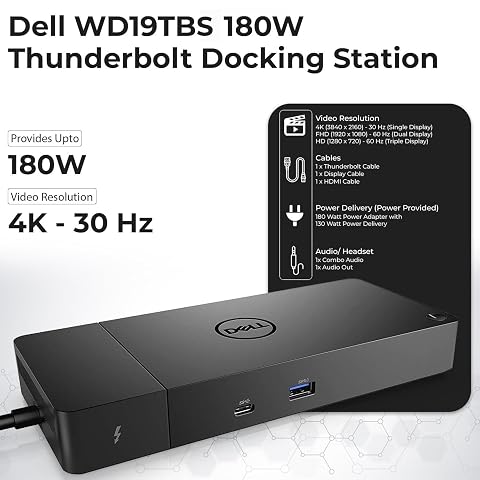
While the Lenovo dock delivers an exceptional mix of dual display capability and high-speed data, diverse user requirements may favor alternative port configurations, higher native power outputs, or dedicated desktop form factors like the wd19tbs docking station or the vertical-mount satechi dual dock stand.
Dual HDMI USB C Dock

The Dual HDMI USB C Dock is an 8-in-1 portable hub that focuses on dual HDMI monitor connectivity alongside built-in SD and TF card readers. Offering up to 85W of maximum power delivery passthrough and gigabit ethernet, it caters directly to photographers and videographers who frequently offload media cards on location, though it trades away the DisplayPort interface found on the Lenovo unit.
Universal Dock

The Universal Dock is a heavy-duty enterprise docking solution engineered by Dell. Supporting quad display configurations alongside 100W native power delivery charging, this unit provides extensive USB-A and USB-C expandability designed for stationary office desks rather than ultralight travel convenience.
for Windows and Mac

The for Windows and Mac dock by Plugable utilizes universal USB 3.0 or USB-C connectivity with dedicated DisplayLink driver requirements to support dual HDMI displays. With six USB ports and dedicated audio connections, it serves as a reliable solution for older legacy laptops that lack native DisplayPort Alternate Mode over USB-C.
Final Verdict
This lenovo 40B90000US review demonstrates that thoughtful engineering can squeeze true desktop-class visual flexibility into a remarkably compact footprint. The combination of DisplayPort 1.4, HDMI 2.0, full 10 Gbps peripheral data channels, and an integrated gigabit network interface makes this unit a standout performer among mobile docking hubs. By integrating smart cable management and utilizing a chassis composed of 66% recycled plastic, Lenovo has built a durable, environmentally conscious tool that eliminates travel desk clutter.
Ultimately, answering whether the lenovo usb-c dual display travel dock worth it comes down to your personal mobility and display requirements. If your daily workflow relies on running two high-resolution monitors while moving between the office, client sites, and home, the hardware provides seamless plug-and-play capability backed by flexible 65W to 100W charging configurations. For travelers needing uncompromised display channels and rapid data speeds without lugging a hefty brick, this dock stands as an exceptional productivity asset.
FAQ
What video resolutions does the Lenovo USB-C Dual Display Travel Dock support?
The dock supports up to two 4K displays simultaneously using its DisplayPort 1.4 and HDMI 2.0 output ports. Actual multi-monitor refresh rates depend on the capabilities of the host laptop’s graphics processing unit and its USB-C DisplayPort Alternate Mode implementation.
How much power delivery does the dock provide to a connected laptop?
When used with the included 100W USB-C charger, the dock supplies 65W of direct power delivery passthrough to your notebook. If you need higher power output, pairing the unit with an optional 135W USB-C adapter elevates power delivery up to 100W.
Does this travel dock require special software or drivers to function?
The dock operates using industry-standard USB-C DisplayPort Alternate Mode and native operating system controllers, offering plug-and-play functionality across Windows, macOS, and other standard systems. The gigabit ethernet port is also designed for plug-and-play operation.
Can I charge my phone using the dock without my laptop connected?
Yes. The dock includes an always-on USB port that delivers up to 5V/2.4A of power to charge mobile phones, wireless earbuds, or tablets even when the host notebook is completely disconnected.
What devices are compatible with this travel dock?
The dock is engineered for universal compatibility across laptops that support industry-standard USB Type-C Alternate Mode or Thunderbolt protocols via their USB-C connection.
How these reviews are put together
- 203reviews published
- 2,271products with a buyer rating
- 2,222products with listed features
- 87brands covered
Every number, star and price on this site is read from the Amazon product listing. We do not run lab tests of our own, so a score here is the average rating left by buyers, not a verdict from a test bench. Prices change without notice; check the listing before buying.