Dell KB216 Wired Keyboard: Performance for Work and Play
The Dell KB216 is a full-sized, low-profile desktop peripheral designed to provide a straightforward, functional typing solution for everyday computing tasks across home and professional environments. Featuring an island-style layout, quiet membrane switches, and dedicated audio shortcuts, it strips away unnecessary complexity in favor of consistent daily utility. The verdict on this peripheral is clear:…
By Eric Monroe
8 min read
As Amazon Associates, we earn from qualifying purchases. This means we may receive a small commission at no extra cost to you if you click through and make a purchase.
The Dell KB216 is a full-sized, low-profile desktop peripheral designed to provide a straightforward, functional typing solution for everyday computing tasks across home and professional environments. Featuring an island-style layout, quiet membrane switches, and dedicated audio shortcuts, it strips away unnecessary complexity in favor of consistent daily utility. The verdict on this peripheral is clear: it delivers dependable input stability and comfortable short-travel typing for standard productivity and relaxed casual gaming, making it a reliable workhorse for users who want plug-and-play simplicity without software bloat.
This keyboard is an ideal match for remote professionals, students, data-entry specialists, and casual PC gamers who appreciate the shallow travel of laptop keys and require an integrated numeric keypad. Conversely, competitive esports players who depend on high-speed mechanical switches, advanced anti-ghosting matrices, and programmable macros will find its membrane design limiting and should look toward dedicated gaming hardware instead.
Chiclet Architecture and Everyday Typing Feel
The defining operational characteristic of this keyboard is its low-profile key design. Exploring the dell kb216 typing experience reveals that the flat, island-style keys closely mimic the shallow actuation depth of modern laptop keyboards. Users transitioning frequently between a mobile notebook and a desktop workstation will appreciate the zero-adjustment muscle memory. Fingers glide effortlessly across the low keycaps without needing to lift high between keystrokes, reducing wrist and finger fatigue during prolonged document drafting, spreadsheet compilation, or long coding sessions.
Underneath the keycaps, quiet membrane domes absorb key impacts to deliver a subdued sound signature. In shared offices, university libraries, or late-night gaming setups, the subdued acoustic output ensures keystrokes do not echo across the room or register on sensitive open voice microphones. The physical separation between keycaps on this dell kb216 chiclet keyboard helps prevent unintentional multi-key strikes, maintaining typing accuracy even during rapid, uninterrupted data entry.
While the keys actuate softly with a gentle bottom-out sensation, larger keys like the spacebar and shift keys maintain consistent alignment across their surfaces. Typists accustomed to high-end mechanical keyboards may miss the crisp click or tactile bump of custom switches. If your primary goal is distinctive switch tactility and mechanical customization, comparing this layout with specialized keyboards like the aula f75 pro highlights the clear structural difference between everyday chiclet membranes and enthusiast-grade mechanical hardware.
Input Responsiveness and Casual Gaming Latency
When assessing the dell kb216 for gaming, expectations must be framed around standard office membrane technology. The keyboard relies on a direct corded USB connection, establishing a continuous, hardwired electrical link to your personal computer. Because it bypasses wireless frequencies and battery power management cycles, the dell kb216 latency remains consistent, avoiding signal drops, radio interference, and sudden disconnections in the middle of a session.
For casual entertainment—such as turn-based tactics, real-time strategy titles, building simulators, and slow-paced role-playing games—the key registration feels prompt and predictable. Gamers who pair their desktop system with expansive visual setups like the dell alienware aw3426dw will find standard character movements and navigation hotkeys registered reliably. The low-profile keys allow quick finger traversal across hotkey clusters without physical resistance.
However, players who focus on competitive, fast-twitch first-person shooters or complex fighting games will encounter the physical boundaries of a standard desktop keyboard. The listing indicates standard office and everyday desktop engineering rather than specialized anti-ghosting matrices or N-key rollover. Pressing three or more diagonal movement keys and action modifiers simultaneously can result in missed inputs during chaotic firefights. Casual gaming runs smoothly, but high-stakes competitive play demands gaming-grade hardware.
Dedicated Multimedia Shortcuts and Daily Workflow
Media control is an area where the dell multimedia keyboard kb216 provides convenient everyday functionality. Integrated along the top row are dedicated physical controls for essential playback tasks. Users can instantly play, pause, rewind, fast-forward, and adjust system audio levels up or down without clicking through desktop software or minimizing a full-screen application.
Many standard office peripherals require holding an extra function key combination to manipulate speaker volume or skip background music tracks. By isolating these controls into independent buttons, this board allows immediate, single-touch adjustments. Whether you are balancing background commentary during research or adjusting volume while exploring open-world game maps, the isolated controls save time and preserve your workflow focus.
The multimedia keys function automatically on Windows computers via standard system drivers without requiring heavy background utilities or specialized driver packages. Users who prefer specialized built-in pointing sticks might lean toward compact enterprise units like the lenovo thinkpad keyboard with trackpoint, but for standard full-sized Windows desktop setups, these dedicated media buttons handle daily playback adjustments seamlessly.
Desk Footprint and Physical Build Quality
A detailed inspection of the dell kb216 build quality reveals a durable, highly utilitarian desktop peripheral. Spanning 17.4 inches wide, 5.0 inches deep, and 1.0 inch thick, the keyboard maintains an exceptionally compact desk footprint for a full 104-key configuration. Dell achieved this lean form factor by eliminating bulky plastic bezels around the exterior frame, leaving only the essential chassis needed to house the full key set and numeric keypad.
Weighing 17.74 ounces (1.1 pounds), the chassis is light enough to reposition easily across a desk mat while remaining sufficiently grounded during daily typing. The matte black plastic finish resists fingerprint marks and surface oils from long workdays. Additionally, the listing notes that a matching ergonomic palm rest is available for separate purchase, giving users the option to add wrist elevation if their daily posture demands extra support.
Reviewing the official dell kb216 specs highlights comprehensive compatibility across personal computers running Windows 10 or newer. Dell specifically designed this model to support an extensive array of its personal computer lines, including Alienware laptops (13 R2, 15 R2, 17 R3), Inspiron desktops, Latitude business portables, OptiPlex workstations, Precision towers, Vostro business desktops, and XPS systems. This wide hardware compatibility ensures seamless plug-and-play operation across home and corporate environments alike.
Dell KB216 Pros and Cons
Pros
- Low-profile chiclet keys for quiet typing
- Dedicated hardware multimedia and volume controls
- Full 104-key layout in a compact footprint
- Stable plug-and-play corded USB connection
- Validated across extensive Dell desktop and laptop systems
Cons
- Membrane switches lack mechanical tactile feedback
- No built-in key backlighting for dark environments
- Optional palm rest sold separately
Who Should Buy the Dell KB216
Buy It If
- You prefer flat, low-profile chiclet keys that offer short, quiet travel similar to modern laptop keyboards.
- You want dedicated physical buttons for volume adjustment and media playback without memorizing modifier combinations.
- You require a full 104-key layout with an integrated numeric pad while maintaining a slim desk profile.
- You need a dependable, wired USB peripheral for daily office productivity, web browsing, and casual gaming sessions.
Skip It If
- You play competitive multiplayer games that demand high-speed mechanical switches, anti-ghosting matrices, and custom macro keys.
- You frequently work or game in dark environments and require built-in key backlighting.
- You are building a minimalist workspace centered entirely on wireless, battery-operated accessories.
Dell KB216 Alternatives Worth a Look
While the featured keyboard serves as an effective, full-sized computing baseline, alternative keyboards cater to distinct workspace demands, connectivity methods, and layout sizes.
Amazon Basics Wired QWERTY Keyboard
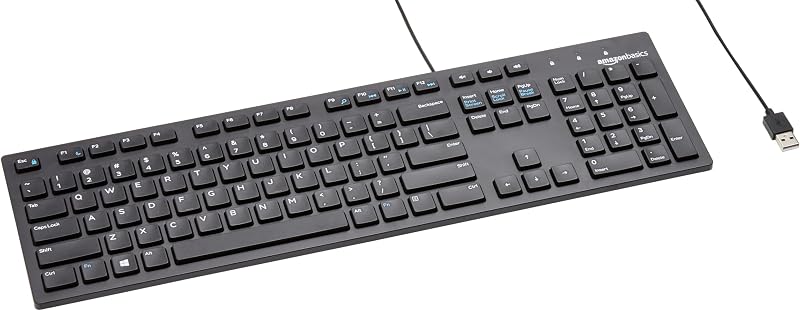
The Amazon Basics Wired QWERTY Keyboard is a full-sized, corded USB peripheral designed for standard plug-and-play operation with Windows computers. Like the Dell model, it includes convenient media controls and a traditional full-sized layout. Home workers or students seeking a purely utilitarian, baseline replacement keyboard for secondary desktop stations will find it a direct, practical alternative.
Full size keyboard with spill-resistant
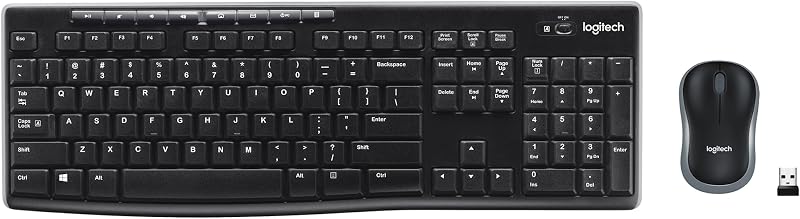
The Full size keyboard with spill-resistant design provides a cord-free desktop solution paired with a compact ambidextrous mouse, communicating through a single included USB-A nano receiver. Users looking to clean up messy desk cables while gaining defensive protection against accidental liquid spills during long work or entertainment sessions will benefit from this wireless combo.
Creamy Computer Keyboard for PC

The Creamy Computer Keyboard for PC features a compact 68-key silent wireless gaming design equipped with RGB backlighting, a built-in 2000mAh battery, carbon fiber keycaps, and a membrane structure with a light box. PC enthusiasts who want a travel-friendly gaming footprint, illuminated visual styling, and wireless flexibility over a traditional 104-key number pad should select this compact alternative.
Final Verdict
This dell kb216 wired keyboard review demonstrates that the peripheral accomplishes its core mission: delivering dependable, no-frills typing performance for everyday computer users. Its quiet chiclet keys, dedicated audio controls, and slim perimeter borders make it an uncomplicated peripheral that integrates neatly onto crowded desks. The wired USB connection delivers consistent signal continuity, providing a stable foundation for office software, school assignments, and casual entertainment.
Ultimately, is dell kb216 worth it for your personal workspace? If your computing time revolves around typing, browsing, spreadsheets, and casual gaming where competitive split-second inputs are not a priority, this keyboard delivers exceptional everyday utility. Users seeking advanced mechanical feedback or illuminated gaming accents should explore specialized alternatives, but for everyday desktop reliability, this wired unit gets the job done.
FAQ
Does the Dell KB216 have backlit keys for typing in the dark?
No, the listing does not specify any backlighting features. The keyboard uses standard white lettering on black chiclet keys, which requires ambient room lighting for optimal visibility.
Can I use the Dell KB216 for fast-paced competitive gaming?
While its wired USB connection provides steady latency for casual gaming, the keyboard is designed for everyday desktop use rather than competitive esports. It lacks mechanical switches, custom macro configuration, and specialized anti-ghosting matrices needed for high-intensity multiplayer titles.
Is a palm rest included in the box with the keyboard?
No, the listing states that an ergonomic palm rest is available for separate purchase. The product package includes the corded keyboard itself.
What operating system is required to use this keyboard?
The keyboard is compatible with personal computers running the Windows operating system, with the product data specifying Windows 10 as the minimum operating system version.
Can the dedicated multimedia keys be remapped to other functions?
The multimedia keys are dedicated hardware controls configured for volume and media playback commands. The manufacturer listing does not mention custom software or remapping capabilities for these keys.
How these reviews are put together
- 540reviews published
- 2,271products with a buyer rating
- 2,222products with listed features
- 87brands covered
Every number, star and price on this site is read from the Amazon product listing. We do not run lab tests of our own, so scores here are out of 10, based on listed specifications and buyer feedback, not a verdict from a test bench. Prices change without notice; check the listing before buying.


