Lenovo ThinkPad Compact USB Keyboard: Performance & Ergonomics
The Lenovo ThinkPad Compact USB Keyboard is an external, low-profile peripheral that transplants the iconic enterprise laptop typing experience straight onto your desktop. Built with an integrated TrackPoint pointing stick and tactile scissor switches, this wired unit delivers a focused, highly responsive typing experience that eliminates the need to reach for a standalone mouse, earning…
By Eric Monroe
9 min read
As Amazon Associates, we earn from qualifying purchases. This means we may receive a small commission at no extra cost to you if you click through and make a purchase.
The Lenovo ThinkPad Compact USB Keyboard is an external, low-profile peripheral that transplants the iconic enterprise laptop typing experience straight onto your desktop. Built with an integrated TrackPoint pointing stick and tactile scissor switches, this wired unit delivers a focused, highly responsive typing experience that eliminates the need to reach for a standalone mouse, earning our nod as a purpose-built productivity weapon for clutter-free workspaces.
This compact peripheral suits touch typists, coding professionals, and mobile workers who cherish the legendary tactile feedback found on machines like the t14 gen 6 or the spacious lenovo thinkpad t16 gen 3. However, multimedia power users seeking extensive programmable macros, aggressive mechanical key travel, or high-speed gaming sensors should look elsewhere, as this board is tuned strictly for typing precision and streamlined ergonomics.
Typing Feel and Scissor Switch Mechanism
The typing performance of the Lenovo ThinkPad Compact USB Keyboard centers on its scissor lift key mechanism. Rather than using mushy traditional membranes or tall mechanical switches, this thinkpad scissor switch keyboard relies on low-profile stabilizers under every keycap. When depressed, each key produces an immediate, crisp tactile response followed by a firm bottom-out that prevents accidental double-strikes. The deliberate actuation profile closely mirrors the responsive tactile feel praised on high-end business notebooks such as the thinkpad p71 mobile workstation.
Lenovo implemented an island style layout with carefully engineered spacing between keycaps. The keys feature slightly larger top surface areas compared to generic slim decks, providing a centered target that reduces typos during rapid data entry or long coding sessions. The switches offer a tactile stroke that gives your fingers instant confirmation of a registered keypress without demanding excessive muscular effort, keeping hand fatigue minimal during intense typing marathons.
While the product specifications make a curious reference to a Romer-G mechanical model, the physical unit functions entirely on the award-winning scissor switch architecture described across its core hardware profile. The result is a whisper-quiet, short-travel deck that feels grounded and reassuringly predictable under heavy finger work, establishing a balanced typing feel that mechanical switch purists often appreciate for daily office output.
TrackPoint Navigation and Mouse Elimination
The defining element of this thinkpad wired keyboard with trackpoint is the iconic red pointing stick nestled between the G, H, and B keys. This isometric joystick translates directional pressure directly into smooth cursor movement across the screen. By mastering lenovo usb keyboard trackpoint navigation, users eliminate the physical reach between the home row and an external mouse, shaving seconds off repetitive daily tasks and maintaining physical alignment throughout the day.
Positioned directly beneath the spacebar are three dedicated mouse buttons configured in an ambidextrous arrangement. The left and right buttons deliver a distinct mechanical click, while the center button functions as a smooth scrolling toggle when pressed in tandem with the pointing stick. Because your hands never have to leave the home typing row to click, drag, or highlight text, workflow continuity remains uninterrupted across deep research or text manipulation tasks.
For minimalist desks, eliminating the mouse pad and standalone pointer opens up valuable surface space. The trackpoint does not require an optical sensor to track across a physical desk, meaning you can balance this deck on your lap, operate it on crowded cafe tables, or slot it into compact equipment racks without losing granular cursor control.
Desktop Ergonomics and Space Efficiency
Designing a proper thinkpad trackpoint keyboard for desktop use requires balancing stability with a compact physical footprint. The deck features built-in keyboard tilt feet along the underside that elevate the typing angle to match natural wrist posture. The low-profile chassis sits flush against the desk surface, keeping wrist extension to an absolute minimum and reducing the need for an external padded wrist rest.
The plastic enclosure measures just over half an inch in height, giving the board an ultra-slim profile that slides effortlessly into a laptop bag or backpack alongside other gear. Deploying a lenovo trackpoint compact keyboard setup allows you to position your typing deck directly in line with your monitor, avoiding the awkward shoulder flare often caused by wide full-sized boards equipped with dedicated numeric keypads.
Despite its lightweight plastic construction, the enclosure remains rigid during deliberate keystrokes. Rubberized pads along the base secure the keyboard to desk mats or wooden surfaces, preventing slipping when navigating through the TrackPoint or striking keys with vigor.
Function Controls and Windows Integration
Understanding the lenovo thinkpad keyboard with trackpoint specs involves exploring how the top row handles operational tasks. The top edge houses dedicated function keys programmed for Windows navigation, audio volume control, microphone muting, and screen brightness adjustments. These quick-access shortcuts make system adjustments effortless without having to dive through software menus or operating system settings.
One of the handiest productivity utilities is the Fn+Esc function lock toggle. By engaging this shortcut, users can switch instantly between standard F1-F12 legacy functions and native hardware controls. Software developers who rely heavily on direct function keys for debugging can lock the row to standard inputs, while general productivity users can keep multimedia controls active as the default behavior.
The keyboard connects via a standard corded electric USB interface, delivering uninterrupted plug-and-play reliability without the latency, dropouts, or charging cycles associated with wireless peripherals. The wired pipeline guarantees instant communication with the host computer, ensuring keystrokes register reliably the exact moment you strike the keys.
Gaming Performance and Multimedia Experience
When assessing thinkpad compact keyboard gaming performance, expectations must be framed around its business-first heritage. The low-profile scissor switches actuate rapidly with clear tactile feedback, making the board responsive for casual titles, turn-based strategy games, and retro emulation where ultra-precise rapid-fire keystrokes are not paramount. The corded USB connection ensures zero wireless interference or battery depletion during long sessions.
However, enthusiasts playing competitive first-person shooters will encounter distinct limitations. The TrackPoint pointing stick, while brilliant for productivity text selection, cannot match the rapid flick-targeting and wide sweeping velocity of a dedicated optical gaming mouse. Additionally, the compact layout omits macro columns and deep mechanical customizability, limiting advanced control remapping inside complex action titles.
For multimedia use, the hardware audio and mute controls provide prompt physical commands when watching videos or engaging in group calls. While the listing notes single-color backlighting support, users should be aware that the keyboard lacks dynamic RGB illumination, maintaining a subdued aesthetic that prioritizes workplace focus over flashy gaming accents.
Lenovo ThinkPad Compact USB Keyboard Pros and Cons
Pros
- Integrated TrackPoint eliminates external mouse need
- Tactile scissor switch key mechanism
- Dedicated volume and brightness control keys
- Fn lock toggles function rows instantly
- Compact space-saving desktop footprint
- Built-in keyboard tilt feet
Cons
- Not water resistant against spills
- Single color backlighting support only
- Tethered corded electric USB connection only
Check Lenovo ThinkPad Compact USB Keyboard on Amazon
Who Should Buy the Lenovo ThinkPad Compact USB Keyboard
Buy It If
- You want the exact tactile scissor-switch feel of an enterprise ThinkPad laptop on your desktop setup.
- You want to eliminate an external mouse entirely by relying on integrated TrackPoint navigation.
- You work in space-restricted environments like server racks, small desks, or mobile workstations.
- You require instant, dependable plug-and-play USB connectivity with dedicated Windows shortcut controls.
Skip It If
- You need liquid spill resistance for messy workspaces or accident-prone desks.
- You play fast-paced competitive shooter games requiring dedicated high-DPI mouse sensors.
- You prefer deep mechanical switch travel with customizable RGB lighting and hot-swap sockets.
Lenovo ThinkPad Compact USB Keyboard Alternatives Worth a Look
If the unique combination of low-profile scissor keys and pointing stick hardware does not completely align with your desktop goals, several other keyboards offer alternative layouts, connectivity methods, and switch mechanisms.
Amazon Basics Wired QWERTY Keyboard
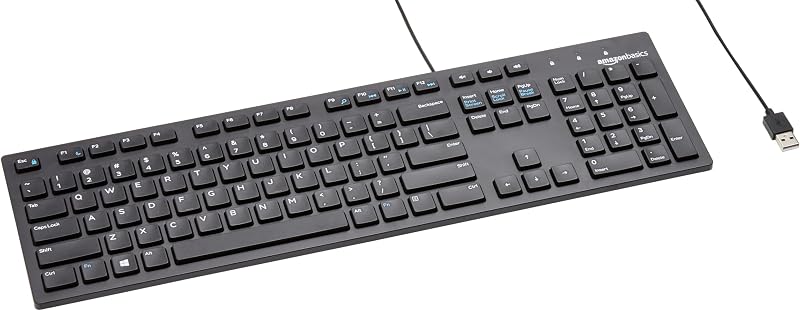
The Amazon Basics Wired QWERTY Keyboard provides a traditional full-sized layout featuring dedicated numeric pads and integrated media controls. Connected via a reliable plug-and-play USB cable, it serves shoppers who require a familiar standard deck for general data entry without the compact footprint or specialized TrackPoint hardware of the ThinkPad deck.
Full size keyboard with spill-resistant
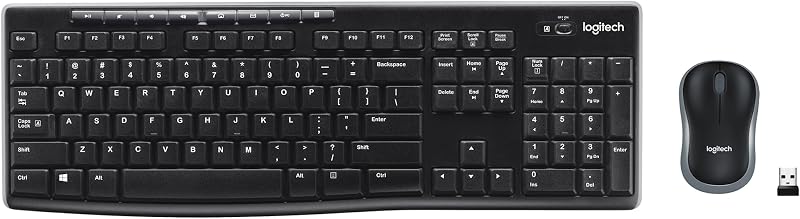
The Full size keyboard with spill-resistant design delivers a complete wireless desktop bundle paired with a compact ambidextrous mouse over a single USB-A nano receiver. This option suits office users who worry about liquid accidents around their desk and prefer a traditional separate mouse rather than relying on an integrated pointing stick.
Creamy Computer Keyboard for PC

The Creamy Computer Keyboard for PC offers a stylized 68-key wireless setup equipped with carbon fiber keycaps, RGB backlighting, a membrane structure, and an integrated 2000mAh rechargeable battery. It caters directly to recreational PC gamers and aesthetic desk enthusiasts seeking vibrant visual flair and silent operation over utilitarian corporate design.
Final Verdict
So, is lenovo thinkpad keyboard with trackpoint worth it for modern setups? If your daily workflow revolves around writing, programming, or managing expansive spreadsheets, the answer is a definitive yes. By transplanting the unrivaled tactile feedback of ThinkPad laptops into an external USB deck, it allows you to build an ultra-clean, mouse-free workspace centered entirely around the home row. Paired with reliable enterprise gear like the lenovo thinkpad t14 32gb ram, it forms an exceptionally disciplined workstation.
Ultimately, this lenovo thinkpad compact usb keyboard review concludes that the board succeeds precisely because it stays true to its identity. It does not attempt to mimic flashy gaming boards or oversized office peripherals. Instead, it provides a rugged, tactile, and space-conscious tool engineered for typists who prioritize speed, accuracy, and proven ergonomics above all else.
FAQ
How does the integrated TrackPoint compare to a standard desktop mouse?
The integrated TrackPoint acts as an isometric pointing stick that moves the cursor based on directional finger pressure. It allows you to navigate screens and click physical buttons without lifting your hands away from the typing home row, saving motion and desk space, though it is less suitable for fast twitch gaming than a traditional optical mouse.
Does this keyboard require special drivers to use the function keys?
The keyboard operates via standard USB plug-and-play on Windows systems. Built-in shortcuts like volume control, mute, and brightness adjust natively, and the Fn+Esc combination allows you to lock the function row to standard F1-F12 commands without installing third-party management suites.
Is the keyboard protected against liquid spills?
No, the product specifications indicate that this keyboard is not water resistant. Liquids spilled directly onto the island-style key deck can damage internal traces and scissor mechanisms, so drinks should be kept clear of the operational area.
Can the keyboard tilt angle be adjusted?
Yes, the underside of the plastic chassis includes integrated keyboard tilt feet. Deploying these legs elevates the rear edge slightly, providing an angled slope that matches natural hand posture during extended typing sessions.
What key switch technology does this keyboard utilize?
The keyboard uses a tactile scissor lift mechanism beneath an island-style keycap design. This setup delivers short, defined travel with a crisp tactile bump upon actuation, minimizing key wobble and maximizing typing comfort.
How these reviews are put together
- 540reviews published
- 2,271products with a buyer rating
- 2,222products with listed features
- 87brands covered
Every number, star and price on this site is read from the Amazon product listing. We do not run lab tests of our own, so scores here are out of 10, based on listed specifications and buyer feedback, not a verdict from a test bench. Prices change without notice; check the listing before buying.


