Razer Ornata V3: Low-Profile Mecha-Membrane Gaming Performance
The Razer Ornata V3 is an ultra-slim, full-sized hybrid keyboard engineered to bridge the tactile feel of mechanical gaming hardware with the cushioned actuation of traditional membrane decks. Serving as a refined entry in Razer’s ergonomic lineup, it delivers an approachable typing experience paired with snappy audio feedback, proving that low-profile decks can hold their…
By Eric Monroe
9 min read
As Amazon Associates, we earn from qualifying purchases. This means we may receive a small commission at no extra cost to you if you click through and make a purchase.
The Razer Ornata V3 is an ultra-slim, full-sized hybrid keyboard engineered to bridge the tactile feel of mechanical gaming hardware with the cushioned actuation of traditional membrane decks. Serving as a refined entry in Razer’s ergonomic lineup, it delivers an approachable typing experience paired with snappy audio feedback, proving that low-profile decks can hold their own during competitive gameplay and demanding office routines alike.
This hybrid board is an exceptional match for PC gamers and typists who suffer from wrist fatigue and want a shallower key stroke without sacrificing a crisp, physical click. However, pure mechanical purists who demand individual mechanical stem customization, hot-swappable switches, or cordless desktop setups will want to seek out traditional wireless alternatives instead.
Hybrid Switch Mechanics and Actuation Feel
At the core of this board sits Razer mecha membrane switches, a hybrid technology engineered to satisfy two conflicting keyboard preferences. By layering a mechanical spring-click mechanism over an elastomeric membrane dome, every press provides a distinct, audible snap at the actuation point before bottoming out against a cushioned membrane layer. This architecture provides immediate auditory and tactile validation when executing split-second commands, avoiding the mushy, indistinct sensation common to baseline office keyboards.
When considering the razer ornata v2 vs v3, the shift toward a low-profile architecture drastically transforms key navigation. While the prior razer ornata v2 relied on taller key structures, this newer revision uses significantly shorter switches and slim keycaps. The physical travel distance needed to register an input is minimized, allowing your fingertips to glide between commands across the 104-key QWERTY layout with reduced vertical lifting. If you routinely transition between work typing and competitive sessions next to high-performance machines like the razer blade 16 oled, the shorter keystroke offers rapid-fire responsiveness that closely mimics a refined laptop board while retaining a crisp click.
The acoustic signature is unmistakably clicky without producing the intense metallic resonance often heard on exposed metal switch plates. Because each switch ultimately strikes an underlying membrane pad, the bottom-out noise is dampened. Typists who appreciate snappy physical confirmation during long typing blocks will find the hybrid tactile balance remarkably satisfying, though open-office workers should keep in mind that the click mechanism remains clearly audible.
Low-Profile Ergonomics and Build Durability
Measuring merely 1.23 inches in height, this razer low profile gaming keyboard is designed to enforce a natural hand and forearm posture. Conventional mechanical keyboards feature elevated switch housings that frequently force users to cock their wrists backward at an unnatural upward pitch. The Ornata V3 combats this by dropping the overall chassis thickness, allowing your hands to rest in an open, neutral plane that wards off muscular strain throughout marathon gaming sessions.
Ergonomics receive a major boost thanks to the included magnetic soft touch razer ornata wrist rest. Designed specifically to match the low-profile frame, it snaps seamlessly against the lower lip of the keyboard housing using integrated magnets. Rather than relying on rigid plastic latches that snap under lateral pressure, the magnetic bond keeps the rest firmly anchored during frantic mouse swipes while remaining effortless to detach when packing your gear. The soft-touch surface provides resilient cushioning that evenly distributes pressure across the base of your palms.
Durability has also been reinforced on the keycap level. Standard ABS keycaps frequently develop an unsightly greasy shine and lose their printed lettering after months of intense WASD friction. Razer counteracts this by utilizing UV-coated keycaps that provide an extra protective barrier over the legends. This coating shields the surfaces from oil, skin acidity, and wear, ensuring the lettering remains sharp and legible over years of competitive play. Additionally, the deck features certified water resistance, granting peace of mind against accidental liquid spills during intense desktop matches.
Gaming Responsiveness and Hardware Integration
Assessing the razer ornata v3 for gaming requires looking at reliability under pressure. Built strictly around a wired USB corded electric interface, the keyboard eliminates the threat of latency spikes, frequency interference, or mid-match battery drainage. Every input across its 104-key layout transfers instantaneously to your PC, ensuring precise execution whether dodging abilities in an arena shooter or firing off macros in a strategy game.
Convenience extends to audio and stream management via dedicated backlit media keys. Located in the upper-right corner of the board, these buttons allow you to play, pause, skip tracks, and adjust desktop volume or backlighting brightness on the fly without minimizing your active fullscreen window. If you keep your streaming battlestation tidy with accessories like the razer base station, having hardware-level controls directly above the numpad ensures that background music and communication volume can be calibrated without interrupting match focus.
The keyboard is officially validated for PC systems running Windows 10 or later. While plug-and-play functionality registers basic key strikes instantly on standard USB ports, advanced customization of the secondary key mappings and the 19 specialized button combinations relies on the Windows software ecosystem. Gamers seeking an ambidextrous, stable layout with a standard bottom row will appreciate the traditional spacing, which prevents accidental mispresses when reaching for difficult modifier keys during play.
Lighting Customization and Desk Aesthetics
Visual presentation is governed by a 10-zone razer chroma rgb keyboard backlighting system. While enthusiast-tier mechanical keyboards occasionally offer individual per-key LED diodes, the Ornata V3 divides its backlighting into ten customizable illumination sectors across the chassis. The translucent switch housings and white under-membrane allow the illumination to diffuse uniformly beneath the low-profile keycaps, producing a vivid underglow that outlines every individual key legend clearly in dimly lit rooms.
Through Chroma compatibility, the lighting array can synchronize alongside supported hardware ecosystems, peripherals, and reactive in-game integration. Pairing the board alongside dedicated gaming headsets such as the razer barracuda pro allows you to curate an integrated desktop aesthetic that shifts color based on your preferences or in-game health alerts. Because the dedicated media controls are also backlit, finding audio controls in the dark is straightforward.
The understated matte black casing balances entertainment-focused RGB styling with clean, modern minimalism. When the backlighting is dialed to a static neutral hue, the keyboard looks sleek enough to fit on a professional workstation. The low-profile silhouette avoids the chunky, oversized styling typical of vintage gaming keyboards, maintaining a modern desktop footprint that leaves ample clearance for wide, low-DPI mouse movements.
Razer Ornata V3 Pros and Cons
Pros
- Snappy clicky mecha-membrane hybrid switches
- Slim low-profile keys reduce wrist fatigue
- Fade-resistant UV-coated keycaps
- Magnetic soft-touch wrist rest included
- Dedicated backlit media control buttons
- Water-resistant construction protects against spills
Cons
- Requires wired USB corded connection
- Lighting limited to 10 zones
- Requires Windows 10 or newer
Check Razer Ornata V3 on Amazon
Who Should Buy the Razer Ornata V3
Buy It If
- You suffer from wrist strain and want an ergonomic low-profile deck paired with a magnetic soft-touch wrist rest.
- You crave the crisp, tactile click of mechanical hardware but prefer the cushioned bottom-out feeling of a membrane switch.
- You need a full-sized 104-key QWERTY layout complete with dedicated backlit media controls and spill-resistant durability.
- You prioritize low-maintenance durability and want UV-coated keycaps that resist fading and skin oils.
Skip It If
- You demand custom mechanical keyboards with hot-swappable switch sockets and standard Cherry MX stem compatibility.
- You need completely wireless functionality to declutter your desk setup without managing a USB cable.
- You require granular, individual per-key RGB backlighting control rather than 10-zone lighting sectors.
Razer Ornata V3 Alternatives Worth a Look
If the hybrid switch architecture or wired configuration of the Ornata V3 does not completely align with your battlestation goals, several alternative keyboards cater to different workspace and budget requirements.
Amazon Basics Wired QWERTY Keyboard
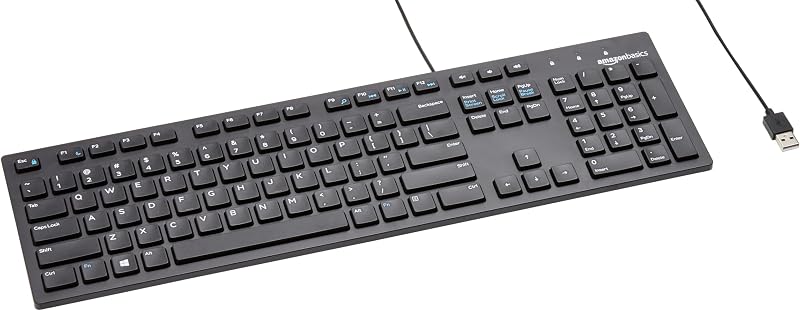
The Amazon Basics Wired QWERTY Keyboard is an entry-level, full-sized peripheral built exclusively for standard computing tasks. It features a straightforward plug-and-play USB connection, built-in media control access, and broad Windows compatibility. Shoppers who simply need a reliable, basic office replacement deck without gaming-oriented clicky switches, RGB backlighting, or specialized wrist rests should look toward this utilitarian alternative.
Full size keyboard with spill-resistant
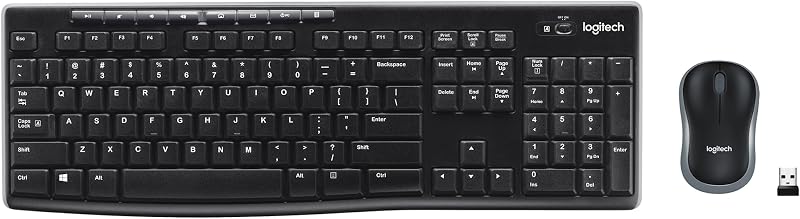
For users who want to eliminate desktop clutter completely, the Full size keyboard with spill-resistant design provides a cord-free workspace via its bundled USB-A nano receiver. This Logitech MK270 combo integrates a full-sized spill-resistant keyboard alongside a compact ambidextrous mouse. Choose this option if your priority is cordless convenience and basic spill protection rather than low-profile hybrid gaming performance.
Creamy Computer Keyboard for PC

The Creamy Computer Keyboard for PC, known as the MechLands Halo68, targets enthusiasts desiring a compact 68-key footprint. It features a specialized silent membrane structure, unique carbon fiber keycaps, RGB backlighting with an accent light box, and a built-in 2000mAh rechargeable battery for wireless use. This alternative is ideal for gamers who want a space-saving compact form factor and quiet acoustics over a full-sized clicky layout.
Final Verdict
The Razer Ornata V3 successfully carves out a specialized niche in the peripheral landscape. By fusing tactile mechanical clicks with low-profile membrane cushioning, Razer has produced a deck that alleviates wrist fatigue without feeling sluggish. Features like the magnetic soft-touch wrist rest, UV-treated key legends, and dedicated backlit media keys demonstrate thoughtful ergonomics tailored for prolonged PC sessions.
So, is razer ornata v3 worth it? For users seeking an ergonomic, low-profile hybrid keyboard that bridges everyday typing comfort with responsive gaming performance, it represents an outstanding desktop upgrade. While users who require wireless freedom or per-key RGB lighting will need to explore other avenues, the Ornata V3 delivers a polished, durable experience that makes gaming and typing equally enjoyable.
FAQ
Does the Razer Ornata V3 use authentic mechanical switches
No, the board utilizes proprietary Razer Mecha-Membrane switches. This hybrid design pairs a physical mechanical click spring with an underlying membrane dome, producing the snappy clicky sensation of mechanical switches alongside the soft, cushioned bottom-out feel of a membrane keyboard.
How do the Razer Ornata V3 specs compare to standard gaming keyboards
The razer ornata v3 specs center around an ultra-slim 1.23-inch height profile, a full 104-key QWERTY layout, 10-zone Chroma RGB backlighting, UV-coated fade-resistant keycaps, water resistance, and a wired USB corded electric connection compatible with Windows 10 and newer systems.
Can the wrist rest be removed from the keyboard
Yes, the included soft-touch wrist rest connects via integrated magnets. It snaps firmly into place against the lower lip of the keyboard frame during regular use and can be pulled away instantly without risking broken plastic clips.
Does the Razer Ornata V3 offer individual per-key RGB lighting
No, the keyboard features 10-zone customizable backlighting powered by Razer Chroma RGB. Rather than addressing every single switch independently, illumination is managed across ten distinct lighting zones that cast a vivid, diffused glow beneath the keycaps.
Is the keyboard protected against drink spills
Yes, the listing specifies that the keyboard features water resistance. Its underlying membrane structure and sealed deck components offer reliable protection against minor liquid spills and splashes during everyday desktop use.
How these reviews are put together
- 556reviews published
- 2,271products with a buyer rating
- 2,222products with listed features
- 87brands covered
Every number, star and price on this site is read from the Amazon product listing. We do not run lab tests of our own, so scores here are out of 10, based on listed specifications and buyer feedback, not a verdict from a test bench. Prices change without notice; check the listing before buying.


