Google Nest Wifi Pro Wi-Fi 6E Mesh System: Gamer’s Performance Breakdown
The Google Nest Wifi Pro represents a major generational shift for home mesh networking by incorporating tri-band Wi-Fi 6E connectivity to tackle dense household traffic. Built to deliver seamless wireless coverage while offloading demanding tasks to a dedicated wireless spectrum, this three-router system promises clean signals, automated optimization, and simple app-based operation. For households managing…
By Eric Monroe
10 min read
As Amazon Associates, we earn from qualifying purchases. This means we may receive a small commission at no extra cost to you if you click through and make a purchase.
The Google Nest Wifi Pro represents a major generational shift for home mesh networking by incorporating tri-band Wi-Fi 6E connectivity to tackle dense household traffic. Built to deliver seamless wireless coverage while offloading demanding tasks to a dedicated wireless spectrum, this three-router system promises clean signals, automated optimization, and simple app-based operation. For households managing multiple high-definition streams and remote work tasks, it offers an unobtrusive and reliable home networking solution, though its streamlined architecture leaves out the granular telemetry controls that competitive, tournament-focused gamers often crave.
This mesh setup is best suited for busy households, media enthusiasts, and casual to mid-tier multiplayer gamers who want reliable coverage across large floor plans without troubleshooting complex router dashboards. However, power users running multi-gigabit fiber connections, competitive esports players demanding strict packet-level prioritization, or anyone hoping to expand an existing older Google mesh system will find key limitations that warrant exploring alternative hardware.
Tri-Band Throughput and 6 GHz Band Performance
The standout upgrade in the Google Nest Wifi Pro hardware profile is its tri-band design, which grants connected hardware access to the newly opened 6 GHz spectrum alongside traditional 2.4 GHz and 5 GHz networks. By introducing the nest wifi pro 6ghz band into home environments, the system bypasses the airwave congestion common in residential neighborhoods where dozens of legacy networks overlap. According to official performance documentation, this hardware can operate up to twice as fast as a Wi-Fi 6 router running standard 80 MHz channels when paired with client devices that support 160 MHz wide channels. This makes an immediate difference when handling massive multi-gigabyte game downloads or streaming 4K media content across rooms.
Operating across three discrete frequencies allows the nest wifi pro tri band architecture to segment client devices intelligently. High-bandwidth hardware such as modern desktop rigs outfitted with an msi pro z790-p wifi ddr5 motherboard can communicate across pristine 6 GHz pathways, leaving the 2.4 GHz and 5 GHz lanes free for smart home gadgets, mobile phones, and background appliances. Because legacy Wi-Fi protocols cannot access the 6 GHz band, compatible devices experience virtually zero airtime competition from older wireless hardware, which stabilizes data delivery during peak evening hours.
It is important to understand the physics of higher frequency transmissions when evaluating the nest wifi pro specs. While the 6 GHz spectrum provides exceptionally clean throughput, higher frequencies naturally suffer faster attenuation when encountering solid barriers like drywall, concrete, or brick. The system mitigates this drop-off using built-in technology designed to keep connections consistent even near the outer boundaries of coverage. However, achieving maximum throughput speeds still requires deliberate node placement to ensure nodes maintain strong backhaul connections across the entire living space.
Latency Behavior and Gaming Responsiveness
Network latency dictates the entire experience in fast-paced competitive gaming, where a sudden spike in ping leads directly to missed shots or dropped inputs. When assessing the Google Nest Wifi Pro for gaming, the primary advantage lies in the 6 GHz spectrum’s ability to eradicate local packet queuing caused by neighbor network interference. With clear airwaves and 160 MHz channel support, the router minimizes transmission delays for compatible endpoints, keeping local network hops clean and steady during tense multiplayer sessions.
Traffic prioritization on this system is automated rather than manual. The internal software continuously assesses network activity, automatically adjusting performance to help web pages load quickly while prioritizing high-bandwidth interactive traffic such as video calls. While this automated optimization keeps general household traffic flowing smoothly without user input, it operates differently from dedicated gaming routers that allow players to manually reserve bandwidth for specific console IP addresses or game ports. For casual and cooperative gaming, this automated management prevents family streaming habits from completely disrupting match stability.
For serious competitive gaming setups, wired connectivity remains the benchmark for raw stability. Using the physical nest wifi pro ethernet ports to hardwire a gaming PC—such as a competitive desktop built around an msi mag b760 tomahawk wifi ddr4 board—provides a reliable 1.0 Gbps physical link directly to a mesh node. Even when a node communicates with the primary router wirelessly, anchoring your gaming machine via Ethernet eliminates the local wireless contention layer between your PC and the nearest access point, which noticeably reduces google nest wifi pro latency fluctuations during peak household usage.
Whole-Home Mesh Coverage and Reliability
Coverage scope is one of the primary reasons shoppers consider the nest wifi pro 3 pack. With all three nodes deployed, the system covers up to 6,600 square feet of living space, with each individual router unit rated to provide up to 2,200 square feet of coverage. This broad coverage envelope makes the system well suited for multi-story houses, sprawling suburban ranch layouts, or properties where detached workspaces require stable internet connectivity.
Maintaining high-speed continuity across rooms requires smart handoff mechanics. As mobile devices move from room to room, the mesh system automatically shifts connections to the closest access point without dropping active data sessions. Entertainment devices anchored in living rooms or bedrooms, such as the onn google tv 4k pro streaming device, maintain a steady stream of data without buffering hiccups because the nest wifi pro mesh coverage blankets intermediate dead zones that standard single-unit routers often leave exposed.
Reliability also stems from autonomous maintenance tools baked directly into the proprietary operating system. The system constantly monitors its internal health, runs diagnostics on data pathways, and automatically resolves common connection errors without requiring manual reboots. If wireless backhaul degrades between two distant points, the router platform self-corrects routing tables to restore throughput, which significantly reduces the maintenance burden on homeowners who want their network to function quietly in the background.
System Management, Wired Ports, and Network Security
Day-to-day administration of the system is managed through an intuitive mobile app interface. The software displays every active client connected to the local network, giving administrators the ability to review attached devices at a glance. You can easily pause network access for unfamiliar devices, set up parental controls to manage family screen time, and establish a completely isolated guest network with a distinct password so your primary credentials remain private.
Physical connectivity on the units is intentionally lean. The system listing notes 4 total ports with a maximum data transfer rate of 1 Gbps, a LAN port bandwidth limit of 1.0 Gbps, and an upstream data transfer ceiling of 500 Mbps. For households subscribed to standard gigabit broadband plans, these gigabit Ethernet connections provide adequate bandwidth for smart home hubs, streaming boxes, or desktop computers. However, because the physical interfaces do not offer multi-gigabit capabilities, homes with broadband tiers exceeding 1 Gbps will find their speeds capped at the router interface level.
Security is reinforced through automated hardware-level protections. The system uses secure booting mechanisms and regular automated software updates to protect the mesh points from running unauthorized software or falling victim to router-level attacks. Wireless security is anchored by the standard WPA2 protocol. It is also critical to note that the Nest Wifi Pro is not backward compatible with older generations of Google Wifi or Nest Wifi routers, meaning existing points cannot be repurposed as satellite nodes in this Wi-Fi 6E environment.
Google Nest Wifi Pro Pros and Cons
Pros
- Tri-band Wi-Fi 6E with clean 6 GHz channel access
- Expansive 6,600 sq. ft. coverage across three units
- Autonomous network self-diagnosis and issue resolution
- Automated traffic adjustments prioritize real-time calls
- Secure boot architecture defends against unauthorized software
Cons
- Lacks backward compatibility with older Google mesh gear
- Wired Ethernet interfaces max out at 1.0 Gbps
- No manual QoS bandwidth sliders for gaming
Check Google Nest Wifi Pro on Amazon
Who Should Buy the Google Nest Wifi Pro
Buy It If
- You own modern Wi-Fi 6E compatible phones, motherboards, or streaming devices and want to take advantage of clean, interference-free 6 GHz airwaves.
- You need to cover up to 6,600 square feet across multiple floors and prefer an automated system that diagnoses and resolves its own network problems.
- You prefer a simple, streamlined mobile app interface to monitor connected hardware, pause unfamiliar devices, and configure isolated guest networks.
- Your household engages in simultaneous remote work calls, 4K media consumption, and casual gaming without requiring complicated manual router tweaking.
Skip It If
- You already own previous-generation Google Wifi or Nest Wifi units and want to expand your existing mesh network rather than replacing it entirely.
- You subscribe to an internet service tier faster than 1 Gbps and require multi-gigabit wired Ethernet ports to leverage your full ISP throughput.
- You are an esports enthusiast who demands manual Quality of Service controls, strict packet queuing, and advanced port-forwarding telemetry dashboards.
Google Nest Wifi Pro Alternatives Worth a Look
Shoppers searching for whole-home wireless systems should consider how competing mesh platforms align with their specific floor plan requirements, wired hardware needs, and budget priorities.
Covers up to 6500 Sq.Ft.
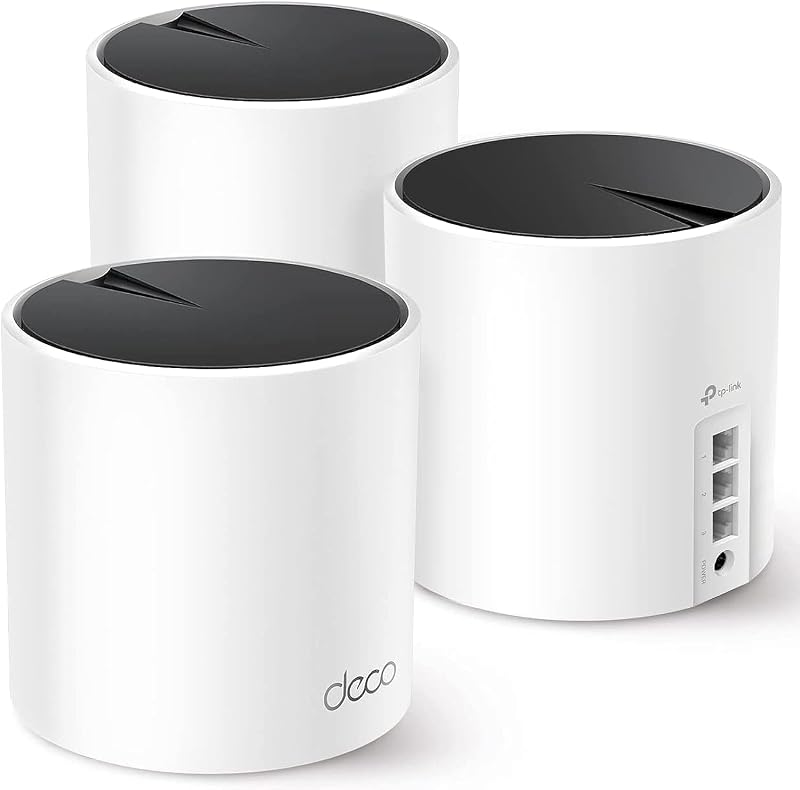
The Covers up to 6500 Sq.Ft. mesh solution, known as the TP-Link Deco X55 AX3000 Wi-Fi 6 mesh system, comes in a three-pack designed to blanket expansive spaces. It features three Gigabit ports per unit and supports dedicated Ethernet backhaul connections across the entire setup. This alternative is an appealing choice for homeowners who want extra physical wired connections on every satellite unit to connect gaming consoles and smart TVs directly without relying purely on wireless mesh jumps.
Up to 5,500 Sq.ft. Coverage

The Up to 5,500 Sq.ft. Coverage system, representing the TP-Link Deco S4 AC1900 three-pack, is engineered to replace traditional wireless routers and range extenders across mid-sized homes. Featuring standard gigabit ports and Alexa compatibility, it delivers dependable dual-band AC wireless coverage. Shoppers on simpler internet service tiers who do not yet own Wi-Fi 6E hardware and want straightforward multi-room coverage may prefer this uncomplicated alternative.
Wi-Fi up to 7200 Sq.Ft

The Wi-Fi up to 7200 Sq.Ft option, highlighting the TP-Link Deco XE75 AXE5400 tri-band Wi-Fi 6E three-pack, utilizes AI-driven networking to cover vast properties. Offering access to the clear 6 GHz band alongside modern WPA3 security protocols, this platform delivers comprehensive wireless reach. Users with large homes who want Wi-Fi 6E support, extended square footage ratings, and modern encryption standards should consider this package over smaller-capacity systems.
Final Verdict
When asking is nest wifi pro worth it, the answer depends on your performance priorities and the age of your client hardware. As a cohesive whole-home mesh solution, this three-pack excels at eliminating dead spots across large properties while automatically handling background optimization. The integration of the 6 GHz band gives modern laptops, tablets, and gaming machines an uncrowded fast lane, significantly reducing local airwave interference that disrupts streaming and casual online play.
However, the platform makes clear trade-offs to preserve its minimalist, user-friendly identity. The omission of backward compatibility means owners of legacy Google networking gear must start fresh, and the 1.0 Gbps LAN port bandwidth caps physical throughput below the limits of high-end multi-gig fiber connections. If you value seamless app management, automated issue diagnosis, and reliable tri-band coverage for a busy household, the Google Nest Wifi Pro delivers an exceptionally polished home networking experience.
FAQ
Can Google Nest Wifi Pro work with older Google Wifi or Nest Wifi points?
No, the Google Nest Wifi Pro uses advanced Wi-Fi 6E technology and is not compatible with previous generations of Google Wifi or Nest Wifi. If you are upgrading from an older Google mesh setup, you must replace the entire system rather than mixing older nodes into the new 6E mesh network.
How does the 6 GHz band benefit gaming and streaming?
The 6 GHz band provides an exclusive wireless frequency dedicated to newer Wi-Fi 6E devices. Because older legacy devices cannot connect to this band, it remains free from household airwave congestion. This uncrowded environment supports wide 160 MHz channels that enable faster throughput and reduce transmission delays during high-bandwidth tasks.
What kind of wired connectivity do the Nest Wifi Pro ethernet ports provide?
The system features 4 total ports with a LAN port bandwidth rated at 1.0 Gbps and a maximum data transfer rate of 1 Gbps, along with a 500 Mbps maximum upstream rate. These gigabit ports let you wire critical hardware like a gaming PC, console, or streaming box directly into the mesh nodes for a steady physical link.
Does Google Nest Wifi Pro offer manual Quality of Service controls?
The listing indicates that the system handles traffic shaping automatically. It actively monitors network performance, prioritizes video calls, and assists with page load speeds. However, it does not include granular, slider-based manual Quality of Service controls for assigning specific bandwidth allocations to individual devices.
How much area does the Nest Wifi Pro 3 pack cover?
A single Google Nest Wifi Pro router provides up to 2,200 square feet of coverage. When configured as a three-pack mesh system, the three routers combine to cover up to 6,600 square feet of fast, reliable Wi-Fi, with built-in technology designed to keep signals consistent near the edges of coverage.
How these reviews are put together
- 203reviews published
- 2,271products with a buyer rating
- 2,222products with listed features
- 87brands covered
Every number, star and price on this site is read from the Amazon product listing. We do not run lab tests of our own, so a score here is the average rating left by buyers, not a verdict from a test bench. Prices change without notice; check the listing before buying.