Netgear Nighthawk XR1000: DumaOS 3.0 and WiFi 6 for Competitive Play
The Netgear Nighthawk XR1000 is a specialized dual-band WiFi 6 gaming router engineered to eliminate local network congestion and stabilize latency during competitive multiplayer sessions. Operating on the dedicated DumaOS 3.0 platform and rated for AX5400 wireless bandwidth, this networking hub serves as a high-performance control center designed to combat bufferbloat, jitter, and erratic server…
By Eric Monroe
8 min read
As Amazon Associates, we earn from qualifying purchases. This means we may receive a small commission at no extra cost to you if you click through and make a purchase.
The Netgear Nighthawk XR1000 is a specialized dual-band WiFi 6 gaming router engineered to eliminate local network congestion and stabilize latency during competitive multiplayer sessions. Operating on the dedicated DumaOS 3.0 platform and rated for AX5400 wireless bandwidth, this networking hub serves as a high-performance control center designed to combat bufferbloat, jitter, and erratic server routing directly from a comprehensive management dashboard.
This router suits competitive PC and console players who share a busy domestic network and need deliberate bandwidth allocation to preserve their connection quality. However, casual households seeking a simple plug-and-play whole-home setup or international shoppers residing outside the United States should bypass this unit in favor of general-purpose mesh systems.
DumaOS 3.0 and Lag Spike Mitigation
The defining strength of the netgear nighthawk xr1000 for gaming is its specialized operating system. Rather than relying on generic Quality of Service toggles found in ordinary consumer networking hardware, this router utilizes netgear nighthawk xr1000 dumaos 3.0 to manage data traffic dynamically. The software is engineered specifically to eliminate packet congestion and delivers netgear nighthawk xr1000 ping reduction up to 93 percent by scheduling gaming packets ahead of other domestic downloads. For gamers competing in fast-paced first-person shooters or fighting games, this level of queue management prevents sudden local traffic spikes from disrupting matches.
A primary element of this software package is the xr1000 geo fencing setup. This tool lets players define geographic parameters on a visual world map to restrict connections to nearby host servers and game lobbies. By filtering out hosts outside your target radius, the router prevents the matchmaking engine from connecting you to high-ping servers halfway across the globe. DumaOS 3.0 complements this with a live ping heatmap, allowing players to visualize the current latency of various multiplayer servers before committing to a competitive match.
Traffic prioritization within the operating system provides granular control over device bandwidth allocation. You can set anti-bufferbloat thresholds to guarantee that streaming video, file transfers, or background game downloads cannot monopolize the incoming or outgoing pipeline. While a whole-home mesh solution such as the netgear orbi 770 series focuses on covering large square footage across several nodes, the XR1000 directs its system resources toward packet stabilization and real-time gaming priority.
WiFi 6 Performance and AX5400 Bandwidth
Wireless capacity on the nighthawk xr1000 ax5400 relies on the 802.11ax protocol to deliver aggregate wireless speeds reaching up to 5.4 Gbps across its dual-band spectrum. Moving to WiFi 6 delivers up to four times the device capacity of older AC-tier routers. By packing data into transmissions more efficiently and organizing schedules across multiple channels, the netgear xr1000 wifi 6 router reduces latency overhead when dozens of wireless products operate simultaneously on the same local network.
The dual-band architecture separates wireless tasks cleanly across 2.4 GHz and 5 GHz frequencies. Handheld gaming hardware like the ayaneo pocket ds benefits from the clean, responsive 802.11ax throughput when streaming local games or engaging in handheld multiplayer sessions throughout the home. Four fixed external antennas direct the signal outward, maintaining broad residential coverage and preventing dead spots from degrading mobile gaming performance.
In addition to raw throughput, WiFi 6 scheduling prevents background household traffic from introducing jitter into active wireless gaming sessions. Because 802.11ax handles simultaneous device requests without creating linear transmission queues, family members streaming video or loading rich media web pages do not disrupt ongoing competitive play. This makes the dual-band array an effective upgrade for homes juggling multiple active screens.
Hardware Specs and Physical Port Layout
A review of the netgear nighthawk xr1000 specs shows hardware calibrated to support continuous traffic routing without sluggishness. The router includes 1 GB of installed RAM, providing the memory headroom necessary to operate DumaOS 3.0, process firewall filters, and generate live traffic heatmaps without system slowdowns. The physical housing supports four fixed antennas designed for stable beamforming across local devices, supported by high-level hardware firewall processing.
For wired battlestations, the rear panel houses 4 x 1G Ethernet LAN ports offering reliable 1000 Mbps bandwidth to every connected machine. Hardwiring desktop computers and home consoles remains the standard approach for competitive play to bypass wireless interference entirely. Connecting a dedicated desktop rig equipped with a display like the samsung viewfinity s6 directly into one of these gigabit ports delivers uninterrupted data transmission straight to the gateway.
Local media sharing is supported through a single USB 3.0 port located on the router chassis. This port allows users to connect an external hard drive and share files, media libraries, and gameplay captures across all connected devices on the local network. While the wired connections are standard gigabit rather than multi-gigabit interfaces, the four LAN ports cover the essential wired requirements of a typical multi-console gaming hub.
Network Security and Administration Tools
Security on the netgear nighthawk pro gaming xr1000 is integrated directly into the firmware to shield local hardware from external vulnerabilities and online attacks. The router supports standard WPA2-PSK wireless security protocols and operates a high-grade built-in firewall right out of the box. Automated firmware updates are enabled by default, ensuring that critical security patches, operational bug fixes, and performance updates are applied without requiring continuous manual monitoring from the user.
For elevated defense across connected endpoints, the router includes NETGEAR Armor software. This comprehensive security layer acts as an automated shield that guards against hackers, malware, and data intrusions across all connected devices, including smart home gadgets, tablets, and phones. The listing includes a 30-day trial of NETGEAR Armor, providing advanced vulnerability scanning and VPN privacy features for testing before you decide on a recurring subscription.
Day-to-day administrative tasks can be managed either via a dedicated mobile app or through the comprehensive DumaOS web portal. The mobile app offers basic control over guest networks, device permissions, and network status checks from a smartphone. For competitive tuning, the web dashboard remains the core interface for setting bandwidth quotas, configuring geo fencing parameters, and monitoring active connection statistics.
Netgear Nighthawk XR1000 Pros and Cons
Pros
- DumaOS 3.0 with ping reduction up to 93%
- Dual-band WiFi 6 speeds up to 5.4 Gbps
- Four 1G Ethernet ports for wired consoles
- Geo fencing and ping heatmap server tools
- USB 3.0 port for network drive sharing
Cons
- Made for use in the US only
- Ethernet ports limited to 1G speeds
- NETGEAR Armor requires subscription after 30-day trial
Check Netgear Nighthawk XR1000 on Amazon
Who Should Buy the Netgear Nighthawk XR1000
Buy It If
- You play competitive multiplayer games and need DumaOS 3.0 tools like geo fencing to avoid high-ping remote servers.
- Your home network experiences severe bufferbloat caused by household members streaming video while you play.
- You want AX5400 WiFi 6 bandwidth paired with four dedicated 1G Ethernet ports for wired gaming consoles and PCs.
- You want a dedicated USB 3.0 port to share an external hard drive across your local home network.
Skip It If
- You reside outside the United States, as the manufacturer specifies this product is made for use in the US only.
- You require multi-gigabit Ethernet ports to handle an internet service plan exceeding 1 Gbps.
- You prefer a simple, maintenance-free mesh system designed solely for whole-home wireless coverage without deep gaming menus.
Netgear Nighthawk XR1000 Alternatives Worth a Look
If the specialized gaming firmware or hardware layout of the XR1000 does not align with your specific home networking needs, several alternative routers provide general wireless connectivity across distinct performance tiers.
Dual Band Wireless Internet

The Dual Band Wireless Internet router is a TP-Link AX1800 WiFi 6 router (Archer AX21 V5) that features gigabit throughput, Easy Mesh compatibility, and Alexa integration as a Certified for Humans device. Shoppers who need an affordable entry point into WiFi 6 and value mesh expansion over specialized gaming QoS tools will find this model a practical alternative.
MU-MIMO Wireless Internet Router

The MU-MIMO Wireless Internet Router is a TP-Link AC1200 gigabit dual-band WiFi router (Archer A6) equipped with four antennas, OneMesh compatibility, and access point mode. This unit serves budget-conscious users who need basic gigabit Ethernet routing and long-range coverage using older AC standards without the advanced traffic shaping of DumaOS.
4 x 10 100 Mbps
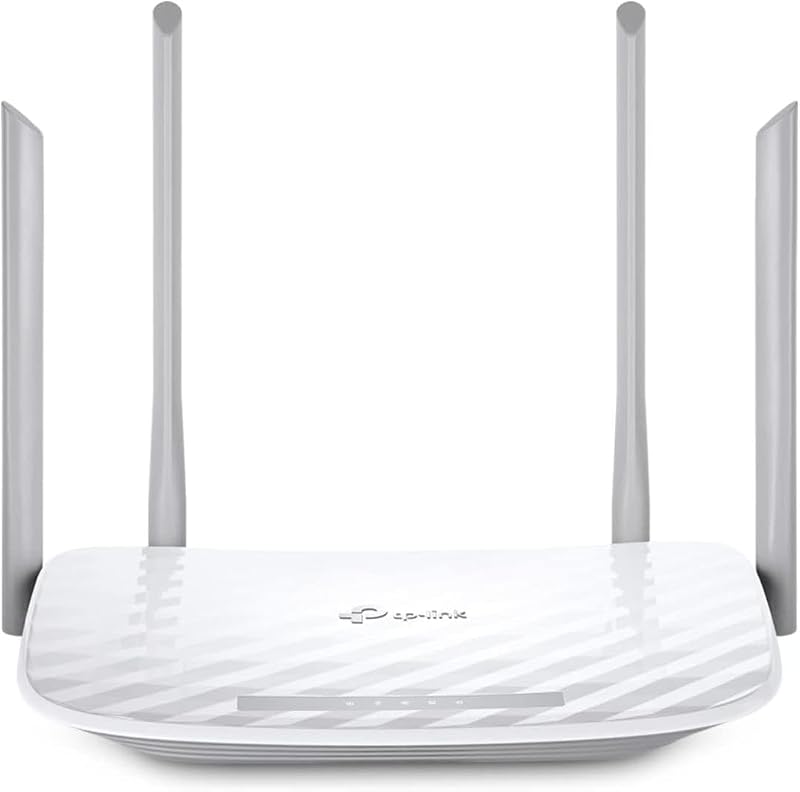
The 4 x 10 100 Mbps router is a TP-Link AC1200 dual-band router (Archer A54) offering four 10/100 Mbps Fast Ethernet ports, EasyMesh compatibility, guest WiFi, access point mode, IPv6, and parental controls. This alternative is designed strictly for lightweight residential browsing on modest internet connections rather than demanding competitive gaming environments.
Final Verdict
When considering whether is netgear nighthawk xr1000 worth it, the decision centers entirely on how much value you place on controlling your connection quality. For competitive gamers who regularly face ping spikes, packet loss, or poorly routed matchmaking hosts, the combination of DumaOS 3.0, geo fencing, and anti-bufferbloat controls provides genuine practical value. Supported by AX5400 WiFi 6 bandwidth, 1 GB of RAM, and four gigabit LAN ports, it delivers a focused set of networking tools designed to stabilize online play.
However, users looking for basic wireless internet coverage across a sprawling house without complex configuration menus will find its gaming tools redundant. The absence of multi-gigabit Ethernet and its US-only geographic restriction also establish clear operational limits. If your primary objective is eliminating local latency bottlenecks and taking full command over your online gaming packets, the Netgear Nighthawk XR1000 stands as an effective, performance-oriented routing solution.
FAQ
How does DumaOS 3.0 help reduce ping in online games?
DumaOS 3.0 reduces ping by prioritizing gaming packets over domestic streaming downloads and background updates. It also includes geo fencing tools that block distant, high-latency game servers, helping to reduce ping spikes by up to 93 percent.
Can the Netgear Nighthawk XR1000 be used outside the United States?
The manufacturer listing explicitly states that this router is made for use in the US only. Operating this model in other countries may lead to regulatory wireless issues or power compatibility limitations.
Does the Netgear Nighthawk XR1000 support wired gaming consoles?
Yes, the router includes 4 gigabit Ethernet LAN ports capable of 1000 Mbps bandwidth. You can hardwire gaming PCs, PlayStation, Xbox, and Nintendo Switch systems directly to achieve a stable, low-latency connection.
What does the USB 3.0 port on the router do?
The USB 3.0 port allows you to connect an external storage drive directly to the router. Once plugged in, the drive can be shared across all wired and wireless devices on your home network for local backups and media access.
What built-in security features are included with this router?
The router includes WPA2-PSK encryption, a high-level hardware firewall, and automatic firmware updates. It also features a 30-day trial of NETGEAR Armor software, which provides real-time protection against hackers and adds VPN privacy for connected devices.
How these reviews are put together
- 540reviews published
- 2,271products with a buyer rating
- 2,222products with listed features
- 87brands covered
Every number, star and price on this site is read from the Amazon product listing. We do not run lab tests of our own, so scores here are out of 10, based on listed specifications and buyer feedback, not a verdict from a test bench. Prices change without notice; check the listing before buying.


