Ubiquiti NanoStation Loco M2 Review: Zero-Config Wireless Bridging
Establishing a dedicated network connection between buildings without digging up a lawn or running conduit is a common networking challenge. The Ubiquiti NanoStation Loco M2 pre-configured bundle addresses this dilemma by providing a pre-paired point-to-point wireless bridge engineered to link detached garages, workshops, or outbuildings back to a primary network. Packaged and prepared by GOOD…
By Eric Monroe
9 min read
As Amazon Associates, we earn from qualifying purchases. This means we may receive a small commission at no extra cost to you if you click through and make a purchase.
Establishing a dedicated network connection between buildings without digging up a lawn or running conduit is a common networking challenge. The Ubiquiti NanoStation Loco M2 pre-configured bundle addresses this dilemma by providing a pre-paired point-to-point wireless bridge engineered to link detached garages, workshops, or outbuildings back to a primary network. Packaged and prepared by GOOD STORY, this two-unit system comes with network roles assigned and pairing encryption configured right out of the box. Our verdict is that this hardware bundle provides a practical, time-saving networking solution for standard broadband tasks, media streaming, and general Internet sharing, provided you understand the throughput limits of 2.4GHz 802.11n wireless technology.
This bridge suits homeowners, remote workers, and casual gamers who need dependable connectivity in an outdoor structure without wrestling with complex IP subnets or antenna alignment menus. If your goal is to stream high-definition video, operate security cameras, or power an outbuilding office workstation like a mac mini refurbished desktop, this hardware offers reliable stability. However, users seeking gigabit transfer rates for local network storage or gamers demanding ultra-fast multi-gigabyte downloads should look toward newer multi-gigabit hardware instead.
Pre-Configured Setup and Network Installation
Deploying an enterprise outdoor bridge typically requires familiarity with subnet routing, manual frequency selection, and static IP configuration. The primary appeal of this pre-configured nanostation loco m2 bundle is that it bypasses that technical friction. The package provides two paired Ubiquiti units that have already completed a configuration checklist: one unit is assigned the Access Point role, the other acts as the Station receiver, link encryption is active with a secure password, and managed IP addresses are pre-assigned. For shoppers who find complex networking dashboards intimidating, this preparation turns an advanced project into an accessible physical installation.
Completing the ubiquiti nanostation loco m2 setup involves mounting the units and running your network cables. The kit includes two mounting straps to secure the lightweight two-pound housings to outdoor poles. You connect an Ethernet cable from your main router—such as a cloud gateway max—into the LAN port of the first included PoE injector, running a second cable from the injector PoE port up to the transmitting unit. At the destination outbuilding, the receiving unit is wired identically to feed a PC, switch, or access point. Crucially, you must avoid pressing the physical reset button on either unit, as a factory reset wipes all pre-applied link parameters and requires manual AirOS reconfiguration.
Throughput and Speed Performance for Outbuilding Networks
When assessing the ubiquiti nanostation loco m2 specs, the primary metric is its stated 150 megabits per second data transfer rate. Operating on the 2.4GHz band with an 802.11 b/g/n hardware interface, this bridge is built for steady directional transmission. Because this nanostation loco m2 point to point link focuses its wireless signal directly between the two paired units rather than broadcasting omnidirectionally to dozens of client devices, it maintains far more consistent throughput across outdoor distances than standard indoor Wi-Fi.
Evaluating the connection in a typical nanostation loco m2 speed test reveals where its throughput excels. A consistent 150 Mbps link easily accommodates multiple high-definition video streams, cloud backups, and security camera feeds, with 4K streaming requiring only 15 to 25 Mbps. The pre-activated PoE passthrough capability also simplifies powering downstream network gear. However, real-world throughput under standard conditions remains below the 150 Mbps theoretical ceiling due to 802.11n protocol overhead. For everyday browsing, office work, and video streaming, the speed is ample, but moving massive local files across your network will take noticeably longer than over physical gigabit cabling.
Gaming, Latency, and Entertainment Viability
A major consideration for entertainment setups is whether the ubiquiti nanostation loco m2 for gaming provides a reliable experience. In competitive multiplayer games, raw bandwidth volume is rarely the primary requirement; games typically consume modest amounts of data. The critical factor is latency stability, jitter, and packet loss. Because this system creates an isolated wireless bridge between the main house and your outbuilding, it avoids the channel congestion and bufferbloat common to traditional consumer Wi-Fi repeaters.
With a clear line-of-sight, the directional bridge provides steady ping times suited for competitive online gaming on desktops and game consoles. Gamers playing in a detached garage or garden office will experience responsive, dependable connectivity during multiplayer matches. Portable gaming enthusiasts streaming titles locally to handheld devices like a retroid pocket 6 will also find the steady packet flow minimizes micro-stuttering. The main compromise is downloading massive 100GB game updates, which requires patience over a 150 Mbps link compared to a gigabit fiber connection.
Wireless Range, Signal Stability, and Outdoor Deployment
The listing highlights an expansive ubiquiti loco m2 range reaching up to 10+ kilometers under optimal line-of-sight conditions. While commercial operators deploy NanoStation hardware across vast distances, the vast majority of residential users deploy this ubiquiti loco m2 outdoor wireless bridge across distances between 50 and 1,000 feet to link detached garages, barns, or workshops. Operating on the 2.4GHz spectrum gives this bridge an advantage when dealing with minor environmental obstacles, as longer 2.4GHz waves penetrate light foliage and exterior materials better than 5GHz or 60GHz signals.
Physical durability is another key element of outdoor networking. The NanoStation Loco M2 features a compact, weather-resistant plastic enclosure, with the total package weighing two pounds. The included mounting straps allow for secure attachment to poles or wall brackets, keeping the directional antennas properly aligned through wind and rain. Because power is delivered directly through the Ethernet cabling via the included PoE injectors, you only need to run a single outdoor-rated network cable to each unit, keeping installation clean and weather-sealed.
Ubiquiti NanoStation Loco M2 Pros and Cons
Pros
- Pre-configured pair eliminates complex AirOS setup
- Manufacturer-rated transmission range up to 10 kilometers
- Dedicated directional bridge with 150+ Mbps throughput
- Includes two PoE injectors with power cords
- Broad hardware compatibility with consoles and smart TVs
Cons
- Factory reset wipes all pre-applied configuration
- Limited to older 2.4GHz 802.11 b/g/n standard
- Maximum theoretical throughput capped at 150 Mbps
Check Ubiquiti NanoStation Loco M2 on Amazon
Who Should Buy the Ubiquiti NanoStation Loco M2
Deciding whether the is ubiquiti nanostation loco m2 worth it comes down to matching your performance expectations with the physical layout of your property. This system excels at solving outdoor networking gaps without administrative complexity.
Buy It If
- You want a pre-paired outdoor wireless bridge that works right out of the box without requiring manual IP address or subnet configuration.
- Your outbuilding needs focus on 4K streaming, remote office work, security camera recording, and responsive online multiplayer gaming.
- You need an efficient way to connect a detached garage, shed, or guest house without excavating your lawn for Ethernet conduit.
- Your outdoor transmission line involves minor foliage where 2.4GHz wireless signal propagation performs better than 5GHz frequencies.
Skip It If
- You demand gigabit or multi-gigabit local file transfer speeds for heavy network storage backups and immediate multi-gigabyte game patch downloads.
- You live in an extremely dense urban area where the 2.4GHz spectrum is heavily congested by neighboring wireless networks.
- You want to configure custom routing parameters from scratch and intend to reset the hardware firmware to factory defaults.
Ubiquiti NanoStation Loco M2 Alternatives Worth a Look
Depending on whether you need modern multi-gigabit access points, indoor desktop signal extension, or internal network routing, several alternative options exist across different networking categories.
WiFi 7 Dual Band

The WiFi 7 Dual Band access point (BE5000 Wireless Access Point, EAP720) offers a business-class indoor wireless solution featuring PoE power support, Omada centralized management, WPA3 security, and a high-speed 2.5G Ethernet port. Unlike the directional outdoor NanoStation bridge, this device is engineered to distribute high-capacity wireless signals to dozens of modern smartphones, laptops, and tablets inside a building. Choose this alternative if you need high-bandwidth local wireless coverage and fast wired backhaul inside an existing structure rather than an outdoor point-to-point link.
Desktop WiFi Bridge

For expanding indoor wireless coverage, the Desktop WiFi Bridge (TP-Link TL-WA1201) operates as an AC1200 dual-band wireless gigabit access point equipped with four fixed antennas, MU-MIMO beamforming, and multiple operating modes including client bridge and range extender. It is designed for indoor desktop placement to bridge wireless connections to home entertainment setups or remote desks. This is a better choice if you want to eliminate an indoor Wi-Fi dead zone across a single floor without mounting outdoor hardware on exterior walls.
4 x 10 100 Mbps
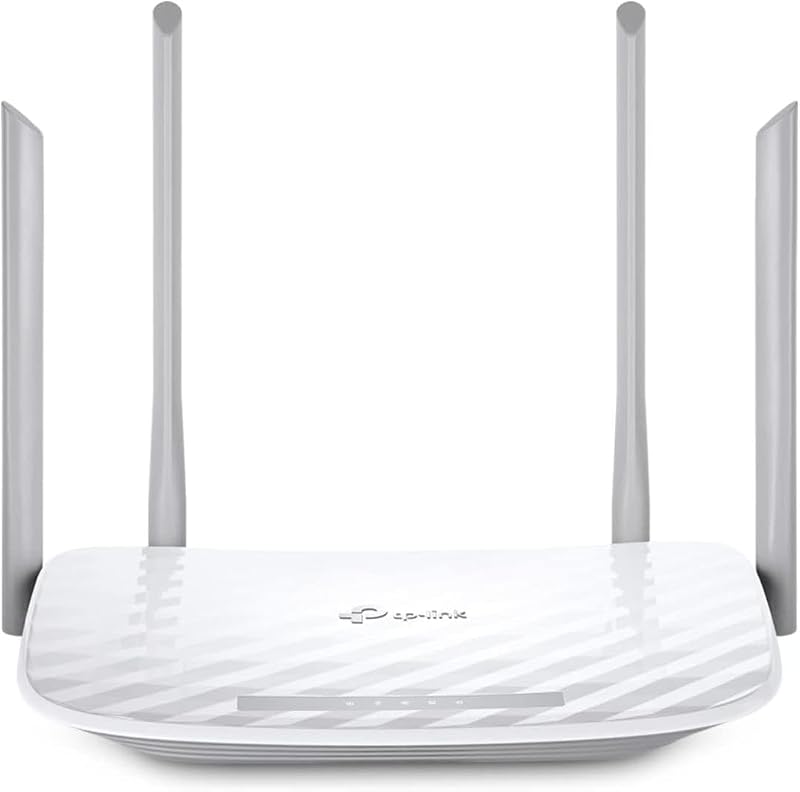
The 4 x 10 100 Mbps router (TP-Link AC1200 Archer A54) offers dual-band wireless internet distribution, EasyMesh compatibility, parental controls, and four Fast Ethernet ports. While the NanoStation Loco M2 delivers a reliable wireless connection between buildings, it terminates in a single Ethernet cable. Pairing this budget-friendly dual-band router at the receiving end of the bridge allows you to broadcast local Wi-Fi and connect multiple wired devices like consoles and smart TVs inside your outbuilding.
Final Verdict
The Ubiquiti NanoStation Loco M2 pre-configured bridge bundle successfully removes the intimidation factor from long-range outdoor networking. By pre-programming the access point and station roles, securing the connection with pre-applied encryption, and bundling two PoE injectors with power cords and mounting straps, GOOD STORY provides a straightforward solution for property owners who want dependable outbuilding internet access without IT expertise.
While its 150 Mbps data rate and 2.4GHz 802.11n hardware interface represent older wireless standards, they are more than adequate for streaming high-definition media, conducting video calls, operating security cameras, and playing online games with steady ping times. As long as you observe the warning to avoid resetting the devices to factory defaults, this point-to-point package offers a reliable, low-maintenance way to extend your home network outdoors.
FAQ
Can the Ubiquiti NanoStation Loco M2 be used for online gaming?
Yes, the Ubiquiti NanoStation Loco M2 works well for online gaming. Competitive gaming relies on low, consistent latency and minimal packet loss rather than gigabit bandwidth. Because this point-to-point bridge creates a dedicated directional connection, it maintains steady ping times for multiplayer play, though downloading large game updates will take longer than on a gigabit connection.
How far can the Ubiquiti NanoStation Loco M2 transmit a wireless signal?
The product specifications indicate a maximum link range of up to 10+ kilometers under optimal conditions with unobstructed line-of-sight. For typical residential and light commercial use, it reliably bridges distances between 50 feet and several thousand feet across yards, driveways, and open property.
What happens if I press the reset button on these pre-configured units?
Pressing the physical reset button clears the expert pre-applied configuration and restores the hardware to factory settings. This erases the pre-paired access point and station roles, IP addresses, and encryption keys, requiring you to manually reconfigure the network bridge through the AirOS web interface.
What hardware comes included in the pre-configured bundle?
The bundle includes two paired Ubiquiti NanoStation Loco M2 units, two PoE injectors with power cords, two mounting straps for installation, and an installation guide and information sheet.
Does the Ubiquiti NanoStation Loco M2 broadcast standard Wi-Fi for mobile phones?
The bridge functions as a dedicated point-to-point wireless tunnel between two points, providing an Ethernet output at the destination. To connect smartphones and mobile devices wirelessly inside your outbuilding, you should connect the receiving unit’s Ethernet cable to an indoor Wi-Fi router or access point.
Once the wireless bridge delivers internet to your outbuilding, you will likely need an indoor access point to distribute coverage to your devices. Pairing the receiver with a distributed network setup detailed in our Mesh WiFi Guide ensures seamless roaming between your main home and detached workspace without dead zones. This creates a unified home network that balances point-to-point reliability outdoors with widespread wireless access indoors.
How these reviews are put together
- 522reviews published
- 2,271products with a buyer rating
- 2,222products with listed features
- 87brands covered
Every number, star and price on this site is read from the Amazon product listing. We do not run lab tests of our own, so scores here are out of 10, based on listed specifications and buyer feedback, not a verdict from a test bench. Prices change without notice; check the listing before buying.


