MSI Radeon RX Vega 56 Air Boost Analysis: HBM2 Power Tested
The MSI RX Vega 56 Air Boost represents a compelling study in graphics hardware history, bringing workstation-style stacked memory to a dedicated desktop platform. Engineered around AMD Radeon RX Vega graphics processing silicon, this card combines an 1181 MHz base GPU clock speed with 8GB of second-generation High Bandwidth Memory communicating across an expansive 2048-bit…
By Rachel Ford
9 min read
As Amazon Associates, we earn from qualifying purchases. This means we may receive a small commission at no extra cost to you if you click through and make a purchase.
The MSI RX Vega 56 Air Boost represents a compelling study in graphics hardware history, bringing workstation-style stacked memory to a dedicated desktop platform. Engineered around AMD Radeon RX Vega graphics processing silicon, this card combines an 1181 MHz base GPU clock speed with 8GB of second-generation High Bandwidth Memory communicating across an expansive 2048-bit bus. Our verdict on this discrete graphics accelerator is that it remains a fascinating showcase of early stacked memory engineering, delivering fluid performance in compatible desktop titles, though its single-fan radial cooler and legacy architecture require measured expectations.
This graphics card best suits hardware collectors, technical enthusiasts, and budget-oriented builders seeking to experiment with high-bandwidth memory in a dedicated secondary desktop. If you are exploring how classic compute hardware handles older gaming libraries or need a multi-display workstation card supporting up to 3840 x 2160 resolution, it offers genuine utility. On the other hand, mainstream gamers who want silent cooling, plug-and-play simplicity, and ongoing driver optimizations for the newest game releases should look past legacy silicon and evaluate modern solutions like the xfx swift amd radeon rx 9060 xt instead.
Evaluating this graphics card begins with a close look at the technical foundation provided in the manufacturer specifications. The table below summarizes the core hardware parameters documented for this model.
| Attribute | Detail |
|---|---|
| Graphics Coprocessor | AMD Radeon RX Vega 56 |
| Base GPU Clock Speed | 1181 MHz |
| Memory Capacity | 8GB HBM2 |
| Memory Interface | 2048-bit |
| Memory Clock Speed | 800 MHz |
| Display Outputs | DisplayPort x 3, HDMI |
| Maximum Resolution | 3840 x 2160 |
| Cooling Hardware | 1 Fan (Air Boost Radial Blower) |
| Expansion Interface | PCI Express |
| Included in Box | Graphics card, cables and connectors, quick setup guide |
Memory Bandwidth and the HBM2 Architecture
The defining technical highlight of the MSI RX Vega 56 Air Boost is its memory subsystem. While standard desktop graphics cards traditionally distribute discrete GDDR memory packages around the perimeter of the primary processor, this card integrates 8GB HBM2 on an interposer directly adjacent to the GPU silicon. Operating across an ultra-wide 2048-bit memory bus with an 800 MHz memory clock speed, this configuration unlocks vast raw memory bandwidth designed to prevent data starvation during texture-heavy rendering cycles.
When assessing the rx vega 56 8gb hbm2 implementation, enthusiasts immediately notice the engineering advantages of on-package memory. The massive bus width allows the graphics processor to exchange high-resolution assets with minimal latency compared to narrower memory buses found on standard graphics boards. This design helps smooth out frame pacing and prevents choppy visual delivery during intense gaming sequences, creating an artifact-free presentation across high-resolution displays.
However, running high-density stacked memory also introduces distinct operational considerations. High-bandwidth memory demands tight temperature regulation because the memory stacks sit in immediate physical proximity to the core graphics processor. Enthusiasts will find that while the memory interface delivers immense data throughput, overall rendering performance remains tethered to the 1181 MHz base clock and the processing efficiency of the underlying graphics coprocessor.
Thermal Design and Single-Fan Air Boost Cooling
Managing heat dissipation on a high-performance desktop processor is critical, and MSI implemented an Air Boost cooling solution featuring a single radial fan. Unlike open-air multi-fan coolers that recirculate thermal exhaust inside the computer chassis, a blower configuration pulls intake air through 1 fan, forces it across internal heatsink fins, and vents the heated air directly through the rear expansion bracket. This mechanism provides clear advantages in space-restricted cases or systems with limited chassis exhaust capability.
Despite the benefit of external heat exhaustion, single-fan blower designs involve notable acoustic trade-offs. To keep the 1181 MHz core and adjacent HBM2 stacks within stable operational parameters under sustained computational load, the radial fan must rotate at high speeds. This generates higher audible pitch and volume compared to contemporary axial-fan cooling solutions. Users prioritizing a whisper-quiet gaming environment will need to account for this acoustic characteristic when planning their setup.
System airflow planning plays an essential role in keeping this card stable. Supplying unobstructed intake air from the front of the computer tower helps the radial fan draw in cooler air, mitigating thermal throttling during prolonged gaming sessions. While the product listing does not specify precise thermal design power or exact power supply wattage recommendations, providing dependable system ventilation is vital for maintaining peak clock speeds.
Resolution Capabilities and Display Connectivity
For external video connections, the card includes three DisplayPort outputs alongside a single HDMI interface. This video output configuration offers broad flexibility for multi-monitor desktop environments and modern displays, supporting a maximum digital resolution of 3840 x 2160. The manufacturer description also notes support for immersive virtual reality environments, leveraging fluid frame delivery to reduce choppy frame transitions during VR gaming.
When assessing resolution targets, rx vega 56 1440p gaming represents the practical sweet spot for this hardware platform. Although the card cleanly supports 3840 x 2160 output for desktop productivity, video playback, and casual titles, rendering demanding modern games at native 4K pushes the 1181 MHz base clock beyond its comfort zone. At 1440p, the card balances visual clarity with steady frame rates, utilizing its 2048-bit memory bus to maintain consistent texture throughput across mid-tier visual presets.
Users who rely on multi-display setups will appreciate having three dedicated DisplayPort connections straight out of the box. This layout simplifies triple-monitor workstations or mixed-display gaming rigs without requiring specialized video adapters. For general productivity, creative timelines, and desktop management, the native connectivity delivers exceptional versatility across modern high-resolution panels.
Comparing Desktop Vega Silicon to Vega M
Enthusiasts examining older AMD architectures frequently research both discrete desktop hardware and integrated hybrid designs, prompting the natural rx vega 56 vs vega m comparison. The primary keyword focus, radeon rx vega m, designates a semi-custom mobile and embedded graphics module that paired Vega compute silicon with integrated HBM2 memory, frequently embedded alongside Intel host processors in compact laptops and mini-PCs. Conversely, the MSI RX Vega 56 Air Boost is an unconstrained desktop PCI Express board built for standard computer cases.
When contrasting radeon rx vega m specs against the desktop rx vega 56 specs, the divergence in raw computing capability is substantial. While both platforms utilize high-bandwidth memory technology, the desktop Vega 56 features a full 8GB HBM2 capacity, an 1181 MHz base clock, and a complete 2048-bit memory interface running at 800 MHz. In contrast, mobile Vega M implementations were engineered around strict thermal and power limits, restricting compute resources and memory allocation to function inside ultra-compact enclosures.
Consequently, radeon rx vega m gaming performance was targeted at 1080p gaming at modest graphical detail settings, serving as a high-efficiency alternative to basic integrated graphics. The desktop Vega 56 card operates in an entirely different performance tier, providing substantially higher graphics throughput. When evaluating whether is radeon rx vega m worth it, the answer centers on small-form-factor portability, whereas shoppers asking is rx vega 56 worth it are deciding whether a discrete desktop card fits their gaming chassis. To see how modern memory architectures have developed across recent desktop releases, reading our rx 9070 16 gb review provides valuable generational perspective.
MSI RX Vega 56 Air Boost Pros and Cons
Pros
- High-bandwidth 8GB HBM2 memory architecture
- Ultra-wide 2048-bit memory bus interface
- Triple DisplayPort and single HDMI outputs
- Blower fan vents heat directly outside chassis
- Supports high resolutions up to 3840×2160
Cons
- Single radial fan increases noise under load
- Legacy graphics architecture lacks modern driver updates
- Listing does not specify power consumption ratings
Check MSI RX Vega 56 Air Boost on Amazon
Who Should Buy the MSI RX Vega 56 Air Boost
Matching your performance needs with the real capabilities of previous-generation graphics silicon is essential before choosing a desktop component. The MSI RX Vega 56 Air Boost offers unique hardware characteristics that appeal to specific user scenarios while falling short for others.
Buy It If
- You are building a dedicated retro or legacy gaming rig to revisit titles from the late 2010s at steady frame rates.
- You want to explore high-bandwidth memory and a 2048-bit interface on a desktop PCI Express platform.
- Your desktop computer enclosure benefits from a rear-exhaust blower design that vents warm air outside the case.
- You need a desktop graphics card equipped with three DisplayPort outputs and one HDMI port for multi-display setups up to 3840 x 2160 resolution.
Skip It If
- You require whisper-quiet desktop operation, as the single radial fan creates perceptible noise under intensive graphics workloads.
- You intend to play newly released modern games that demand current graphics drivers and active manufacturer optimization.
- Your system case lacks sufficient air intake to supply a high-demand radial cooling fan.
MSI RX Vega 56 Air Boost Alternatives Worth a Look
If you determine that older Vega architecture does not match your computing needs, modern graphics cards deliver substantial advancements in power efficiency, gaming performance, and display connectivity. The following three alternatives from current product generations represent worthwhile choices for different user requirements.
ASUS SFF-Ready Prime NVIDIA GeForce

The ASUS SFF-Ready Prime NVIDIA GeForce RTX 5070 OC Edition is tailored for space-conscious builds, featuring a 2.5-slot profile and dual BIOS support. Armed with 12GB of modern GDDR7 memory, PCIe 5.0 compatibility, and Axial-tech fans, this card delivers a massive leap in processing speed and thermal efficiency over older Vega hardware. PC builders who want modern ray-tracing capability, updated display standards including DisplayPort 2.1, and lower acoustic output should pick this card over a legacy blower design.
GIGABYTE Radeon RX 9070 XT
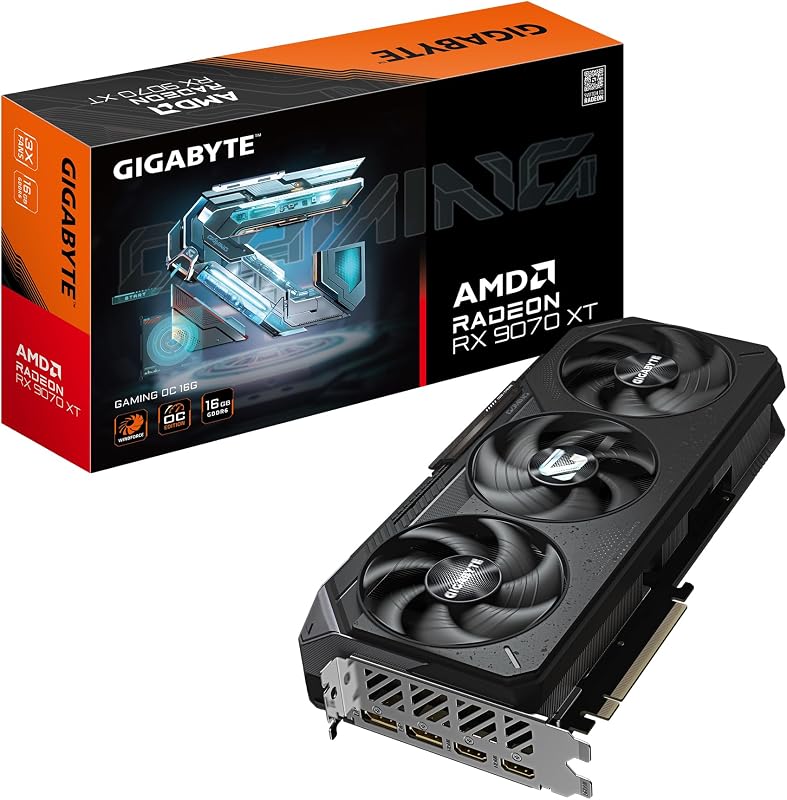
For gamers dedicated to modern AMD hardware, the GIGABYTE Radeon RX 9070 XT Gaming OC 16G provides an enormous generational upgrade. Equipped with 16GB of GDDR6 memory, a PCIe 5.0 interface, and a multi-fan cooling system, this graphics card handles demanding modern gaming libraries with ease. Enthusiasts who want uncompromised high-resolution performance and active driver updates should review our 9070 xt 16gb analysis to understand the extensive performance gains modern silicon offers.
PCIe 5.0
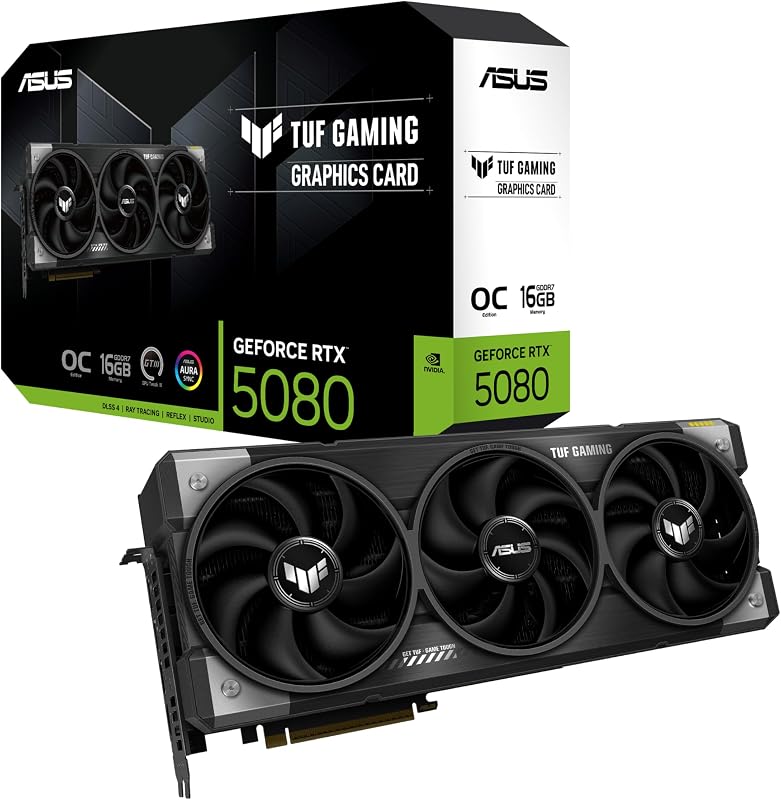
The PCIe 5.0 ASUS TUF Gaming GeForce RTX 5080 OC Edition represents high-end enthusiast graphics hardware designed for extreme rendering demands. Outfitted with 16GB of GDDR7 memory, a robust 3.6-slot thermal footprint, military-grade components, and a protective PCB coating, it is built for maximum durability and uncompromised visual fidelity. Gamers pursuing top-tier 4K performance and modern connectivity like DisplayPort 2.1 will find this option in an entirely different performance class compared to vintage graphics cards.
Final Verdict
The MSI RX Vega 56 Air Boost remains a memorable milestone in AMD graphics history, showcasing the ambition of bringing high-bandwidth stacked memory to desktop gaming enthusiasts. Its 8GB HBM2 capacity, paired with an expansive 2048-bit bus and an 1181 MHz base clock, provides fascinating technical architecture that hardware hobbyists still appreciate. Furthermore, its versatile video output configuration with three DisplayPort connections and one HDMI port delivers strong multi-monitor productivity reaching 3840 x 2160 resolution.
Nevertheless, buyers must weigh these architectural strengths against the operational realities of legacy hardware and single-fan cooling. Modern game releases rely heavily on current driver support and architectural techniques that older Vega hardware no longer receives, and the acoustic output of a radial blower under heavy load can be distracting in everyday environments. For collectors and retro enthusiasts, this card offers genuine mechanical interest, but mainstream gamers seeking long-term reliability and high-framerate modern gaming will find greater satisfaction in current-generation graphics alternatives.
FAQ
What is the base clock speed of the MSI RX Vega 56 Air Boost?
The card features an 1181 MHz base GPU clock speed, paired with an 800 MHz memory clock speed on its high-bandwidth memory interface.
How much video memory is included on this graphics card?
This model includes 8GB of HBM2 video memory operating over an ultra-wide 2048-bit memory bus interface.
What display connections does the card offer?
The card provides three DisplayPort connections and one HDMI output, supporting display resolutions up to 3840 x 2160.
What items come inside the retail package?
The product package includes the graphics card, cables and connectors, and a quick setup guide according to the manufacturer specifications.
Does this graphics card support VR gaming?
Yes, the listing explicitly notes compatibility with VR gaming and entertainment, designed to deliver fluid performance and reduce visual artifacts.
How these reviews are put together
- 938reviews published
- 2,271products with a buyer rating
- 2,222products with listed features
- 87brands covered
Every number, star and price on this site is read from the Amazon product listing. We do not run lab tests of our own, so scores here are out of 10, based on listed specifications and buyer feedback, not a verdict from a test bench. Prices change without notice; check the listing before buying.


