EPOMAKER Aula S102 Pro: Can a Membrane Board Deliver True Gaming Immersion?
The EPOMAKER Aula S102 Pro is a full-size wireless membrane gaming keyboard equipped with an integrated TFT screen, a dedicated rotary volume knob, and dynamic RGB backlighting. Serving as an all-in-one peripheral for quiet productivity and evening play, it delivers an acoustic-friendly desktop typing experience without ditching modern battlestation aesthetic controls. This contemporary pink plastic…
By Eric Monroe
8 min read
As Amazon Associates, we earn from qualifying purchases. This means we may receive a small commission at no extra cost to you if you click through and make a purchase.
The EPOMAKER Aula S102 Pro is a full-size wireless membrane gaming keyboard equipped with an integrated TFT screen, a dedicated rotary volume knob, and dynamic RGB backlighting. Serving as an all-in-one peripheral for quiet productivity and evening play, it delivers an acoustic-friendly desktop typing experience without ditching modern battlestation aesthetic controls.
This contemporary pink plastic board suits gamers, remote professionals, and students who require a silent membrane gaming keyboard with a spacious 105-key layout and flexible multi-device wireless pairing. Competitive esports players who demand rapid mechanical actuation points, modular hot-swappable switch sockets, or ultra-compact desk footprints should look elsewhere.
Silent Membrane Keystrokes and Full Layout Utility
A central consideration in any epomaker aula s102 pro membrane review is how the silicone internal architecture influences daily typing feel. Unlike clicky or tactile mechanical switches, this keyboard relies on a cushioned silicone structure to absorb downward force, creating a remarkably muted acoustic profile. Gamers who stream, typists sharing close living quarters, or workers taking notes during live conference calls can type rapidly without generating intrusive clicking noises.
The board provides a linear switch feel across all 105 keys, maintaining uniform resistance from the top navigation row to the spacebar. Preserving a dedicated numeric keypad and a full set of function keys makes standard data entry, calculation, and document formatting straightforward. While compact form factors like the EPOMAKER x AULA F75 save desk space, a traditional full-size layout ensures spreadsheet operators do not have to rely on secondary function layers.
Because the silicone structure provides a smooth and pillowy bottom-out, key travel feels consistent across the entire plastic enclosure. The keystroke motion cushions the fingers during extended typing marathons, preventing the harsh metal pinging sounds frequently found on unpadded entry-level mechanical boards.
Tri-Mode Connectivity and Platform Flexibility
Evaluating aula s102 pro wireless performance reveals broad utility across diverse gaming and productivity hardware. The board offers three separate connection modes: low-latency 2.4GHz wireless engaged via the FN+3 hotkey, dual-device Bluetooth switching via FN+1 and FN+2, and stable wired input using the detachable USB A-to-C cable. This arrangement allows the keyboard to communicate reliably with gaming consoles, laptops, desktop PCs, and mobile tablets.
Handling diverse operating systems is equally straightforward. Executing an epomaker aula s102 pro mac setup involves a simple FN+A shortcut to remap top-row commands and modifier keys, while FN+S switches the mapping back to standard Windows configurations. Operating system support extends to Windows 7 or newer and macOS 11 Big Sur or newer, providing flexible plug-and-play functionality across older rigs and modern work laptops alike.
The ability to hop between two Bluetooth devices and a dedicated 2.4GHz gaming channel means one desk board can manage multiple systems seamlessly. Enthusiasts comparing options against mid-sized models such as the AULA S75 Pro will appreciate that this full-size alternative maintains quick switching across multiple computers without demanding repeated manual pairing procedures.
Onboard Controls With the TFT Screen and Volume Knob
Direct hardware control is anchored by the integrated aula s102 pro tft screen mounted on the top deck. The display offers clear visual status indicators for active connection modes and operating profiles directly on the frame. Having an integrated display prevents players from guessing battery states or hunting through background Windows menus to confirm connection pathways.
Positioned right beside the display, the epomaker s102 pro volume knob provides continuous audio adjustment without breaking immersion. Gamers can adjust game volume, balance voice chat, or mute media instantly during critical moments without alt-tabbing away from active full-screen windows. The rotary roller provides smooth dial control tailored for quick adjustments during matches or virtual meetings.
Beyond audio level adjustments, users can execute quick aesthetic modifications using native key combinations. FN shortcuts allow direct cycling through backlight animations, brightness steps, and color changes, keeping visual management entirely onboard and eliminating the requirement for complex companion software suites.
Ergonomic Design and Daily Gaming Immersion
Testing the epomaker aula s102 pro for gaming highlights how physical ergonomics impact hand fatigue during intense play. The keyboard features a 2cm front mid-height build engineered to keep palms in a neutral alignment. Paired with sculpted, tiered Cherry-profile keycaps that match the natural reach of the fingers, it minimizes strain across the WASD cluster during lengthy late-night sessions.
Under the base of the plastic housing, a 2-stage adjustable kick-stand lets gamers customize the desk angle to match their seated posture. While competitive gaming boards such as the AULA F75 Pro center their appeal on mechanical hot-swap customization, the S102 Pro emphasizes quiet, fatigue-free membrane actuation in a contemporary form factor measuring 15.75 by 5.71 by 0.79 inches.
For open-mic team games, co-op adventures, and atmospheric RPGs, the silent linear switches ensure team voice chats remain clear and free of background clatter. Keys actuate smoothly with minimal fingertip effort, offering a comfortable, relaxed cadence for both casual gaming and everyday typing tasks.
Dynamic RGB Backlighting and Rechargeable Power Management
Aesthetic appeal is elevated by full dynamic RGB backlighting integrated across the board. The backlighting system provides fluid color transitions and rhythmic lighting effects that turn a basic workstation into an eye-catching gaming setup. Brightness and color modes adjust rapidly via onboard shortcuts to match your room lighting or custom desk accessories.
For cordless desktop arrangements, aula s102 pro battery life is supplied by an internal rechargeable battery. Players can replenish the battery using the included USB A-to-C cable while continuing to use the keyboard in wired mode. The listing does not specify the exact milliamp-hour (mAh) capacity of the internal battery, but automatic sleep intervals help conserve power during pauses in play.
The bright RGB illumination contrasts attractively against the contemporary pink plastic body, making it a distinct centerpiece on creative setups. Illumination passes cleanly around the sculpted Cherry keycaps, providing high visibility in darkened rooms without introducing harsh glare.
EPOMAKER Aula S102 Pro Pros and Cons
Pros
- Silent silicone membrane typing feel
- Integrated TFT display screen
- Dedicated rotary volume knob
- Tri-mode wireless with Bluetooth and 2.4GHz
- Full 105-key layout with dedicated numpad
- Comfortable sculpted Cherry profile keycaps
Cons
- No hot-swappable mechanical switches
- Plastic chassis construction
- Battery milliamp-hour capacity not specified
Check EPOMAKER Aula S102 Pro on Amazon
Who Should Buy the EPOMAKER Aula S102 Pro
Buy It If
- You need a quiet, full-size keyboard with a dedicated numpad for daytime office work and silent midnight gaming.
- You manage multiple devices and need fast switching across Windows, macOS, and mobile tablets.
- You want dedicated hardware tools like a rotary volume roller and an onboard TFT status screen.
- You value comfortable typing ergonomics supported by Cherry-profile keycaps and a 2-stage kickstand.
Skip It If
- You demand modular mechanical switches with tactile feedback or custom hot-swappable sockets.
- You play high-tier competitive esports requiring ultra-light, adjustable mechanical actuation points.
- You want an ultra-compact tenkeyless or 65-percent form factor to free up maximum mouse space.
EPOMAKER Aula S102 Pro Alternatives Worth a Look
While the S102 Pro combines silent membrane switches with premium visual hardware, reviewing nearby alternatives helps determine which keyboard configuration best suits your workspace.
Amazon Basics Wired QWERTY Keyboard
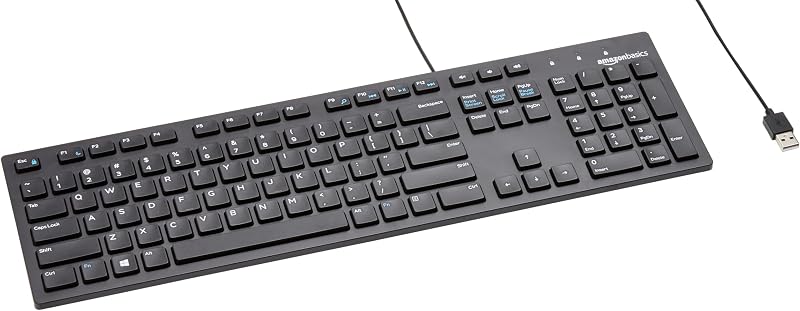
The Amazon Basics Wired QWERTY Keyboard offers straightforward, plug-and-play functionality in a full-sized black layout designed for Windows. It lacks wireless connectivity, backlighting, and display screens, making it a practical option for shoppers who want a basic wired keyboard for everyday typing without gaming features.
Logitech MK270 Combo
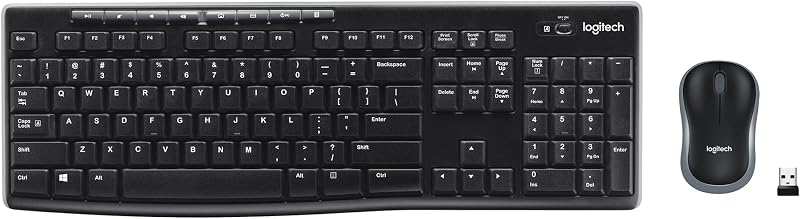
The Full size keyboard with spill-resistant design includes a compact ambidextrous mouse and operates via a single USB-A nano receiver. Users looking for an all-in-one home office package featuring spill resistance and an included pointing device should pick this bundle over a dedicated gaming keyboard.
MechLands Halo68
The Creamy Computer Keyboard for PC features a compact 68-key membrane structure, a 2000mAh rechargeable battery, RGB backlights, and carbon fiber keycaps. Users who want quiet, creamy membrane keystrokes in a much smaller footprint that frees up desk area will prefer this compact layout over the full-size S102 Pro.

Final Verdict
Deciding whether the epomaker aula s102 pro is worth it comes down to whether your desk needs a silent, full-size board packed with modern hardware conveniences. By merging quiet silicone membrane actuation with a dedicated TFT display screen, a rotary volume knob, and tri-mode wireless flexibility, EPOMAKER has produced a uniquely well-rounded peripheral. It allows users to transition effortlessly between demanding spreadsheet work and late-night gaming sessions without disturbing household members.
While dedicated competitive esports players will still lean toward mechanical boards with swappable components, the S102 Pro fills an important niche for typists who prefer cushioned keystrokes and rich visual feedback. For everyday PC gamers seeking quiet operation, dedicated media controls, and multi-device freedom, this membrane keyboard delivers exceptional utility.
FAQ
What are the primary EPOMAKER Aula S102 Pro specs?
Key epomaker aula s102 pro specs include a full-size 105-key QWERTY layout, linear membrane switches with a silicone internal structure, tri-mode wireless (2.4GHz, Bluetooth, USB wired), an onboard TFT screen, a rotary volume roller, dynamic RGB backlighting, sculpted Cherry-profile keycaps, and a 2cm front mid-height plastic body measuring 15.75 by 5.71 by 0.79 inches.
Can the EPOMAKER Aula S102 Pro connect to Apple computers?
Yes. The keyboard includes integrated Mac compatibility using the FN+A hotkey shortcut to switch operating modes, requiring macOS 11 Big Sur or newer. Users can toggle back to standard Windows layouts at any point by pressing FN+S.
Does the EPOMAKER Aula S102 Pro have hot-swappable switches?
No. The S102 Pro utilizes a unified silicone membrane structure rather than individual hot-swappable mechanical switch sockets, delivering silent linear keypresses across its fixed 105-key layout.
What is the battery capacity of the EPOMAKER Aula S102 Pro?
The keyboard is powered by an internal rechargeable battery, but the listing does not specify the exact milliamp-hour (mAh) capacity. It recharges via an included USB A-to-C cable.
Can you use the EPOMAKER Aula S102 Pro while it charges?
Yes. Connecting the keyboard to your computer with the included USB A-to-C cable allows uninterrupted wired play and typing while the internal battery recharges.
How these reviews are put together
- 1,107reviews published
- 2,271products with a buyer rating
- 2,222products with listed features
- 87brands covered
Every number, star and price on this site is read from the Amazon product listing. We do not run lab tests of our own, so scores here are out of 10, based on listed specifications and buyer feedback, not a verdict from a test bench. Prices change without notice; check the listing before buying.


